
CataImage App Icon

CataImage

Photo & Video • Marco Ottico
4+ v10.1.0 Recorded price: Free App Store →
IPA Analysis
Technical Specs
Bundle ID com.cataimage.app
Version 10.1.0
App Store Size 61.14 MB
Minimum iOS 17.0
Devices iPhone, iPad, iPod touch
Catalog release date 2026-01-31
Latest recorded version date 2026-10-14
Features & Support
Advisory 4+
Languages (8)
EN, FR, DE, IT, JA, RU, ZH, ES
Top In App Purchases
Monthly Checking selected store…
3 Months Checking selected store…
Yearly Checking selected store…
Compare country prices →

Preview

CataImage screenshot 1 CataImage screenshot 2 CataImage screenshot 3 CataImage screenshot 4 CataImage screenshot 5 CataImage screenshot 6 CataImage screenshot 7 CataImage screenshot 8 CataImage screenshot 9 CataImage screenshot 10 CataImage screenshot 11 CataImage screenshot 12 CataImage screenshot 13 CataImage screenshot 14 CataImage screenshot 15 CataImage screenshot 16 CataImage screenshot 17 CataImage screenshot 18 CataImage screenshot 19 CataImage screenshot 20

Description

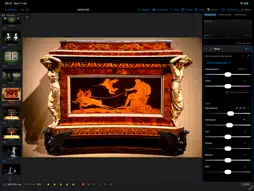
Cataimage is the professional app for photographers that combines a powerful catalog with a true RAW editor, on Mac, iPhone, and iPad. Organize thousands of photos, develop your RAW files without compromise, and manage IPTC metadata like a pro — all in a single app. PROFESSIONAL RAW EDITOR • Non-destructive RAW development with real-time preview • Exposure, contrast, highlights/shadows, whites/blacks, temperature, and tint • Curves, HSL, color grading, and Point Color for total color control • Local masks with automatic subject selection (AI) • Healing and cloning to remove imperfections • Over 60 film simulations with realistic grain • Automatic lens and perspective correction (distortion, vignetting) • Cropping, straightening, and perspective correction • Negative to positive: scan and convert your negatives • Soft proofing and single or batch export (JPEG, TIFF, HEIF, PNG) IPTC CATALOG AND METADATA • Unlimited photo management, organized with ease • Complete IPTC editor: title, caption, author, keywords, copyright, location • Find and replace across the metadata of all your images at once • Reusable IPTC templates with batch application • Star ratings and color labels • Batch rename and move ALL YOUR FORMATS • RAW: Canon CR3/CR2, Sony ARW, Nikon NEF, Fujifilm RAF, Leica/Adobe DNG, Pentax PEF, and more • Plus JPEG, HEIF, TIFF, and PNG, with format filtering in the grid ON ALL YOUR DEVICES • Mac, iPhone, and iPad, with an interface optimized for each • Access your photos via iCloud too Whether you need to catalog an archive, develop a RAW shot, or give your files the look of film, Cataimage has everything you need. Cataimage PRO is an auto-renewable subscription (monthly or yearly). Payment is charged to your Apple Account at confirmation of purchase. It renews automatically unless canceled at least 24 hours before the end of the current period; your account is charged for renewal within 24 hours prior to the end of the period. You can manage or cancel your subscription in your Apple Account settings. Privacy Policy: https://www.cataimage.com/privacy-policy/ Terms of Use (EULA): https://www.apple.com/legal/internet-services/itunes/dev/stdeula/

What's New

Version 10.1.0 2026-10-14
10.1.0 is a big update: a faster grid, reworked RAW development, safer metadata and plenty of new things for Mac and iPad. A FASTER GRID • Your whole folder is...10.1.0 is a big update: a faster grid, reworked RAW development, safer metadata and plenty of new things for Mac and iPad. A FASTER GRID • Your whole folder is in the grid straight away, even with tens of thousands of photos • RAW-only folders no longer weigh the app down, and iCloud folders scroll without stopping • Your last folder reopens at launch with its selection, and going back to a folder brings you to the photo you were on • Prefer the old grid? You'll find Classic grid in Settings RAW DEVELOPMENT • A new base rendering for RAW files (except Fuji X-Trans): highlights burn out far less when you push Exposure • Lowering Highlights recovers bright areas without darkening the rest, and whites no longer turn yellow • Shadows open up dark areas without lifting midtones and highlights; Contrast no longer crushes shadows to pure black • The preview stays sharp while you drag a slider, and the image no longer jumps when you let go DEVELOPING A SERIES • With photos selected, the editor opens on those only, and the Unedited filter shows what's left • Paste adjustments from the grid onto all the selected photos: an “As shot” white balance stays each photo's own • Sync asks which photos to change, and you can undo it • On iPhone and iPad, gradients are drawn right on the photo A FASTER, STEADIER EDITOR • More responsive sliders and Before/After without freezes SAFER METADATA • Rating a RAW no longer adds technical text to the caption • Edit Metadata asks first on many photos, can be stopped and undone in one go; City and keywords are no longer lost if you rate photos meanwhile • Details shows the Title, Caption, Author and Copyright stored in CR3 files, and exported files carry the same text in IPTC, EXIF and XMP • If a file is locked or read-only, you're told, and your changes wait instead of being lost PLATES AND FACES • If covered areas aren't saved in the file, the photo isn't exported and the app tells you why • “Show where” marks the areas you need to cover again • On iPhone, Redact plates and Blur faces are now in the editor too EXPORT • Export starts from the format and quality you set in Settings • Files are exported in the photo's own color space, or Adobe RGB if the photo doesn't say • Long exports work in batches: if you stop one, what's already done is kept • Existing files are never overwritten; if the disk fills up, export stops and tells you how many photos made it • Rename and Move tell you which photos didn't make it and why MAC • From the Finder: right-click a folder › Services › Open in Cataimage • A complete menu bar, with a Go menu, keyboard shortcuts and a Quick Guide • A click selects, a double-click opens; hover over a thumbnail to rate and label it • An Information panel beside the grid; Move to Trash now sends photos to the Trash IPAD • With a keyboard, the same keys work everywhere: 1-5 for stars, 6-9 (instead of R, Y, G, B), P and O for labels • With two windows open, commands go to the one you're using, and the layout follows the window size GUIDE, ACCESSIBILITY AND LANGUAGES • The guided tour has been redone for iPhone, iPad and Mac; replay it anytime from Settings with Guided tour • More VoiceOver labels, and larger text now reaches Details and the toolbars • Letters on color labels with Differentiate Without Color, and an Automatic theme • Clearer wording throughout, and corrected texts in German, Japanese, Russian and Chinese

Technical Analysis

Package Overview Basic metadata
Bundle ID com.cataimage.app
Current Version 10.1.0
Minimum iOS 17.0
Package Size App Store Size
Package Metadata 1 / 5 version records
Detailed binary, privacy manifest, framework, and Info.plist results have not been indexed for this package yet. The verified App Store and archive metadata above remains available.

Developer Information

Known Version Records

1 version record with stored package metadata • 5 known version records

Stored metadata does not guarantee a package is currently available to download.

Details Version / IDs Version date Action
CataImage icon
Not archived
App Store ID: 890955551 Unknown Request Version
CataImage icon
Not archived
App Store ID: 888201872 Unknown Request Version
CataImage icon
54.42 MB
v10.0.5
App Store ID: 882576886Build: 10.0.5
2026-09-08 19:12:19 Get Version
CataImage icon
Not archived
App Store ID: 882389045 Unknown Request Version
CataImage icon
Not archived
App Store ID: 881713195 Unknown Request Version