
Preview


Description
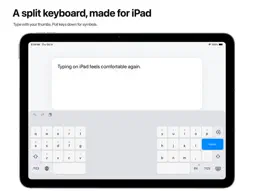
Type comfortably while holding your iPad. Split Keyboard brings the keys within reach of your thumbs, with helpful word suggestions and autocorrection. Your words stay on your iPad. KEYS WITHIN REACH Two keyboard halves bring the keys closer to your thumbs, so you can type with both hands while holding your iPad. The open center gives your thumbs space between the two sides. SUGGESTIONS THAT FOLLOW YOUR WORDS Complete words, correct spelling, and get suggestions for what comes next. Undo an automatic correction with Delete. Let the keyboard learn words you use, with the option to forget them whenever you choose. USEFUL SHORTCUTS, WITHIN REACH Pull letter keys down for numbers and symbols. Hold a letter for accented characters. Move the cursor by holding Space or dragging with two fingers. WRITE IN YOUR LANGUAGES Switch between English, Italian, German, French, Spanish, and Portuguese for Portugal and Brazil. Choose familiar layouts, including German QWERTZ and French AZERTY or QWERTY. YOUR WORDS STAY ON YOUR IPAD Suggestions and word learning work locally. No accounts, tracking, or network access. Full Access is never required. Turn learning off or delete learned words in settings. For iPad and apps that support custom keyboards. iPadOS may use the system keyboard in secure and phone-number fields.
What's New
Version 1.3 2026-10-08
• Word suggestions, next-word predictions, and automatic spelling corrections across all supported typing languages. • Undo an auto-correction with Delete, or k... Technical Analysis
Package Overview Basic metadata
Bundle ID
com.marconunnari.SplitKeyboard Current Version 1.3
Minimum iOS 18.0
Package Size App Store Size
Package Metadata 0 / 0 version records
Detailed binary, privacy manifest, framework, and Info.plist results have not been indexed for this package yet. The verified App Store and archive metadata above remains available.
Developer Information
Known Version Records
0 version records with stored package metadata
Stored metadata does not guarantee a package is currently available to download.
| Details | Version / IDs | Version date | Action |
|---|