
Preview



Description
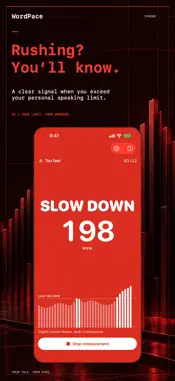
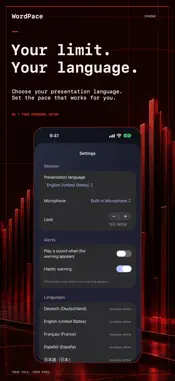
Nerves make you speak faster, and you're the last to notice. WordPace measures your speaking pace while you present and warns you the moment you get too fast. Live, during the talk, not in the feedback afterwards. HOW IT WORKS Choose the language you'll present in, set a limit, and start the measurement. After about twenty seconds of speech, the first reliable reading appears in words per minute, and it keeps updating from there. Go over your limit and your screen turns red. Once you're comfortably back under it, the warning clears on its own. It also clears when you stop talking. WHAT IT MEASURES WordPace counts only the time you're actually speaking. Pauses don't count, because otherwise every breath would make you look slower than you are. The reading always covers the last twenty seconds of speech, so it shows how fast you are right now, not your average since you started. A WARNING ONLY YOU SEE On iPhone, the warning fills the screen, with a short vibration if you want one. On Mac, a red banner covers your display. It lets clicks through, so you keep advancing your slides as usual. With a second display, or by sharing only the presentation window in a video call, your audience never sees it. If you'd rather keep the number in view, the Mac can show a small floating readout, and you can start and stop from the menu bar icon. On both devices, you can add a sound so you don't have to look at the screen at all. EVERY LANGUAGE HAS ITS OWN LIMIT English is spoken at a different pace than German or Spanish, so WordPace keeps a separate limit for each presentation language. The default for English is 165 words per minute. A few minutes of rehearsal will show you where your own pace sits; set the limit a little above it. WordPace recognizes English as spoken in the United States, the United Kingdom, Canada, Australia, and elsewhere, along with many other languages. The warning appears in the language you're speaking, whatever language your iPhone or Mac is set to. AFTER THE TALK At the end of each session you see your average pace, your peak, how often you were warned, and how your pace developed over the whole session. That shows you where you sped up. The summary is for this session only; nothing is kept as a history. EVERYTHING STAYS ON YOUR DEVICE Speech recognition runs entirely on your iPhone or Mac. WordPace records nothing and stores no transcript. All the measurement needs is when each word starts and ends, not which word it was. The app collects no data and asks for a single permission: the microphone. The only things it saves are your settings. GOOD TO KNOW WordPace requires iOS 26 or macOS 26. The first time you use a language, your device downloads Apple's speech model for it. That needs an internet connection briefly; after that, the measurement works offline too. On Mac, the warning appears over regular windows, not over an app in full-screen mode. No subscription, no account.
What's New
Version 1.4 2026-11-04
Your pace is now drawn as you speak: every bar of the trace is five seconds of your talk against your limit, red where you went too fast, and the recap grows ou... Technical Analysis
Package Overview Basic metadata
Bundle ID
com.mattes.wordpace Current Version 1.4
Minimum iOS 26.0
Package Size App Store Size
Package Metadata 0 / 0 version records
Detailed binary, privacy manifest, framework, and Info.plist results have not been indexed for this package yet. The verified App Store and archive metadata above remains available.
Price History (USA store)
2 recorded price change points. These are historical observations, not a guarantee of the current price.
| Recorded at | Price | Currency |
|---|---|---|
| 0.99 | USD | |
| 2.99 | USD |
Developer Information
Known Version Records
0 version records with stored package metadata
Stored metadata does not guarantee a package is currently available to download.
| Details | Version / IDs | Version date | Action |
|---|