
Preview
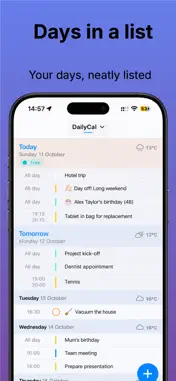
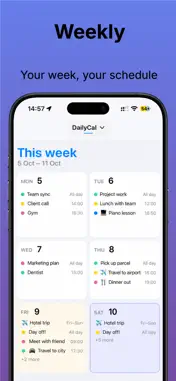


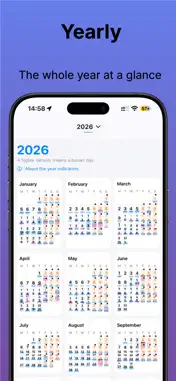


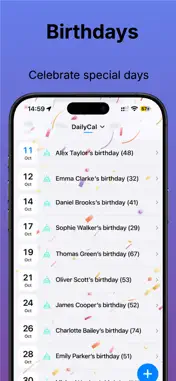

Description
DailyCal — Make your day manageable Bring calendars, reminders, travel time and practical planning together in one calm, flexible agenda. See what matters now, prepare for tomorrow and adjust your plans when life changes. Plan with confidence - Day Plan connects Now, the rest of today and tomorrow, with clear next steps and easy access to planning tools. - Planning Check highlights overlapping appointments, protected time and rolling appointments. Review conflicts and practical Plan B alternatives before making changes. - Running late? Build a recovery plan, keep important appointments fixed and review new task times. Undo the latest saved task rescheduling while the plan remains open. - Schedule tasks using estimated duration, priority and deadlines, alongside appointments, known travel time and protected time. - Find free time by duration, period, day part and weekend preference. - Review your week’s appointments, tasks, travel, available time and conflicts. - Prepare tomorrow with progress tracking that does not complete tasks or change appointments. - Protect recurring time blocks and breaks. Skip or move one block without changing its repeating rule. Appointments that fit your life - Reschedule appointments, plan follow-ups and browse recurring series. - Use preparation checklists, linked reminders, related appointments, notes, time zones and sharing. - Keep unfinished appointments on your radar with rolling appointments. - Edit ordinary calendar fields in Apple’s familiar calendar editor. - Review changes before saving. Travel and weather - Choose your current location or a fixed departure address, with a separate fixed return address. - Include travel time and arrival buffers, with automatic refreshes as appointments approach. - See calculation times and warnings when a retained travel estimate may be outdated. - View daily weather and weather at appointment locations, using the dates available from your selected provider. Add plans your way - Plan with natural language or create appointments from copied text, screenshots, shared content and .ics files. - Review recognised details before continuing in the calendar editor. - Reuse appointment templates and customise Quick Add’s tap and long-press actions. - Use Siri and Shortcuts to find information, prepare appointments and manage supported calendar and reminder actions. An overview that works for you - Choose list, day, multi-day, week, month, year, task and birthday views. - Browse a synchronised day strip with dates, weather and coloured activity timelines. - Follow current appointments and planned tasks with the list’s Now marker, progress and countdowns. - Save calendar sets and choose planning sources separately from visible calendars. - Personalise colours, appearance rules, timeline detail and days off. - Search appointments, reminders and Settings. Filter results, revisit recent searches and include undated tasks. - See birthdays and anniversaries, with optional decorations and celebration sounds. - Keep upcoming information close with widgets, Live Activities and Apple Watch. Your preferences and your data - Export and restore supported DailyCal settings without Plus. Review a backup before importing and check restored links afterwards. - Use optional iCloud synchronisation for supported preferences and export calendars to CSV. - Preview optional technical information before opening a feedback email. - Choose British English, Dutch, German, French, Spanish, Italian, Portuguese, Japanese or Norwegian. - VoiceOver support, larger text, reduced motion, optional visual accessibility and left- or right-handed controls help you use DailyCal your way. DailyCal Plus unlocks advanced planning, travel and weather, templates, calendar sets, rolling appointments, additional widgets, Apple Watch and more. Privacy Policy: https://apps.mjanssen.nl/privacy-policy/ Terms of Use (EULA): https://www.apple.com/legal/internet-services/itunes/dev/stdeula/
What's New
Version 1.4.2 2026-11-03
fixes Technical Analysis
Package Overview Basic metadata
Bundle ID
nl.mjanssen.dagenza Current Version 1.4.2
Minimum iOS 17.0
Package Size App Store Size
Package Metadata 0 / 0 version records
Detailed binary, privacy manifest, framework, and Info.plist results have not been indexed for this package yet. The verified App Store and archive metadata above remains available.
Developer Information
Known Version Records
0 version records with stored package metadata
Stored metadata does not guarantee a package is currently available to download.
| Details | Version / IDs | Version date | Action |
|---|