
Preview



Description
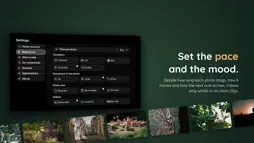
Imagozo brings the photos and videos you already have to your Apple TV. It plays them straight from your home NAS, Microsoft OneDrive and shared iCloud albums, mixed in one slideshow, and turns your trips into stories to enjoy on the sofa with family and friends. Story mode Photos taken on the same day and in the same place come together as a story. Each story opens with a chapter card and a map of where you were, in one of three styles. Move on or go back with the remote, or pause on a card for as long as you like. Stories and places in the library Browse your stories year by year, or pick a country or city, and the slideshow starts with one click. When you come back, the library is still where you left it. Smart albums Instead of picking photos one by one, describe what belongs in an album: a place, a year, a folder, a keyword, who took the photo, a rating or a camera. The matching photos gather by themselves, and new ones join as they arrive. Leave out single photos you don't want, give each album its own title and cover, and set its own pace, transition and loop. To play a folder just once, start it right from the library without saving an album. On-screen info Show the title, caption, place, date, capture time or author right on the photo. Imagozo reads these details from the photo file itself, including what you wrote in Lightroom, down to the city, canton or state and country. Start from a built-in template such as Story, Memory or Lightroom, or design your own: place each detail where you want it, choose its size and background, and gather several details on one shared surface. Photo details Swipe down on any photo to open its details: where and when it was taken, the camera it came from and the place on a map. Your pace and look Choose how long each photo stays, how one leads to the next and how gently the camera moves through it. Photos fill the screen or keep soft blurred edges. Videos play in full, for up to 30 seconds or as a short clip, and Live Photos from iCloud come to life for a moment. Top Shelf With Imagozo in the top row of your Home Screen, your recent stories appear right above it. Choose one and it starts straight away. Your photos stay yours Photos and videos stream directly from your NAS, OneDrive or iCloud to your Apple TV. No account, no tracking and no server in between. Made by one developer I build Imagozo on my own, and some of its best ideas came from people who wrote to me. If you miss something, you can reach me at imagozo.whatsit.ch.
What's New
Version 1.1 2026-10-18
Imagozo 1.1 brings smart albums, a new library and much more. Smart albums Instead of picking photos one by one, describe what belongs in an album: place, year...Imagozo 1.1 brings smart albums, a new library and much more. Smart albums Instead of picking photos one by one, describe what belongs in an album: place, year, folder, keyword, who took the photo, rating or camera. Matching photos join by themselves, new ones included. You can leave out single photos, and every album gets its own title, subtitle and cover photo. Stories and places in the library The library shows your stories by year and your photos by country and city. One click starts the slideshow. More on-screen info The capture time is now a detail of its own, and several details can share one surface. The progress dots are larger and easier to see. More new features • Live Photos from iCloud move briefly in the slideshow. • Story intros show the places around you like a map and choose a better view for long trips. • After an update, Imagozo briefly shows what's new. • Clearer texts and clearer focus on every screen. Faster and more reliable • Shorter waits at launch and with large libraries. • Videos from your NAS start faster. • Photos from your NAS load smoothly, even while Imagozo reads in new photos. • Imagozo keeps the space it uses on your Apple TV within limits. • If a source is briefly out of reach, your photos and albums stay. Fixed • The capture date is recognised more reliably, including HEIC files from Lightroom and videos. • The pinboard shows its photos reliably again. • Story mode no longer switches to random on its own. • The note that Imagozo is reading your photos for the first time no longer appears at every launch. • Cut-off texts in menus and settings. Important when updating On first launch, Imagozo reads your photos again, which can take a moment depending on your library. Albums from version 1.0 can't be carried over, so please create them again as smart albums. Your own templates are kept. Thank you to everyone who wrote to me. Technical Analysis
Package Overview Basic metadata
Bundle ID
whatsitch.Diashow Current Version 1.1
Minimum iOS 26.5
Package Size App Store Size
Package Metadata 0 / 0 version records
Detailed binary, privacy manifest, framework, and Info.plist results have not been indexed for this package yet. The verified App Store and archive metadata above remains available.
Developer Information
Known Version Records
0 version records with stored package metadata
Stored metadata does not guarantee a package is currently available to download.
| Details | Version / IDs | Version date | Action |
|---|