Boardsesh App Icon

Boardsesh

Health & Fitness • Marco de Jongh
4+ v2.7.0 Recorded price: Free App Store →
★★★★★
★★★★★
(29 App Store ratings)
IPA Analysis
Technical Specs
Bundle ID com.boardsesh.app
Version 2.7.0
App Store Size 91.61 MB
Minimum iOS 16.4
Devices iPhone, iPad, iPod touch
Catalog release date 2026-04-06
Latest recorded version date 2026-11-04
Features & Support
Advisory 4+
Languages (5)
EN, FR, DE, IT, ES
Top In App Purchases
No In App Purchases Listed

Preview

Boardsesh screenshot 1 Boardsesh screenshot 2 Boardsesh screenshot 3 Boardsesh screenshot 4 Boardsesh screenshot 5 Boardsesh screenshot 6 Boardsesh screenshot 7 Boardsesh screenshot 8 Boardsesh screenshot 9 Boardsesh screenshot 10 Boardsesh screenshot 11 Boardsesh screenshot 12 Boardsesh screenshot 13 Boardsesh screenshot 14 Boardsesh screenshot 15

Description

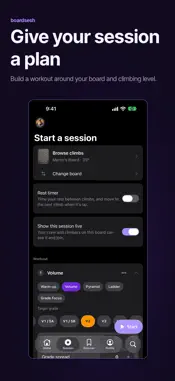
Climb on Kilter, Tension, MoonBoard and more, plus your Spraywall. Keep your climbs, shared queue and logbook in one app. YOUR BOARDS. ONE APP. Boardsesh works with Kilter, Tension, MoonBoard, Woods, Decoy, Touchstone, Grasshopper and So iLL. Switch between supported boards and keep your climbing history together. Your Spraywall, too A home Spraywall, or a Spraywall at your gym? Photograph it and Boardsesh suggests holds from the photo. Fix what it missed, then set climbs, queue them and log sends in the same logbook as your other boards. No LEDs needed: the holds are highlighted on your photo. Share the Spraywall by link and your crew can set on it too. Stripped the Spraywall? Reset it with a new photo, and the old Spraywall is archived with its climbs and sends. Swap a single hold and any climb that used it is flagged. BOARD HISTORY Share a board and you lose track of the last climb fast, and someone always wipes it by accident. See climbs lit through Boardsesh on that board: the climb name, who lit it, who set it, grade and angle, and recent sends. SESSIONS WITH YOUR CREW Start a session and you and your crew can share one queue everyone can drive. Anyone can light the next climb on the wall. When you're done you get a recap and tracking: sends and attempts, grade spread, your hardest send, and progress over time. CONTROL FROM YOUR LOCK SCREEN (iOS 17+) iOS Live Activities tell you what climb is on from your lock screen, and allow you to change it without leaving your lock screen. BUILD A WORKOUT Pick Volume, Pyramid, Ladder or Grade Focus, set a target grade and warm-up, preview the climbs, then push them to the wall one at a time. TRACK YOUR CLIMBING Record sends, flashes and attempts, get a recap with duration, grade spread and your hardest send, and watch your sends and grades climb on the Progress tab. BRING YOUR HISTORY WITH YOU Save your session to Apple Health, and import your past Kilter and Tension logbook from Aurora Climbing. FIND MORE TO CLIMB Follow your crew and setters, search climbers, and pin playlists from Discover. Supported boards: Kilter, Tension, MoonBoard (2010, 2016, 2024, Masters 2017, Masters 2019), Woods (12x12, 8x10), Decoy, Touchstone, Grasshopper and So iLL. Plus Spraywalls: any Spraywall you can photograph. Boardsesh is a community effort that works with these boards and is not affiliated with or endorsed by any board manufacturer.

What's New

Version 2.7.0 2026-11-04
Boardsesh is now available in Italian. KNOW WHEN YOU’RE LIGHTING THE WALL A tap shows a climb without lighting it, so browse freely. “Put on board” lights it ...Boardsesh is now available in Italian. KNOW WHEN YOU’RE LIGHTING THE WALL A tap shows a climb without lighting it, so browse freely. “Put on board” lights it and you drive the wall: every climb you pick lights too, until the time you set in Settings runs out (45 seconds to start with). Swipe “Put on board” left to drive with no end; tap “You are driving the wall” to stop. Want the board free for the next climber? Turn on “Disconnect Bluetooth when driving ends”. iPad and iPhone Duo: more room for the board On iPad, your climbs get the whole screen and the climb on the wall sits in a mini player at the bottom. Tap it to open the player. In landscape, the board sits beside Up next, your logbook and beta. Mount an iPad by your board and open Wall display from the mini player to show the climb full screen, big enough to read from the mat. Open your iPhone Duo and the board sits beside your list. Build a workout on an open Duo and see the planned climbs next to your blocks. Choose two columns for the Climbs list when there's room on iPad. Pick the mini player's buttons in View options, log a send without opening the player, and reach Favourite, Playlist and Share from its menu on wide screens. YOUR REST TIMER ON THE LOCK SCREEN Your rest countdown shows on the Lock Screen and in the Dynamic Island. A soft tick plays in the last seconds and a tone when rest ends, even with your phone on silent. WORKOUTS IN BLOCKS Build a session out of blocks: warm up, then a pyramid, then volume. Add a block mid-session, give each block its own climb filters, and see where you are at a glance. Workouts pick climbs you haven't sent first, can skip what you've sent or tried, and can fill from your Sent or Liked climbs. Mark Fell or Sent from the mini player. Your session recap keeps your workout blocks, reps and results together. PLAY FROM THE LIST YOU TAPPED The player shows which list you're climbing from, and swiping stays on that list, from your logbook and sessions to profiles and similar climbs. Playlists play without touching your queue. Swipe a climb in any list to play it next or last. MORE WAYS TO MAKE IT YOURS - Sort any playlist by difficulty, newest added, rating or shuffle. Liked, Five Stars, Projects and setter pages sort and filter too. - Climbs has its own tab. Tap it again for Filters and name search. On iPhone, Filters opens at half height and looks like iOS Settings. - Choose which sections show on Home and in what order, and whether the app opens on Home or Climbs. - Settings is down to six pages, with your timers in one place. - Log a send at a different angle from the one on the wall. - Get notified about comments on your sessions, climbs, playlists, boards and gyms. FIXES FOR YOUR NEXT SESSION - Your logbook, likes and playlists work with no signal, and downloaded boards no longer download again every week. - Board scans find MoonBoards and newer Kilter boxes, closest first. Boardsesh asks for Bluetooth at your first scan, not at launch. - Swiping down closes the player again. Lit holds stay visible while you browse. - At multi-board gyms, connecting follows the board your current climb is on. The board light button shows whether it's lit, connecting or off, including when a crewmate turns it off. - Mirrored climbs keep their orientation in your logbook and queue history. - Delete several logbook entries in a row, or a climb's grouped entries for one day. - Climbs you unlike leave Liked straight away. - Better VoiceOver and large text support. Free, no ads, open source.

Technical Analysis

Package Overview Basic metadata
Bundle ID com.boardsesh.app
Current Version 2.7.0
Minimum iOS 16.4
Package Size App Store Size
Package Metadata 0 / 8 version records
Detailed binary, privacy manifest, framework, and Info.plist results have not been indexed for this package yet. The verified App Store and archive metadata above remains available.

Developer Information

Known Version Records

0 version records with stored package metadata • 8 known version records

Stored metadata does not guarantee a package is currently available to download.

Details Version / IDs Version date Action
Boardsesh icon
Not archived
App Store ID: 888036008 Unknown Request Version
Boardsesh icon
Not archived
App Store ID: 887994054 Unknown Request Version
Boardsesh icon
Not archived
App Store ID: 887811839 Unknown Request Version
Boardsesh icon
Not archived
App Store ID: 887517098 Unknown Request Version
Boardsesh icon
Not archived
App Store ID: 887015884 Unknown Request Version
Boardsesh icon
Not archived
App Store ID: 886102136 Unknown Request Version
Boardsesh icon
Not archived
App Store ID: 884574945 Unknown Request Version
Boardsesh icon
Not archived
App Store ID: 883910854 Unknown Request Version