Preview


Description
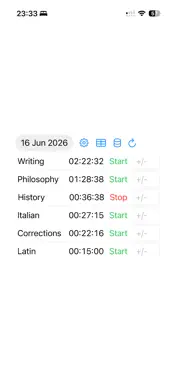
Chronion is a focused, no-nonsense time tracking app for iPhone, iPad, Mac, and Apple Watch. Whether you track work hours, study sessions, or personal projects, it gives you a clear picture of where your time goes — without getting in the way. Start and stop in seconds Each of your categories appears as a row with a single Start/Stop button. Tap once to begin tracking, tap again to stop. Multiple categories can run independently — switch between them freely throughout your day. Full session history Browse your sessions by day using the date picker. Every session is logged with its exact start and end time. Tap any session to open the detail view, where you can review, correct, or invalidate individual entries. Invalidated sessions are shown with a strikethrough and excluded from all totals — useful for accidental starts or duplicates. Manual adjustments Made a mistake? Forgot to start the timer? Use the built-in adjustment field to add or subtract minutes from any category on any day. Adjustments are logged as their own entries so your history stays accurate and auditable. Offline-first, iCloud-backed Time Tracker works fully offline. All data is saved locally first and synced to iCloud automatically when a connection is available. Switch between your iPhone, iPad, and Mac and your sessions follow — no manual export or import needed. The app handles sync conflicts gracefully and keeps all your devices consistent. Apple Watch The companion watch app lets you start and stop timers directly from your wrist. A watch widget keeps your active timer visible at a glance on your watch face, so you never have to pull out your phone just to check the time. Home Screen and Lock Screen widgets Put your timers on your iPhone Home Screen or Lock Screen. The widget shows your active category and lets you start or stop tracking with a single tap — without opening the app. Weekly statistics The built-in stats view breaks down your tracked time by category across full calendar weeks. See daily totals, weekly totals, average hours per week, and average hours per day. Categories can be configured for a 5-day or 7-day week so your averages reflect your actual schedule. CSV export and import Export all your sessions as a CSV file for use in Numbers, Excel, or any other tool. Import existing CSV records to migrate from another app or restore a backup. Privacy by design Chronion requires no account, no login, and no subscription. Your data lives on your device and in your personal iCloud account — it is never sent to any external server or third party.
What's New
Version 1.1 2026-06-26
- Create a new timer category on first screen when CloudKit DB is empty - Minor design improvements Technical Analysis
Package Overview Basic metadata
Bundle ID
com.bormania.timetracking Current Version 1.1
Minimum iOS 26.0
Package Size App Store Size
Package Metadata 0 / 0 version records
Detailed binary, privacy manifest, framework, and Info.plist results have not been indexed for this package yet. The verified App Store and archive metadata above remains available.
Developer Information
Known Version Records
0 version records with stored package metadata
Stored metadata does not guarantee a package is currently available to download.
| Details | Version / IDs | Version date | Action |
|---|