Preview







Description
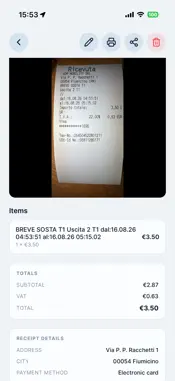
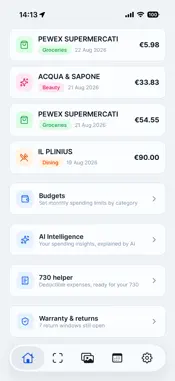
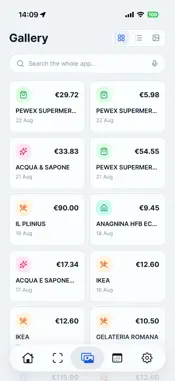
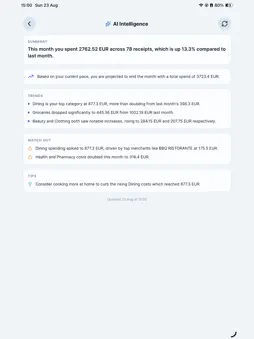
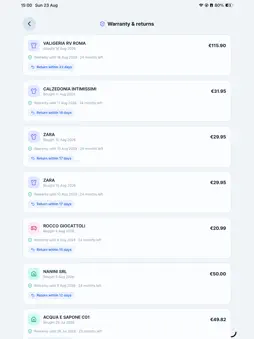
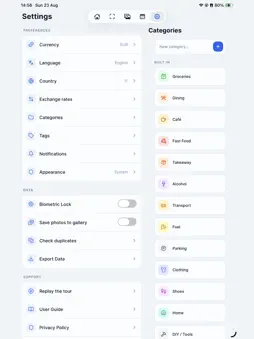
Skontrini — Receipts, spending and warranties, always under control Skontrini turns your pile of receipts into an archive that is tidy, searchable and always with you. Point the camera at a receipt: the app reads merchant, date, total, VAT and category in seconds. No more faded paper, forgotten spending or lost warranties. SCAN IN SECONDS • Point and shoot: the AI reading picks up merchant, date, total, VAT and each line item with its price and rate. • With no connection, an on-device reading keeps you going. • Import from Photos too — screenshots of online payments included — or from PDF invoices and digital receipts. • Automatic categorisation, and duplicate detection with a side-by-side comparison so you decide. • Manual entry and editing, always available and never limited. MULTI-COUNTRY Skontrini reads receipts from three countries, with the right fields for each: • Italy — scontrino, VAT number, tax code, RT serial, lottery code. • United Kingdom — VAT receipt, VAT number, postcode. • Netherlands — kassabon, BTW, BTW-nummer, KvK. 12 currencies supported, with EUR as the default. ORGANISE AND FIND • 34 built-in categories plus your own categories and tags. • Global search: find any receipt by merchant, item, amount or date — dictation included. • Gallery view (grid, list or photos) and Calendar with date-range selection. • Filters by category, period and amount, plus recent searches. KEEP SPENDING IN VIEW • Spending overview: period total, top category and the trend by category. • Monthly budgets per category, with a warning as you approach or pass the limit. • Subscriptions: Skontrini spots recurring charges in your receipts and estimates their monthly cost. • AI Intelligence: summaries, trends, anomalies and advice on your spending, generated by AI. • Deductible expenses: collect what matters for your tax return, with a summary and a PDF export for your accountant (Italy). NEVER LOSE A WARRANTY OR A RETURN • Skontrini tracks the legal warranty under the law of the receipt's country: 24 months in Italy, the product's expected lifetime in the Netherlands, Consumer Rights Act protections in the UK. • Return and withdrawal windows, with the right deadlines for each country. • Reminders before a warranty, a return window or a subscription renewal runs out. • Reminders to scan, and a monthly spending summary — all on the device. PRIVACY FIRST • Your archive lives on the device, in an encrypted database, and can be browsed offline. • To read it, the photo of the receipt is sent to the reading service, which processes it and does not keep it. Manual entry never leaves the device. • Cloud sync and backup are optional, and on your terms. • Unlock the app with Face ID, your fingerprint or the device passcode. • Sign in with email, Apple or Google — or use the app with no account at all. • Export all your data or delete your account whenever you want. We do not sell your data. EXPORT, PRINT, IPAD Export the archive as PDF, CSV or JSON, or print a summary. Built for iPad with a two-pane layout and Split View, and for light, dark or automatic appearance. SKONTRINI PREMIUM Premium unlocks AI scans with no monthly counter and full line-item detail, PDF import, custom tags, budgets, subscriptions, warranty and returns, AI Intelligence, deductible expenses, exports and cloud sync. Available as a monthly or yearly subscription with a free trial. Payment is charged to your App Store account at confirmation; the subscription renews automatically unless cancelled at least 24 hours before the end of the period, and is managed from your App Store settings. Household spending, tax return or warranties: Skontrini is where your receipts belong. Terms of Use (EULA): https://magicaelite.dev/en/portfolio/skontrini/terms Privacy Policy: https://magicaelite.dev/en/portfolio/skontrini/privacy
What's New
Version 1.0.56 2026-11-19
What's new in this version: • Easier "Import from Photos": the choice between photo and PDF now appears right over Home, with no black screen. • When you impor...What's new in this version: • Easier "Import from Photos": the choice between photo and PDF now appears right over Home, with no black screen. • When you import a PDF, you now see its first page while it is being read. • If the date is empty and you tap "Done" in the calendar, the date shown is filled in. • Small fixes and improvements. Technical Analysis
Package Overview Basic metadata
Bundle ID
com.skontrino.app Current Version 1.0.56
Minimum iOS 16.4
Package Size App Store Size
Package Metadata 0 / 0 version records
Detailed binary, privacy manifest, framework, and Info.plist results have not been indexed for this package yet. The verified App Store and archive metadata above remains available.
Developer Information
Known Version Records
0 version records with stored package metadata
Stored metadata does not guarantee a package is currently available to download.
| Details | Version / IDs | Version date | Action |
|---|