
Preview










Description
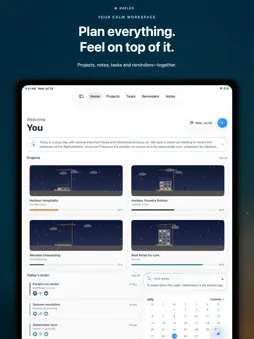
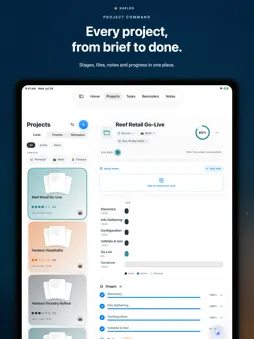
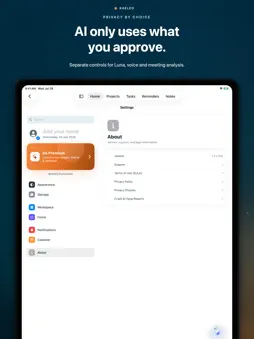
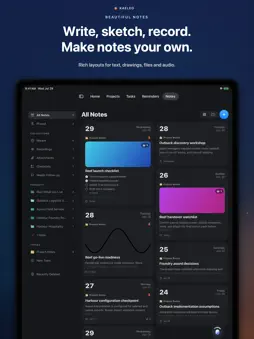
Kaeleo is a workspace for managing projects, tasks, clients, notes, reminders, and your day ahead. Built for focused work, Kaeleo brings everything together in one elegant iPhone experience. Track projects from start to finish, organise tasks by priority and due date, keep notes and files connected to the right work, and always know what needs your attention next. Start each day with Morning Digest, a personalised overview of upcoming tasks, reminders, project activity, and important deadlines. Use the calendar to stay on top of milestones, explore detailed project views to understand progress, and capture ideas, notes, and checklists as work evolves. Key features: • Project tracking with stages, progress, deadlines, and activity • Task management with priorities, reminders, and due dates • Clients and contacts connected to your work • Notes, checklists, and project-linked context • Calendar views for tasks, reminders, and milestones • Morning Digest for a focused daily overview • Beautiful light and dark themes • Fast, intuitive navigation across your workspace Kaeleo is designed for people who want a workspace that feels organised, thoughtful, and effortless to return to every day. Terms of Use: https://www.apple.com/legal/internet-services/itunes/dev/stdeula/ Privacy Policy: github.com/marceloesteban/Kaeleo-Privacy
What's New
Version 1.8 2026-08-07
Kaeleo 1.8 introduces Checklists, a completely new workspace for organizing repeatable work on iPhone and iPad. New: Lists - Create standalone Lists or connec...Kaeleo 1.8 introduces Checklists, a completely new workspace for organizing repeatable work on iPhone and iPad. New: Lists - Create standalone Lists or connect them to projects and stages. - Organize lists with titles, summaries, and topics. - Add an overall deadline or separate deadlines for different groups. - Link notes and individual checklist items to related work. - Attach photos, camera captures, document scans, and files. - Swipe items to edit or delete them. - Mark individual items—or the entire checklist—as complete. - Keep everything synced across your devices. Lists feature the same card design as Notes. Filter them by topic, browse them in a responsive gallery, and open checklists from the same project in a polished stacked deck. List Templates Get started quickly with six built-in templates: - Project Kickoff - Weekly Review - Client Onboarding - Event Run Sheet - Trip - Moving House You can also turn any List into your own reusable template. Personal templates sync across your workspace. Lists with Luna Ask Luna through text or Live Voice to create a list from: - A simple instruction - The note currently open - A meeting or recording - Existing tasks - Your recent conversation Luna can prepare the title, summary, topics, groups, items, and supported deadlines. Every checklist arrives as an editable, synced draft for review. Nothing is applied until you confirm it. Luna can also help update, reschedule, or remove existing checklists through the same reviewable workflow. A New iPad Workspace List includes a fully adaptive iPad experience: - Browse your complete checklist library across the canvas. - Open a checklist in a focused split view. - Expand the editor without losing your filters or scroll position. - Navigate a clearer sidebar organized into Workspace and Library sections. - Reorder or hide sidebar sections using native customization. Better Photos and Attachments - Swipe between checklist photos directly in the rounded header. - Expand photos into a full gallery grid. - Zoom, share, save, select, and remove photos. - Enjoy sharper images sized correctly for iPhone and iPad displays. - Capture photos, scan documents, or import files using the familiar Notes workflow. Better Notes - Web links now open in a focused in-app browser. - Your note stays parked at the bottom, ready to return to with a tap or swipe. - The compact note card preserves useful topic, project, stage, and attachment context. - Inline links, photos, drawings, scans, and other objects are tappable again. - New Note and Templates now live together under the floating + button. Faster Camera Capture The camera now: - Opens faster. - Stays correctly oriented. - Waits until the launch transition is ready before revealing the viewfinder. - Moves smoothly from the capture card into the live camera. Easier Navigation - A new section grid keeps every workspace easy to reach without crowding the tab bar. - Home remains permanently available with its own one-tap button. - Page transitions now respond more naturally to the way you navigate. - Reduce Motion receives simpler, calmer transitions. Refinements Throughout - Smoother List typing and Return-key behavior. - Consistent text wrapping between editing and completed states. - Improved physical-keyboard support on iPad. - Familiar circular swipe actions for editing and deleting items. - Cleaner Task and Reminder card spacing. - Empty description areas no longer leave blank gaps. - Faster rendering in workspaces with many topics. - Improved scrolling, gallery navigation, stability, and performance. Kaeleo 2.0 is already in development and is planned for release alongside iOS 27. Technical Analysis
Package Overview Basic metadata
Bundle ID
marceloluengo.Kaeleo Current Version 1.8
Minimum iOS 26.0
Package Size App Store Size
Package Metadata 0 / 0 version records
Detailed binary, privacy manifest, framework, and Info.plist results have not been indexed for this package yet. The verified App Store and archive metadata above remains available.
Known Version Records
0 version records with stored package metadata
Stored metadata does not guarantee a package is currently available to download.
| Details | Version / IDs | Version date | Action |
|---|