Preview





Description
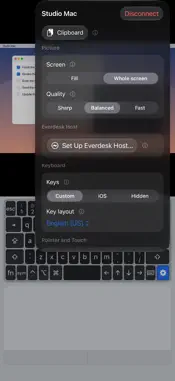
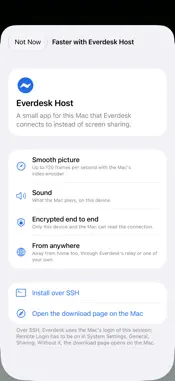
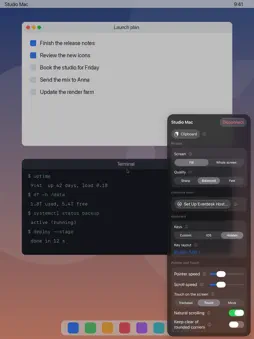
Everdesk puts all your computers on all your Apple devices. ONE PURCHASE, EVERY PLATFORM Everdesk is a one-time purchase. Buy it once and you get it on iPhone, iPad, Mac and Apple Vision Pro. Only Everdesk Relay, for reaching a Mac with Everdesk Host away from home, is an optional subscription. You don't need it: there are free alternatives, see below. Your saved computers and passwords follow you through iCloud. MADE FOR IPHONE DUO On iPhone Duo, Everdesk turns the phone into a small laptop: the computer's screen stands up on the upper half, with a full keyboard and a trackpad on the lower half. Folded, it works on the cover display, and it fits itself around the display's corners and the camera. EVERY COMPUTER YOU OWN • Mac: Apple's own Screen Sharing, encrypted, with a shared clipboard in both directions • Windows: RDP with real multi-touch, sound, and a desktop that follows the size of your screen • Raspberry Pi, Linux and anything else with VNC • PiKVM and GL.iNet GLKVM: sign in directly, with picture, sound, keyboard and mouse, even in the BIOS, and power controls where the device is wired up for them • MeshCentral: sign in to your server, see your devices by group, show only what is online, and open a desktop with a tap BUILT FOR EACH DEVICE • iPhone: a deck with keyboard and trackpad, including keys like Esc, Control and the function keys • iPad: the computer on the whole display, with touch and your keyboard and trackpad • Mac: a native app with a window for every computer, and your own keyboard and mouse • Apple Vision Pro: a window for every session, a scroll wheel beside it, and system buttons for special keys MADE TO BE USED • Tap to click, or use the screen as a trackpad, or move and zoom the picture • Real keyboards and mice are passed straight through • Nearby Macs show up on their own • Pictures of your last session make your computers easy to tell apart EVERDESK HOST FOR THE MAC A free companion app for your Mac: a smoother picture up to 120 frames per second, sound, trackpad gestures and the Mac's Touch Bar. Everdesk measures whether Wi-Fi or a direct AWDL link is faster and takes the better one, and reaches your Mac from anywhere. REMOTE ACCESS, FREE OR WITH EVERDESK RELAY Everdesk Relay is an optional subscription for the easiest way to your Mac from anywhere. Several free alternatives are built in as well: • Run the relay yourself with Docker on a server or NAS of your own • Reach your Mac through Tailscale, which Everdesk joins on its own, without a VPN • Reach your devices through your own MeshCentral server Everything on your home network works without any subscription. MORE THAN THE SCREEN • SSH with terminal, files over SFTP and a code editor • Tailscale and GL.iNet Cloud, to reach your devices from anywhere without a VPN • Folders for your computers, synced over iCloud PRIVATE Everdesk has no accounts of its own. It connects your devices directly to your computers. Everdesk Relay only passes on data that is encrypted end to end between your device and your Mac. You need a computer with Screen Sharing, RDP or VNC turned on, a PiKVM or GLKVM, or a MeshCentral server, and a network connection to it. Terms of Use: https://www.apple.com/legal/internet-services/itunes/dev/stdeula/ Privacy Policy: https://www.martek.de/datenschutzerklaerung/
What's New
Version 1.2 2026-11-12
• Everdesk Host for Windows: the free companion app now runs on Windows PCs too, with a fast picture from the graphics card, sound, touch, clipboard, terminal a...• Everdesk Host for Windows: the free companion app now runs on Windows PCs too, with a fast picture from the graphics card, sound, touch, clipboard, terminal and files, also from away from home. • Nearby shows computers with Everdesk Host in a section of their own. Tap one to pair with a six-digit code you confirm on the computer, without SSH. • Terminal and files of a computer with Everdesk Host from the connection's menu, even with SSH turned off. • Everdesk Host keeps itself up to date, on the Mac and on Windows, and runs on Intel Macs and from macOS 14. • One Everdesk Relay subscription covers all your computers. • iPhone: a status line below the keyboard with remote access, frame rate and data rate. • Vision Pro: windows take the shape of the computer's screen, the bar for moving them stays visible, and the bar below the window has the clipboard and a button for the main window. • Keyboard and mouse go to the session window you used last. • Away from home on mobile data, the connection goes through the relay within seconds. • After sleep or a change of network, Everdesk Host is reachable again right away. Technical Analysis
Package Overview Basic metadata
Bundle ID
de.martek.remotecomputer Current Version 1.2
Minimum iOS 27.0
Package Size App Store Size
Package Metadata 0 / 0 version records
Detailed binary, privacy manifest, framework, and Info.plist results have not been indexed for this package yet. The verified App Store and archive metadata above remains available.
Known Version Records
0 version records with stored package metadata
Stored metadata does not guarantee a package is currently available to download.
| Details | Version / IDs | Version date | Action |
|---|