
Preview










Description
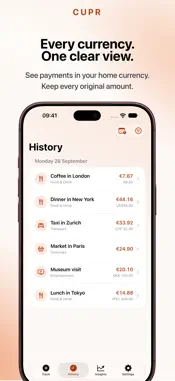
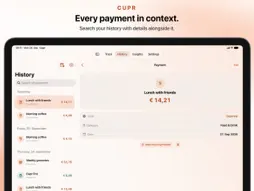
Cupr is a fast, private expense tracker for everyday payments. Remember what you spent without setting up budgets, connecting a bank account, or filling out a form. Enter an amount and save. Add a description, category, or date when useful — or leave a payment Uncategorized and organize it later. You can also track income if you want, with separate categories. Turning income tracking off hides those entries without deleting them. On iPhone Duo, remember payments in seconds on the outer display. Open up for recent entries and Insights with more room to breathe. Capture now. Take a closer look later. WHAT YOU CAN DO - Record expenses in seconds on iPhone and iPad - Add income alongside expenses when it suits you - Customize categories with familiar symbols - Automatically assign categories using your own description rules with Cupr Pro - Automatically convert foreign payments into your default currency - Set up recurring expenses and income - Schedule future payments and see the next 30 days in Coming Up - Explore spending and income with weekly, monthly, quarterly, and yearly Insights - Search your complete History, including notes, and see matching payment counts and totals - Open payments from an Insights category breakdown directly in History - Use a full iPad layout with recent entries, side-by-side History, and multi-column Insights - Set up Apple Pay automation in Shortcuts on iPhone, or track an expense with Siri, Spotlight, or Shortcuts - Quickly record expenses and income on Apple Watch - Get optional reminders when Uncategorized payments are waiting - Export your expenses and income separately as CSV for free CATEGORIES. TAKEN CARE OF. With Cupr Pro, create rules for words and phrases in your payment descriptions, or pick from Cupr’s rule suggestions. The matching category is selected as you type. New Apple Pay payments and CSV imports are categorized when a rule matches. In Categorize Later, review and confirm several matching assignments at once. Your manual choice always comes first. EVERY CURRENCY. ONE CLEARER PICTURE. Cupr converts foreign payments into your default currency using historical reference rates — with or without Pro. Every original amount and currency stays intact. Insights, widgets, and Apple Watch use available conversions for a combined overview. Prefer to keep currencies separate? Turn conversion off in Settings, and totals stay separate by currency. CUPR PRO One purchase, lasting access: Auto Categorization, expanded Insights and sharing, unlimited recurring payments, Home Screen and Lock Screen widgets, a Control Center control, and Universal CSV Import. Tracking, History, categories, currency conversion, and CSV export remain available without Pro. YOUR PAYMENTS, YOUR DATA Cupr requires no account or bank connection. Payments are stored on your devices and, when available, synced through your private iCloud database. SUPPORTED CURRENCIES EUR, USD, GBP, JPY, CHF, CNY, CAD, AUD, HKD, SGD, SEK, DKK, PLN, CZK, HUF, RON, NOK, ISK, NZD, INR, KRW, TRY, UAH, AED, BRL, MXN, ZAR. WHY CUPR The name comes from Cu, the chemical symbol for copper — a metal associated with money for centuries. Cupr brings that idea into the digital age: a simple place to remember your payments and understand your spending. Remember your payments. Understand your money.
What's New
Version 1.3 2026-10-21
Cupr 1.3 — Less sorting. More seeing. Categories that practically sort themselves. Currencies that add up. And continued love for your iPhone Duo — folded or w... Technical Analysis
Package Overview Basic metadata
Bundle ID
at.cupr.app Current Version 1.3
Minimum iOS 18.0
Package Size App Store Size
Package Metadata 0 / 0 version records
Detailed binary, privacy manifest, framework, and Info.plist results have not been indexed for this package yet. The verified App Store and archive metadata above remains available.
Developer Information
Known Version Records
0 version records with stored package metadata
Stored metadata does not guarantee a package is currently available to download.
| Details | Version / IDs | Version date | Action |
|---|