
Preview






Description
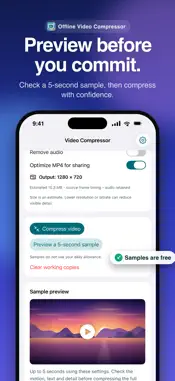
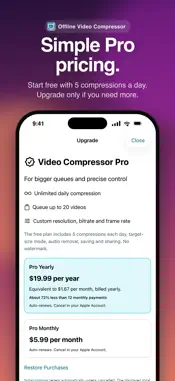
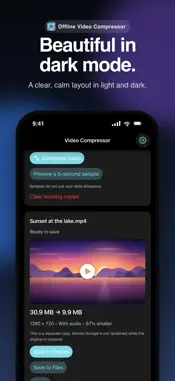
Make large videos easier to share with Offline Video Compressor. Processing happens on your device, with no account, ads, tracking, or video uploads. CHOOSE THE RESULT YOU NEED • Use Small, Balanced or Sharp presets to adjust the size and quality tradeoff. • Enter a target size in MB. The app checks actual output size and retries with reduced settings when necessary. If the target cannot be met, it explains the problem instead of reporting false success. • Preview up to five seconds before processing the full video. • See the input and output dimensions, file sizes, and whether audio is retained. KEEP CONTROL OF YOUR VIDEOS • Import standard-color videos from Photos, Files or Camera. • Preserve source frame timing or choose a custom frame rate with Pro. • Retain audio or deliberately remove it. • Save a separate MP4 to Photos or Files, or use the Share Sheet. • Your original is unchanged. Creating a smaller copy does not automatically reclaim storage while the original remains on your device. FREE AND PRO The free plan includes five successful compressions each day, target-size mode, sample previews, audio removal, saving and sharing. No watermark. Video Compressor Pro adds unlimited daily compression, a sequential queue of up to 20 videos, and custom resolution, video bitrate, frame-rate and audio bitrate controls. Suitable SDR sources can be exported up to UHD 3840 × 2160, or the portrait equivalent, without upscaling. Actual dimensions depend on the source and target settings. GOOD TO KNOW Lower bitrate or resolution can reduce visible quality. Target-size mode may reduce resolution to fit. HDR export is not supported in this version; select a standard-color video or convert a copy to SDR first. Keep the app open during processing; moving it to the background cancels unfinished work safely. Save outputs before clearing the workspace or reopening the app. Cloud-only imports and Apple purchases/restoration may require internet access. Pro is available as an auto-renewable monthly or yearly subscription. Current localized prices and billing periods are displayed before purchase. Manage or cancel your subscription in your Apple Account settings. Existing subscribers can restore Pro through Settings. Terms of Use: https://www.apple.com/legal/internet-services/itunes/dev/stdeula/ Privacy Policy: https://bytesweavers.tech/videocompressorios/privacy.html
What's New
Version 1.1.0 2026-11-11
• New target-size compression with measured output checks and bounded retries. • More accurate resolution controls and source frame timing. • Five-second sample...• New target-size compression with measured output checks and bounded retries. • More accurate resolution controls and source frame timing. • Five-second sample previews before full compression. • Clearer batch status and recovery after failed imports or exports. • Safer temporary-file cleanup and cancellation. • Direct Save to Files, improved Photos saving, and clearer audio handling. • Better Pro purchase, restoration, price-loading and pending-approval messages. • Improved large-text support and dark appearance. HDR export remains unsupported in this release; the app now identifies it clearly instead of silently risking color changes. Technical Analysis
Package Overview Basic metadata
Bundle ID
tech.bytesweavers.offlinevideocompressor Current Version 1.1.0
Minimum iOS 17.0
Package Size App Store Size
Package Metadata 0 / 0 version records
Detailed binary, privacy manifest, framework, and Info.plist results have not been indexed for this package yet. The verified App Store and archive metadata above remains available.
Developer Information
Known Version Records
0 version records with stored package metadata
Stored metadata does not guarantee a package is currently available to download.
| Details | Version / IDs | Version date | Action |
|---|