
Preview




Description
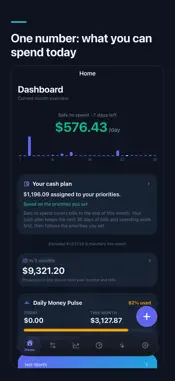
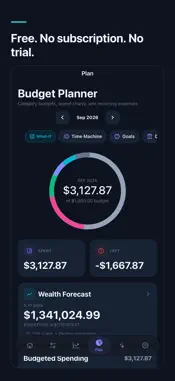
OwnFi is a free budgeting app that imports your bank statements instead of logging into your bank. Drop in the PDF or CSV your bank already sends you and see what you can spend today, which bills are coming, and where the money went. Nothing leaves your phone: no server, no cloud processing, no analytics on your spending, no third-party data sharing. No subscription, no trial, no account to create. IMPORT FROM ANYWHERE • PDF Statement Analyzer — parse bank and credit card statements locally, with automatic detection of major bank formats • CSV Import — auto-detects formats, and the universal parser learns any unknown CSV layout after you confirm it once • Receipt Scanner — capture receipts with on-device OCR and line-item parsing • Screenshot Import — extract transactions from banking app screenshots, including Indian passbook/UPI and Canadian layouts, with an optional review-free auto-add setting • Share to OwnFi — send PDFs, screenshots, and CSVs from any app straight into OwnFi via the share sheet • Quick Add gesture — double-tap the back of your phone to log an expense in two fields, via Back Tap and Shortcuts UNDERSTAND YOUR MONEY • Safe to Spend — open the app to how much you can spend per day for the rest of the month, with upcoming bills already reserved • Daily Money Pulse — today's and this month's spending against your budgets at a glance • Home dashboard — net worth, portfolio, upcoming bills, and savings goals on one screen • Apple Watch — Safe-to-Spend, your next bill, and voice quick-add on your wrist • Activity — every transaction from every source in one searchable timeline with automatic categorization • Insights — monthly trends, top merchants, category patterns, and anomaly detection • What-If Simulator — preview how spending changes affect your savings PLAN AHEAD • Your cash plan — the next 30 days of bills and spending kept aside, the rest shared across the priorities you set. Plus goal pacing, a subscription review, what-ifs and pre-investing facts in the Advisor • Time Machine — project your balance 3 months to 2 years ahead from your income, bills, and spending, then stack "what if" changes on top and compare • Budget Planner — monthly category limits with rollover, AI-suggested amounts, and one-tap shortcuts to Time Machine, What-If, Goals, and Debts • Savings Goals, Bills & Subscriptions on one screen, and Debt Tracker with amortization schedules • Tax-year export — a CSV of one tax year's transactions, using your jurisdiction's dates (UK, India, and calendar-year countries) or a plain calendar year, with each row's currency PRIVATE AI ADVISOR • Chat with an AI that understands your finances — Apple Intelligence on iPhones that have it, with nothing to download, or a language model you install; every figure is computed by OwnFi's own code first • Conversational entry: say "I spent $15 at Starbucks today" and it's saved instantly • Built-in Canadian tax and savings calculators (CPP, EI, RRSP, FHSA, mortgage) • Financial Memories — the advisor remembers your priorities across conversations YOUR DATA, PROTECTED • 100% on-device storage, encrypted at rest with a key held only in your iPhone's keychain — there is no OwnFi server • Face ID / Touch ID app lock • AES-256 encrypted backups you control • Family Sync — send encrypted finance packages to a partner over your local Wi-Fi or by file, no server required • No ad networks, no tracking, no analytics SDKs OwnFi is free, with no in-app purchases and no subscription tier. An optional Partner offers screen in Settings may list approved, labelled partner links. OwnFi does not attach financial data or personal identifiers; ordinary browser requests and partner privacy policies apply. Optional network features: currency exchange rates for conversion, and AI model files you choose to download. Your financial data is never sent anywhere. AI insights are educational only and are not financial, investment, tax, legal, or accounting advice.
What's New
Version 2.0.0 2026-09-26
OwnFi 2.0 plans your cash. It stays free, with no subscription, no account and no ad network, and nothing leaves your phone. • Your cash plan — answer a few qu...OwnFi 2.0 plans your cash. It stays free, with no subscription, no account and no ad network, and nothing leaves your phone. • Your cash plan — answer a few questions (the minimum you keep in chequing, your emergency target, money already set aside, the income and one-off costs you expect, and your priorities in order). OwnFi keeps the next 30 days of bills and spending aside first, then shares what is left across your priorities, each up to what it still needs. The Home card shows where the plan stands; tap it to see the full plan in the Advisor. • Your balances, confirmed — the plan asks you to confirm your balances are current before it shares anything out, flags balances more than a week old, and names an account it cannot convert rather than counting it as zero. • Goals — what each goal needs a month to arrive by its date, and when it arrives at a monthly amount you try. • Subscription review — mark the charges you still value and see what the others add up to a month and a year. Nothing is cancelled or changed. • Compare a what-if — stack a few changes (spend less in a category, a one-off cost, a goal contribution, an extra debt payment, a charge you stop) and see cash a year from now, the lowest point, and goal and debt-free dates against your current path. • Before you invest — cash left after your plan, whether emergency savings are covered, how concentrated your holdings are, and the questions on time horizon, losses and access to your money. No tickers and no picks. • Ask in your own words — "How much of my cash is not yet assigned?" is answered from your saved plan, and "Plan my cash" opens it. • Fixed: a balance read from a statement is now dated to the statement, not to the day you imported it, and importing an older statement no longer overwrites a newer balance. Every figure is arithmetic on your own balances and answers. It is not a recommendation and not financial advice. Your answers are included in your encrypted backup and, if you use Family Sync, shared with your family; the balance confirmation stays on each device. As always: no OwnFi server, only three optional endpoints (exchange rates, public ticker prices, model downloads you start), and everything financial stays on your phone. Technical Analysis
Package Overview Basic metadata
Bundle ID
com.ownfiapp.ownfi Current Version 2.0.0
Minimum iOS 15.1
Package Size App Store Size
Package Metadata 0 / 0 version records
Detailed binary, privacy manifest, framework, and Info.plist results have not been indexed for this package yet. The verified App Store and archive metadata above remains available.
Developer Information
Known Version Records
0 version records with stored package metadata
Stored metadata does not guarantee a package is currently available to download.
| Details | Version / IDs | Version date | Action |
|---|