
Preview



Description
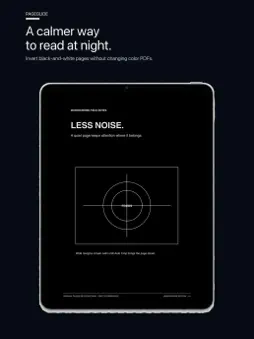
Your PDFs. A better way to read. PageGlide is a focused, book-like reader for DRM-free PDFs you already own. It keeps every page's fixed layout intact, so scanned books, textbooks, manuals, comics, TTRPG rulebooks, magazines, and regular PDFs look the way their creators intended. WIDE SPREADS, MADE FOR IPAD • Split a wide two-page PDF spread into one readable page at a time in portrait. • Turn your iPad to landscape and keep the full spread together. • Choose the layout that matches each PDF when you import it. • Read left-to-right or right-to-left with page order, taps, swipes, and spread order kept consistent. READ PAGE BY PAGE • Turn one page at a time with a horizontal swipe or a tap at either side. • Let every page settle into place instead of using continuous scrolling. • Jump with the page slider, which gently snaps to bookmarked positions. • Close the reader or rotate your iPad without losing your place. MAKE EVERY PAGE COMFORTABLE • Pinch to zoom, pan while enlarged, or double-tap between fit and close-up views. • Safely trim detected white outer margins on screen without modifying the PDF. • Reverse black and white on monochrome pages in Dark mode while preserving pages that contain substantial color. • Rotate a book in 90-degree steps when the PDF's stored orientation is wrong. KEEP YOUR LIBRARY YOURS • Import unencrypted PDFs from Files or iCloud Drive. • See each cover, title, page count, current page, and reading progress at a glance. • Sort by last opened, title, date added, or reading progress. • Rename a book in PageGlide without renaming its original PDF. • Choose a photo as a custom cover, then restore the PDF cover whenever you like. • Add bookmarks with or without a title, rename them later, and return to any marked page. PRIVATE BY DESIGN No account. No uploads. No tracking. PageGlide uses no server or external API. Your PDFs, covers, bookmarks, settings, and reading position stay in the app's storage on your device. The source PDF is never edited. SUPPORTED FILES PageGlide reads DRM-free, unencrypted PDFs on iPadOS 17 or later. Password-protected and encrypted PDFs are not imported. PageGlide does not remove copy protection, reflow text, perform OCR, or edit annotations.
What's New
Version 1.0.3 2026-10-11
• Fine-tune page size in 1% steps from 80% to 130%, and reset to 100% at any time. • Pages now fill the reading area by default. Edges may be cropped; reduce th...• Fine-tune page size in 1% steps from 80% to 130%, and reset to 100% at any time. • Pages now fill the reading area by default. Edges may be cropped; reduce the percentage to see more of the page. • Improved the readability of the page-size controls in light and dark modes. • Reading controls start hidden so you can focus on your book. Tap the center to show or hide them. • Improved PDF importing through the system Files picker. Technical Analysis
Package Overview Basic metadata
Bundle ID
app.pageglide.reader Current Version 1.0.3
Minimum iOS 17.0
Package Size App Store Size
Package Metadata 0 / 0 version records
Detailed binary, privacy manifest, framework, and Info.plist results have not been indexed for this package yet. The verified App Store and archive metadata above remains available.
Developer Information
Known Version Records
0 version records with stored package metadata
Stored metadata does not guarantee a package is currently available to download.
| Details | Version / IDs | Version date | Action |
|---|