Preview



Description
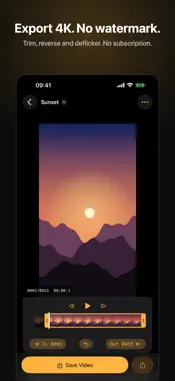
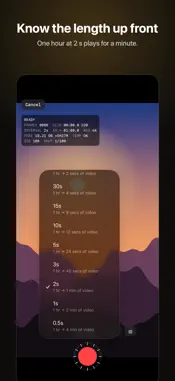
Tickframe shoots time-lapse and stop motion on iPhone and writes every frame to disk the moment it’s taken. If the app or the phone stops, the frames you already shot are still there. Free, with no watermark, no ads and no subscription. Export in 4K. TIME-LAPSE • Intervals from 0.5 s to 5 min. The interval menu shows how much video one hour of capture makes. • Stop after a set time, or start after a delay. • The readout shows frames, elapsed time, clip length, battery, temperature, and free space counted in hours of capture. • During long captures the screen dims itself. Tap to wake it. • Start with a volume button or Camera Control. • Lock focus, exposure and white balance, or set exposure compensation. STOP MOTION • Onion skin shows the last frame over the camera. • Undo the last frame. • Tap the thumbnail to play the last two seconds without leaving the camera. EDIT AND EXPORT • Trim with handles, reverse, deflicker. • 12 to 60 fps. Source resolution, 4K, 1080p or 720p. HEVC or H.264. • Save Video exports and saves to Photos in one step. • Make a video from photos you already have, sorted by the time they were taken. • Every project is a folder in the Files app. Share the frames or save them to Photos. PRO, ONE-TIME PURCHASE • Manual ISO and shutter speed in third stops. • Start at a clock time, for sunrise. While the screen is dimmed, the camera stays off until two minutes before the start. Try Pro settings in the viewfinder before you buy. Pro works with Family Sharing. PRIVACY Tickframe collects no data. Your frames stay on your iPhone. Keep Tickframe open while it captures. iOS turns the camera off when the phone locks or another app comes to the front; capture picks up again when you come back.
Technical Analysis
Package Overview Basic metadata
Bundle ID
dev.dmax.timelapse Current Version 1.0
Minimum iOS 18.0
Package Size App Store Size
Package Metadata 0 / 0 version records
Detailed binary, privacy manifest, framework, and Info.plist results have not been indexed for this package yet. The verified App Store and archive metadata above remains available.
Developer Information
Known Version Records
0 version records with stored package metadata
Stored metadata does not guarantee a package is currently available to download.
| Details | Version / IDs | Version date | Action |
|---|