
Preview







Description
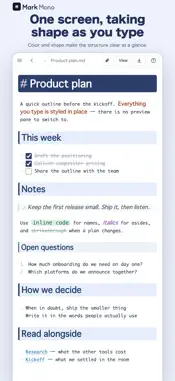
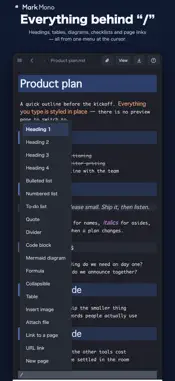
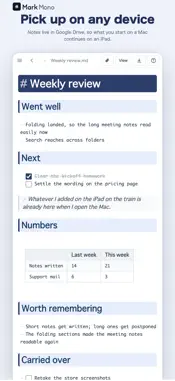
There is no separate input and preview screen. Everything happens on one screen: what you type takes shape right where you typed it. Headings, nested lists and code get distinct colors and shapes, so the structure of a note is clear at a glance. You don’t have to memorize Markdown — type / at the start of a line and pick headings, tables, checklists or diagrams from a menu. With no styling to fiddle with, you can keep writing as you think. On Mac and Windows you can edit plain Markdown (.md) files right where they are. Connect Google Drive and you can pick the same notes up on any device; the files are saved in your own Google Drive. No Google account is needed for local files on Mac and Windows. On iPhone and iPad, notes are kept in the app’s folder or in Google Drive. ■ Open what AI writes Ask ChatGPT, Claude, Gemini or another AI to summarize something in Markdown, then open it here as is — it reads cleanly and stays editable. It's a plain Markdown file, so you can paste it back into an AI to keep going, or drop it straight into Notion or GitHub without reformatting. ■ Ask AI (with your own API key) Add an API key for OpenAI (GPT), Anthropic (Claude) or Google (Gemini) and you can ask AI from inside the app. · On selected text — polish, shorten, make formal, translate, turn into a table or a diagram · From the whole note — meeting notes & to-dos, summarize, extract to-dos, tidy into Markdown, continue writing · In your own words — have it draft a how-to or a first version Check the answer before it goes into your note, and undo it in one step. Usage is billed by the service you choose, and your key stays on this device. ■ What people use it for · A notepad that reads better — jot things down and they turn into tidy headings and bullet points. As light as a plain text editor, far easier to read back · Meeting notes — organize the discussion as it happens and put decisions in a table · To-do lists and tasks — list what needs doing as a checklist and tick items off · Journal, diary and daily log — keep a note per day and find anything later with full-text search · A personal wiki — link notes to one another and build a notebook of what you know · Docs, how-tos and blog drafts — outline with headings, then paste the plain Markdown anywhere · A Markdown viewer — open an .md file and read it with its tables and headings in place · Code and command snippets — kept with syntax highlighting, copied in one click ■ Features · Styling as you type — headings, bold, italic, quotes, rules, footnotes and nested lists are formatted the moment you write them · Type / at the start of a line to insert tables, checklists, diagrams, math and more · Tables render as tables — click one to go back to the raw Markdown and edit it · Diagrams (flowcharts, sequence diagrams and more) from mermaid syntax, and math from TeX, drawn inline · Collapsible sections (details) and clickable checkboxes · Code blocks with syntax highlighting and a one-click copy button · Images and file attachments, with PDFs opening right in the app · Paste a URL and get a link preview card · Full-text search across all your notes · Six themes (Light, Sepia, Solar, Dark, Night, Contrast) and three text sizes · Available in 12 languages ■ Choose where your notes live · Google Drive — saved automatically, with no save button. Your Drive folders stay as they are, and shared drives and multiple Google accounts are supported · On this device — no sign-in needed. On Mac and Windows you can also open any folder you already have · In Google Drive, the app only touches files it created and files you explicitly open ■ About usage · Free to use.
What's New
Version 2.0.4 2026-11-24
• Improved stability and tidied up the app internally. Technical Analysis
Package Overview Basic metadata
Bundle ID
jp.monoshiri.editor Current Version 2.0.4
Minimum iOS 15.0
Package Size App Store Size
Package Metadata 0 / 0 version records
Detailed binary, privacy manifest, framework, and Info.plist results have not been indexed for this package yet. The verified App Store and archive metadata above remains available.
Developer Information
Known Version Records
0 version records with stored package metadata
Stored metadata does not guarantee a package is currently available to download.
| Details | Version / IDs | Version date | Action |
|---|