Preview



Description
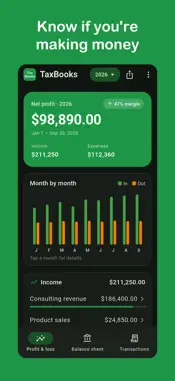
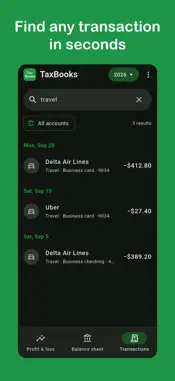
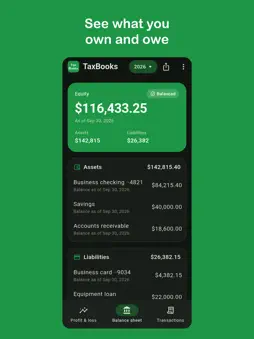
TaxBooks is a bookkeeping app for small business owners, freelancers and the self-employed. It shows your profit and loss statement (P&L), balance sheet and every business transaction on your phone, so you always know if you're making money and you're ready at tax time. KNOW YOUR NUMBERS ANY DAY OF THE YEAR • Profit and loss statement: net profit, income, expenses and profit margin for the year. • Monthly income and expenses: see money in and money out month by month. • Expense tracker: tap any income or expense category to see every transaction behind it. • Transaction search: find any payment or deposit by payee, memo or exact amount. • Account filter: view one bank account or business credit card at a time. • Balance sheet: assets, liabilities and owner's equity, so you see what you own and what you owe. • Past tax years: switch years in one tap to compare. GET TAX-READY WITHOUT THE YEAR-END SCRAMBLE • Share your P&L or balance sheet with your CPA or tax preparer as a PDF. • Spot missing deductions early by seeing exactly where your money goes. • Have clean numbers ready for your tax return, a loan application or quarterly estimated taxes. BUILT FOR • 1099 independent contractors and freelancers • Sole proprietors filing Schedule C • LLCs, S corps, C corps and partnerships • W-2 earners with side income or rental income PRIVATE BY DESIGN TaxBooks never asks for access to your bank or credit card accounts. Your books come from the transactions you upload to TaxBooks on the web. You sign in with Google or Apple, so no new password to remember. Nothing in the app can move money. QUESTIONS PEOPLE ASK What is TaxBooks? TaxBooks is a mobile bookkeeping app that shows your profit and loss statement, balance sheet and transactions for any tax year. It works with your books on moneychoice.us/taxbooks. How do I check my business profit and loss on my phone? Open TaxBooks and sign in with Apple or Google. Your profit and loss statement for the current year opens first, with net profit, margin and a monthly income and expense chart. How can I track business expenses for taxes? Tap any expense category on the P&L, such as travel, meals or software, to see every transaction in it. Search by payee or amount to find a single expense in seconds. How do I send a profit and loss statement to my accountant? Tap the share button on the P&L or balance sheet. TaxBooks creates a PDF you can email, text or save for your CPA. What is the difference between a P&L and a balance sheet? A profit and loss statement shows income minus expenses over a period, which is your profit. A balance sheet shows what your business owns (assets), what it owes (liabilities) and the difference (equity) on a given date. TaxBooks shows both. Is TaxBooks good for self-employed people and freelancers? Yes. It is made for 1099 contractors, freelancers and sole proprietors who need a simple way to see profit, track expenses and prepare for Schedule C. Do I need to connect my bank account? No. TaxBooks never asks for your bank or credit card logins. Can I see past years? Yes. Tap the year at the top of the screen and pick any year in your books. Do I need a TaxBooks account? Yes. Use the same Google or Apple login as the TaxBooks website. If you're new, you can start free at moneychoice.us/taxbooks. Can I edit transactions in the app? The app is for viewing and sharing your numbers. Categorize and reconcile transactions on the TaxBooks website, and the app updates automatically. How do I delete my account? Open the menu and tap Delete account. Your account and books are permanently deleted.
What's New
Version 1.1.0 2026-11-03
• Easy numbers: toggle abbreviated amounts like $325K across the app • Compare P&L year over year on the Profit & loss tab • Compare balance sheet year over yea... Technical Analysis
Package Overview Basic metadata
Bundle ID
us.moneychoice.taxbooks Current Version 1.1.0
Minimum iOS 15.0
Package Size App Store Size
Package Metadata 0 / 0 version records
Detailed binary, privacy manifest, framework, and Info.plist results have not been indexed for this package yet. The verified App Store and archive metadata above remains available.
Developer Information
Known Version Records
0 version records with stored package metadata
Stored metadata does not guarantee a package is currently available to download.
| Details | Version / IDs | Version date | Action |
|---|