Preview




Description
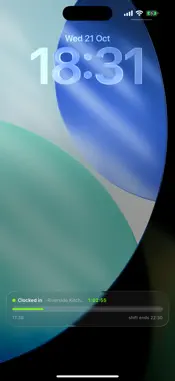
ClockIn Dock is the staff app for hospitality teams. Lay your phone on the holder at the venue to clock in, take your breaks with a live countdown, and see your timesheet and upcoming shifts any time. • Clock in and out by docking your phone or tapping your venue's chip at work • Breaks with a countdown and a reminder when time's up paid or unpaid, as your venue sets them • Your timesheet every shift and total hours, updated live • Your rota see and request changes to upcoming shifts • A Lock Screen Live Activity shows your shift progress and hours while you work • Request a manual clock-in if the dock ever fails, and track its approval • New here? Ask to join with your venue's sign-up code and delete your account from Profile if you leave ClockIn Dock is provided by your employer. You sign in with your work mobile number. Your manager can set up your account, or you can ask to join with the sign-up code they give you; the office accepts your request and sets your pay.
What's New
Version 1.8.0 2026-10-23
Before you start, the app shows the staff privacy notice and a short briefing and asks you to confirm you have read them. Clock in and out by laying your phone ...Before you start, the app shows the staff privacy notice and a short briefing and asks you to confirm you have read them. Clock in and out by laying your phone on your venue’s magnetic holder, lift it off to finish your shift, instead of plugging in a charger cable. New here? Tap “I’m new here” on the first screen and ask to join with your venue ID and the sign-up code your manager gives you; once the office says yes, you sign in like everyone else. Delete your account from Profile, the app says what goes and what your employer keeps before you confirm. If you leave the venue with your phone on you while clocked in, the app closes your shift and tells you (it checks while it’s open; a phone docked in the locker gets no leaving check). The “still clocked in” reminder now asks when you finished. Days you can’t work show “waiting for the office” until it decides. Your timesheet shows the pay week your employer pays against. Signing up also asks for your details — name and phone required, email, address and an emergency contact optional. If you delete your account, your employer has 30 days to restore it if it was a mistake. Notifications clear when you sign out. App updates now arrive only from the App Store. At venues with a locker, while your shift is running, the app is asked about every half hour whether your phone is still on the magnetic holder and can answer with a single magnetic reading; you see nothing, nothing else is read, and no answer ever changes your hours or your pay the staff privacy notice explains it in full. Your Timesheet now has a Holiday tab: how much holiday you have taken, booked and have left, counted from your own holiday year. On iPhone, where your employer has switched it on, the leaving check also runs with the app closed while you’re clocked in with your phone on you, and you need location set to Always, with Precise Location on, to clock in with the button there, it’s never used when you’re clocked out or on a break, no route is kept, and you can always send a manual clock-in for a manager to approve instead. Clock out with no signal and the app sends it once you’re back online with the app open; if someone else signs in on that phone first, it waits for you. The Clock tab has a new look: one circle to tap to clock in or out. On shift it counts your time worked and fills as your rostered shift goes by, one lap an hour if you’re not on the rota, and on a break it counts down your break; the Clock screen turns dark once you’re clocked in and stays dark through your break, and every other screen stays light. Where your employer has switched them on, the app now asks before it clocks you out for leaving, “Clock me out” or “Still working” and clocks you out from when it first saw you outside if you don’t answer within 10 minutes (say “Still working” within 30 minutes after that and your shift reopens) while the app is open, if it can’t confirm you’re still at the venue for 20 minutes, it asks that too, and not answering that never clocks you out. Duty managers and owners have a new home: the Menu button in the middle of the bar opens the rota, holidays, who’s in, staff and the team’s other screens (and approvals, for duty managers: the owner’s are on the bar), Overview shows who is due in today, and Profile is your initials at the top right. Duty managers can edit their venue’s rota, give a shift to someone else and decide holiday and shift requests, never for their own shifts, and they see hours, never a colleague’s pay. Managers and the owner can be told on their phones when someone clocks in for a shift, clocks out, starts a break or hasn’t clocked in 10 minutes after their start; each manager chooses their own alerts and quiet hours. A duty manager can now send you a reminder about that day’s shift, or clock you in if your phone isn’t working; the staff privacy notice explains both. Technical Analysis
Package Overview Basic metadata
Bundle ID
com.clockindock.app Current Version 1.8.0
Minimum iOS 15.1
Package Size App Store Size
Package Metadata 0 / 0 version records
Detailed binary, privacy manifest, framework, and Info.plist results have not been indexed for this package yet. The verified App Store and archive metadata above remains available.
Developer Information
Known Version Records
0 version records with stored package metadata
Stored metadata does not guarantee a package is currently available to download.
| Details | Version / IDs | Version date | Action |
|---|