
Preview


Description
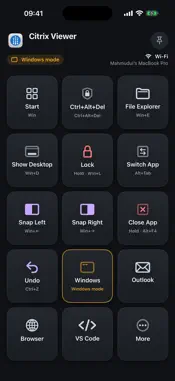
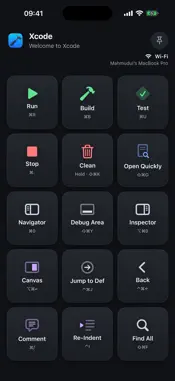
Sidekey turns your iPad or iPhone into a shortcut deck for your Mac. Prop it beside your keyboard. Whenever you switch apps on the Mac, Sidekey shows keys for that app: Run, Build and Test in Xcode; Mute, Video and Share Screen in Zoom; Bold, Comment and Track Changes in Word. Tap a key and the Mac runs the shortcut. KNOW WHERE A TAP WILL LAND The top of the screen shows the Mac app's icon, name and window title, and whether you are connected over USB or Wi-Fi. EVERY TAP GETS AN ANSWER A key glows amber while the Mac works, lights up when the shortcut was sent, and shakes with the Mac's reason when it could not be, for example when a permission is missing. If the app in front changes just as you tap, Sidekey refuses the tap rather than sending it to the wrong app. BUILT-IN LAYOUTS Safari, Chrome, Arc, Finder, Mail, Messages, Notes, Calendar, Music, Photos, Microsoft Word, Excel, PowerPoint, Outlook, Teams, Slack, Zoom, WhatsApp, Telegram, Spotify, Notion, ChatGPT, Citrix Viewer, Xcode, VS Code, Cursor, Antigravity, OpenCode, Terminal and MacDown, plus system keys for every other app: Play/Pause, Screenshot, Spotlight, Lock Mac and more. Shortcuts are taken from each app's own menus or published documentation. To change keys or add a layout for another app, choose Edit Layouts in the Sidekey menu on the Mac. This needs Mac app 1.4.0 or later. WORKS WITH CITRIX In a Citrix session to a remote Windows desktop, Sidekey sends Windows shortcuts such as Ctrl+Alt+Del, Win+E and Alt+F4 into the session. Pick a mode from the bottom row: Windows, Outlook, Browser, VS Code, or More for Word, Excel and Teams. This needs specific Citrix keyboard settings, listed on the support page. PAIRED WITH YOUR MAC Pair once with a code shown on your Mac. Until a device is paired, the Mac runs none of its taps, and the Mac runs only actions from its own layouts, never one sent from your iPad or iPhone. HOLD FOR DISRUPTIVE KEYS Keys that interrupt what you are doing, such as Lock Mac, End Call and Interrupt, fire only after a press and hold. Pin a layout to keep it on screen while you switch apps. USB OR WI-FI Sidekey prefers a USB connection when your iPad is plugged into the Mac, and uses your Wi-Fi network otherwise. PRIVATE Sidekey has no accounts, no analytics and no tracking. Your iPad or iPhone talks only to Sidekey on a Mac, over USB or your local network; nothing is sent to the developer. The connection is not encrypted yet, so use USB (iPad) or a network you trust. REQUIRES THE FREE MAC APP Sidekey needs its free companion app on your Mac (macOS 13 or later), available at hoquem.github.io/sidekey. The Citrix Viewer layout needs Mac app 1.3.0 or later. The Mac app needs Accessibility permission to send shortcuts.
Technical Analysis
Package Overview Basic metadata
Bundle ID
com.hoque.sidekey Current Version 1.0
Minimum iOS 16.0
Package Size App Store Size
Package Metadata 0 / 0 version records
Detailed binary, privacy manifest, framework, and Info.plist results have not been indexed for this package yet. The verified App Store and archive metadata above remains available.
Developer Information
Known Version Records
0 version records with stored package metadata
Stored metadata does not guarantee a package is currently available to download.
| Details | Version / IDs | Version date | Action |
|---|