Preview





Description
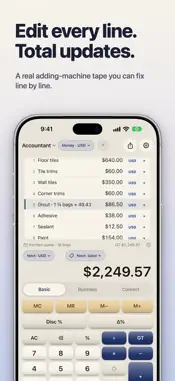
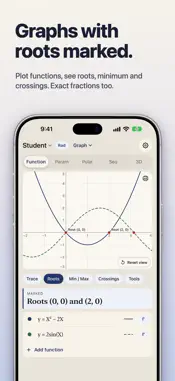
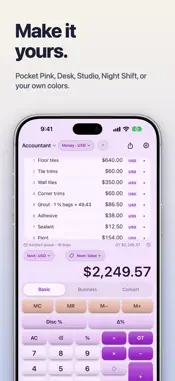
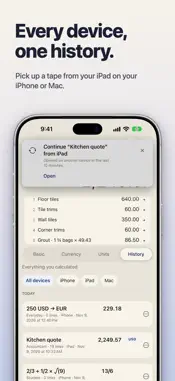
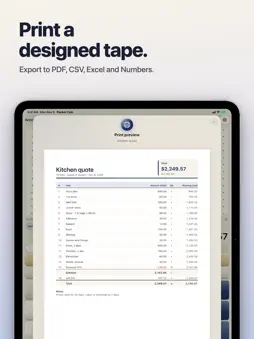
Fix the line, not the whole sum. iPocket is a pocket calculator with a tape you can edit, like a classic adding machine. Mistype an amount three lines up, tap it, put it right, and the subtotal, total and grand total recalculate on the spot. One app, three calculators: a simple calculator for everyday sums, a business and accounting calculator with a printing tape, and a scientific, fraction and graphing calculator for students. It goes where you go, from iPhone to iPad to Mac, through your own iCloud. ADDING MACHINE AND TAPE CALCULATOR • A 10-key style tape with subtotal, total and grand total (GT) • Edit, label or delete any line, and every total follows • Memory keys: MC, MR, M− and M+ • Add notes to a tape and save it in folders TAX, MARGIN AND BUSINESS CALCULATOR • Tax calculator: add tax or take it out, at your own rate • Margin calculator: find a sell price from a cost and a margin • Mark-up, discount and percent change, each on one key • Ready for invoices, quotes, receipts, cash counts and the day's takings PRINT AND EXPORT • Print a tape as a clean, professional page: every line with its running total, the total, and your notes • Save it as a PDF, or export to Excel and Numbers with working SUM formulas, or to CSV • Print or save any graph or chart as a PDF, in color or black and white, or copy it as an image CURRENCY CONVERTER ON THE TAPE Pay in euros, pounds or dollars and add them all to the same tape. The total is in your home currency, the one you choose in Settings. Each line is converted at the day's rate and locked, so yesterday's dinner stays at yesterday's price. Need the total in another currency? Pick one from the tape menu and see it. SCIENTIFIC AND GRAPHING CALCULATOR FOR STUDENTS • A full scientific keyboard: trigonometry, logs, powers and roots, in degrees or radians • Fraction calculator with exact fractions and mixed numbers • Graph functions, parametric curves, polar curves and sequences, with roots, highest and lowest points and crossings marked • 3D graphs: plot a surface and turn it to any angle • Calculus on the graph: derivatives, tangent lines, and integrals shown as the shaded area under a curve or between two curves • Value tables, and every answer ready for the next step • Unit converter built in STATISTICS AND CHARTS • Scan a table: take a photo of a printed table, pick an image or a file, or paste your data, then check every cell before you use it • Mean, median, standard deviation and more from one list or two • Histogram, box plot and scatter plot, with a line of best fit: linear, quadratic, exponential, logarithmic, power and inverse • Distributions with their chart: normal, inverse normal, binomial and Poisson, with the probability shaded and limits you can drag on the normal curve MADE FOR EVERY SCREEN On iPad and Mac, run two calculators side by side and send a result from one to the other. The Mac app is fully native, with a sidebar, a tape you edit with a double-click, and keyboard shortcuts for the keys you use most. Make it yours with themes, from the classic Ledger to Pocket Pink, or colors you pick yourself. FREE, WITH PRO WHEN YOU NEED IT The everyday calculator with a labeled tape and memory keys, the classic cream Ledger theme and your recent history are free, with no ads. iPocket Pro unlocks the editable tape, business and student modes, currency and units, saved tapes, history on every device, export and print, dark mode and every theme, the second calculator and extra widgets. Pro works on iPhone, iPad and Mac. PRIVATE BY DESIGN No account to sign up for. Your tapes live in your own iCloud, where no one else can read them. Exchange rates are for reference only and may be delayed or unavailable. iPocket is a calculator, not financial advice.
What's New
Version 2.0 2026-11-13
iPocket Calculator isn't just simple anymore. It still fits in your pocket, but now it's a real adding machine, a business calculator and a student calculator i...iPocket Calculator isn't just simple anymore. It still fits in your pocket, but now it's a real adding machine, a business calculator and a student calculator in one app. • Edit any line on the tape and watch every total follow • One-tap tax, margin, mark-up and grand total • Student mode: scientific keys, exact fractions, statistics, and 2D and 3D graphs • Add amounts in any currency and see the total in yours • Your history and tapes on iPhone, iPad and Mac, through iCloud • A fully native Mac app • Export to Excel, Numbers, CSV and PDF, and print • New themes, with Pocket Pink, the look you know Technical Analysis
Package Overview Basic metadata
Bundle ID
com.smartware.iPocketCalculator Current Version 2.0
Minimum iOS 18.0
Package Size App Store Size
Package Metadata 1 / 3 version records
Detailed binary, privacy manifest, framework, and Info.plist results have not been indexed for this package yet. The verified App Store and archive metadata above remains available.
Developer Information
Known Version Records
1 version record with stored package metadata • 3 known version records
Stored metadata does not guarantee a package is currently available to download.
| Details | Version / IDs | Version date | Action |
|---|---|---|---|
| 23.95 MB | v1.55 App Store ID: 869889884Build: 1.55 | 2024-10-23 14:04:42 | Get Version |
| Not archived | App Store ID: 869744731 | Unknown | Request Version |
| Not archived | App Store ID: 855249966 | Unknown | Request Version |