Preview







Description
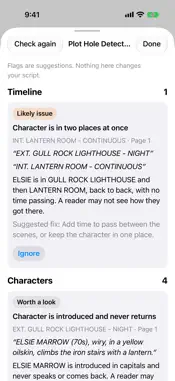
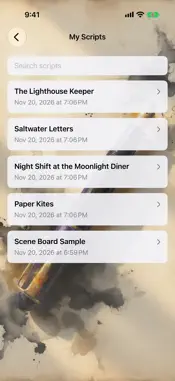
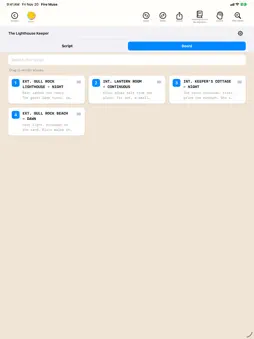
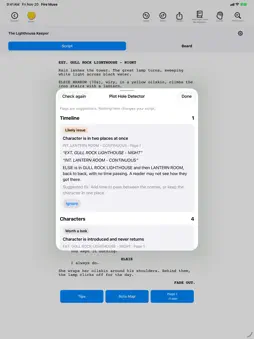
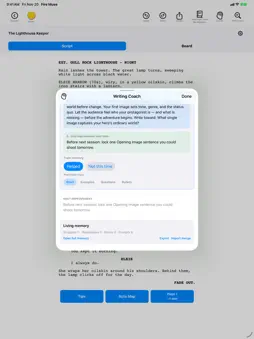
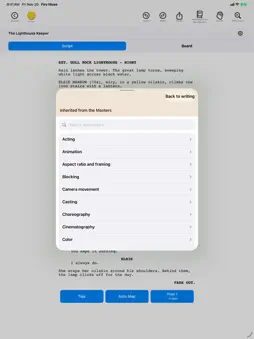
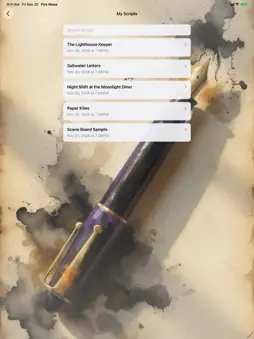
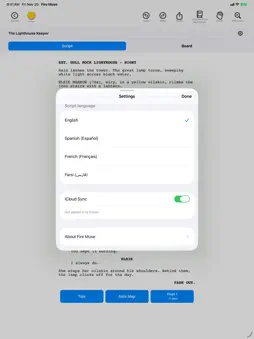
Fire Muse is a screenwriting app for writers, students, and filmmakers. Write real screenplay pages, shape your story scene by scene, & learn from the films that taught us all. JUST START TYPING You don't pick a style first. Type a line the way a screenplay reads and Fire Muse formats it for you: scene headings, action, character names, dialogue, parentheticals, and transitions. How Typing Works walks you through it. WRITE IN YOUR LANGUAGE Choose the language of each script: English, Spanish, French, or Farsi. The app itself stays in English, and only your writing changes. Spanish and French scene headings and time-of-day words are recognized, and names keep their accents in capitals. Farsi scripts read right to left, with Persian letters, digits, and the half-space kept exactly as you type them. Search ignores accents, so "jose" finds "José". SEE YOUR WHOLE STORY The scene board shows every scene as a card. Tap a card to jump to that scene, or drag cards to reorder your script. Search inside a script, and character name suggestions appear as you type. A live page count and running time show how long your script is, and the three-act structure guide maps your pages to classic story beats. MY SCRIPTS Every screenplay you save lives in My Scripts, newest first. Search by title or any line. iCloud Sync, in Settings, can keep those scripts in your private iCloud account across iPhone, iPad, and Mac, along with Writing Coach memory and ignored Plot Hole flags. Saves stay on the device first. Offline conflicts keep the newest edit and save the other as a copy. You can turn sync off and still write offline. SAVE AND SHARE Save as PDF, Final Draft (.fdx), or Fountain, with the correct file type for Files, Finder, AirDrop, and Mail. Share a PDF by text message, email, AirDrop, Files, and more. PLOT HOLE DETECTOR Tap Plot Holes in the editor to check the whole script: time of day that doesn't match, a character in two places at once, dates or ages that don't add up, someone who appears after they're gone, names that don't match, a character introduced and never seen again, something used before it is introduced, a setup that never comes back, or a mention of a scene or place that isn't there. Each flag shows the scene, page, and lines, explains the problem, and suggests a fix. It never changes your script. THE WRITING COACH Open the Writing Coach from the editor when a scene feels muddy or the page is blank. Your current pages are filled in for you. It estimates where you are in a three-act feature, checks a scene for want, opposition, and a turn, and gives you a short, practical note plus one thing to try next time. Mark a note "Helped" or "Not this time" and the coach remembers what works for you. You can export or import its memory. INHERITED FROM THE MASTERS The heart of Fire Muse: 33 crafts and 1,089 techniques from the filmmakers who shaped cinema. Each technique explains what it is, why it works, and how it's done, with a "try it" exercise, three film examples, and a Grokipedia link. Forty-four short films from the masters, with a fresh set rotating onto your device every week. Play one when Fire Muse opens, or skip it, or turn this off in Settings. A small set is ready offline. While you write, a small card can offer a short lesson from the masters beside your script, and you can open the full lesson after. Choose Off, or every 15, 30, or 60 minutes in Settings (default: every 15). MORE TO EXPLORE Search craft topics for scripts, short films, documentaries, cinematography, and directing. Study title card lessons and 33 memorable openings, plus an A to Z glossary of screenwriting terms, with logline samples. Open About Fire Muse in Settings. ON YOUR DEVICE Your scripts, tools, and craft library stay on your device and work without the internet. iCloud Sync is optional and waits when you are offline. Grokipedia links open in Safari. Made for iPhone, iPad, and Mac, in light or dark mode.
What's New
Version 26.1124 2026-11-23
ABOUT FIRE MUSE Open About Fire Muse from Settings to see what the app does in this version, including the version and build number. FILMS FROM THE MASTERS For...ABOUT FIRE MUSE Open About Fire Muse from Settings to see what the app does in this version, including the version and build number. FILMS FROM THE MASTERS Forty-four short films from the masters, with a fresh set rotating onto your device every week. A small set stays ready so a film can play when Fire Muse opens, even if you are offline. You can skip it, or turn this off in Settings. The 33 crafts and 1,089 techniques in Inherited from the Masters are still on your device. While you write, a small card can offer a short lesson beside your script. Made for iPhone, iPad, and Mac. Technical Analysis
Package Overview Basic metadata
Bundle ID
com.btfi.ScriptApp Current Version 26.1124
Minimum iOS 17.0
Package Size App Store Size
Package Metadata 0 / 1 version records
Detailed binary, privacy manifest, framework, and Info.plist results have not been indexed for this package yet. The verified App Store and archive metadata above remains available.
Price History (USA store)
2 recorded price change points. These are historical observations, not a guarantee of the current price.
| Recorded at | Price | Currency |
|---|---|---|
| 0.99 | USD | |
| 4.99 | USD |
Developer Information
Known Version Records
0 version records with stored package metadata • 1 known version records
Stored metadata does not guarantee a package is currently available to download.
| Details | Version / IDs | Version date | Action |
|---|---|---|---|
| Not archived | App Store ID: 887568472 | Unknown | Paid / Arcade |