
Preview





Description
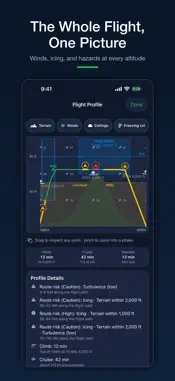
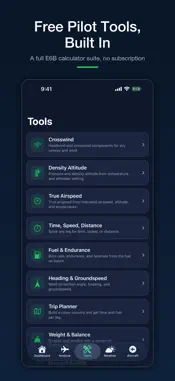
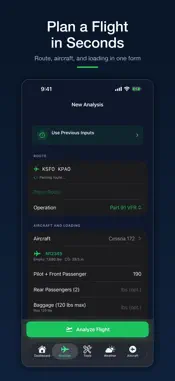
A good go/no-go call weighs weather, NOTAMs, runway performance, and fuel all at once. FlightDecide pulls them into one briefing and gives you a clear GO, CAUTION, or NO GO to review before you leave the ground. Build your flight and get an AI-assisted preflight briefing that gathers the scattered pieces in one place: • Path to GO: for CAUTION and NO GO flights, the exact changes that would flip the call • Free pilot tools: a built-in E6B suite (crosswind, density altitude, true airspeed, weight and balance, and more) that works offline and stays free on every plan • Aviation weather: METARs, TAFs, winds aloft, SIGMETs, G-AIRMETs, and PIREPs • NOTAM awareness for departure and destination • Weight and balance with a CG envelope check and specific load fixes • Takeoff and landing performance against actual runway lengths • Fuel planning with legal reserves and your personal minimum fuel • Cruise altitude: every altitude scored for winds, icing, and turbulence Every flight is scored across 8 risk categories, from weather and NOTAMs to performance, fuel, and weight and balance, then summarized as one GO, CAUTION, or NO GO. Set your personal minimums for ceiling, visibility, wind, and fuel, and your limits go into every analysis. Instead of jumping between a weather app, a NOTAM lookup, a performance chart, and a fuel calculator, you check one briefing. Export any analysis as a PDF for your records. FlightDecide is an advisory tool only and doesn't replace official weather briefings, approved aircraft data, or pilot in command judgment. Always verify critical information with official sources before flight. Privacy Policy: https://flightdecide.com/privacy.html Terms of Use (EULA): https://flightdecide.com/terms.html
What's New
Version 1.3.2 2026-10-15
You can now report a problem from inside the app. Tap Report a Problem on an analysis result or in Settings, say what went wrong, and attach a screenshot if it ...You can now report a problem from inside the app. Tap Report a Problem on an analysis result or in Settings, say what went wrong, and attach a screenshot if it helps. The report includes the app version and your device model, which helps us find the cause faster. A new account reaches its first answer sooner. On an empty Dashboard, Start Your First Analysis looks up your aircraft by N-number, then brings you back to Analyze with the route field ready to type. When nothing but model data covers convection on your route, the briefing now says so. An amber "Quiet on model data only" note tells you no radar-backed source answered, so check radar and convective SIGMETs yourself. Fixes: - The 172S, 172SP, 182T and 206H type cards show the handbook's empty weight and useful load. The 206H useful load was 33 lb too high. - The lock-screen TAF bar shows the local TAF. - Cruise power offers only the settings your aircraft's book publishes, and at the largest text size a refused value shows its reason where you can see it. - Weather Watch history loads. - The Descent angle keeps its decimal. - If the app can't read your sign-in, it shows you as signed out with a Sign In banner and keeps what you typed, instead of failing on every request. Technical Analysis
Package Overview Basic metadata
Bundle ID
com.flightdecide.app Current Version 1.3.2
Minimum iOS 17.0
Package Size App Store Size
Package Metadata 0 / 0 version records
Detailed binary, privacy manifest, framework, and Info.plist results have not been indexed for this package yet. The verified App Store and archive metadata above remains available.
Developer Information
Known Version Records
0 version records with stored package metadata
Stored metadata does not guarantee a package is currently available to download.
| Details | Version / IDs | Version date | Action |
|---|