
Preview




Description
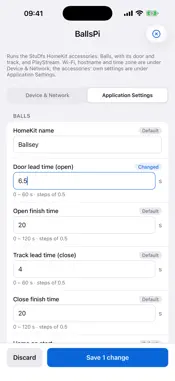
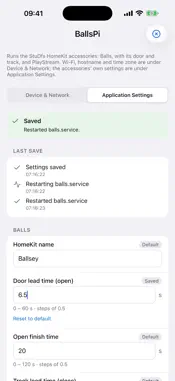
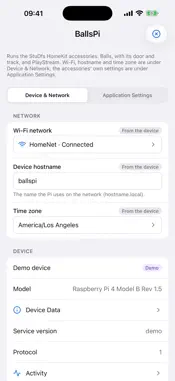
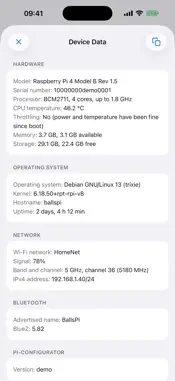
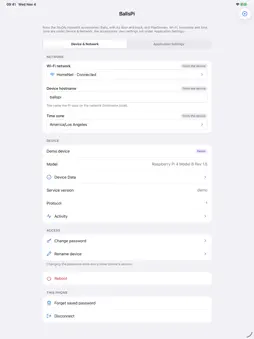
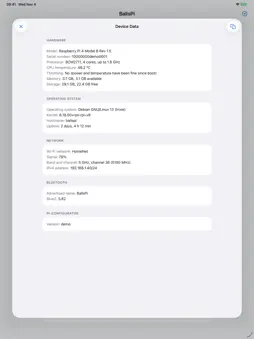
pi-fig sets up Raspberry Pi devices from your iPhone or iPad over Bluetooth. Put a Pi somewhere without a screen or keyboard, open pi-fig, and change its settings in a form the device itself describes. CONNECT WITHOUT A NETWORK Your Pi doesn't need to be on Wi-Fi yet. pi-fig finds nearby devices running the free pi-configurator service and talks to them directly over Bluetooth LE. WI-FI, HOSTNAME AND TIME ZONE See the networks the Pi can see, with signal strength and security. Join one, switch networks, or rejoin a saved network without typing its password again. Rename the Pi on your network and set its time zone. YOUR OWN SETTINGS Each device lists its own settings in a config file: text, numbers with ranges and steps, on/off switches, choices and secrets. pi-fig draws the form from that list, checks every value before saving, and shows which values are saved, which are defaults and which come from the device. A short description from the device sits at the top, so you know what you're setting up. After a change, the Pi can restart or reload your services, and programs on the Pi can be told at once which settings changed, so new values take effect straight away. PASSWORD PROTECTED Each device has its own access password. pi-fig proves it knows the password without ever sending it, using the SRP protocol, and encrypts everything after that. Passwords can be remembered in your device's Keychain. EVERYTHING ELSE - Live progress while changes are applied - Device Data: hardware, operating system, Wi-Fi and Bluetooth details, ready to copy - Reset All to Defaults: put every app setting back to the device's default in one step - Reboot the Pi from your phone, if the device allows it - Change the device's password or Bluetooth name, if the device allows it - Light and dark mode - A built-in demo device, so you can try every screen without a Pi pi-fig needs the pi-configurator service on each Raspberry Pi. pi-fig collects no data: there are no accounts, no analytics and no internet connection. Raspberry Pi is a trademark of Raspberry Pi Ltd. pi-fig is not affiliated with or endorsed by Raspberry Pi Ltd.
What's New
Version 2 2026-11-08
- Reset All to Defaults: a new button above Reboot puts every app setting back to the device's default in one step, after you confirm. - Remembered passwords no...- Reset All to Defaults: a new button above Reboot puts every app setting back to the device's default in one step, after you confirm. - Remembered passwords now belong to the device's name as well as its Bluetooth chip. A Pi that's set up again under a new name asks for its password instead of trying the old one. Renaming a device from the app keeps its saved password. Passwords saved by the previous version need to be typed once more. - Works with pi-configurator 0.2.1 on the Pi, which turns the Pi's Wi-Fi radio on if it's off, so a Pi set up without Wi-Fi now lists nearby networks. Technical Analysis
Package Overview Basic metadata
Bundle ID
com.alexmaghen.pifig Current Version 2
Minimum iOS 16.4
Package Size App Store Size
Package Metadata 0 / 0 version records
Detailed binary, privacy manifest, framework, and Info.plist results have not been indexed for this package yet. The verified App Store and archive metadata above remains available.
Known Version Records
0 version records with stored package metadata
Stored metadata does not guarantee a package is currently available to download.
| Details | Version / IDs | Version date | Action |
|---|