
Preview





Description
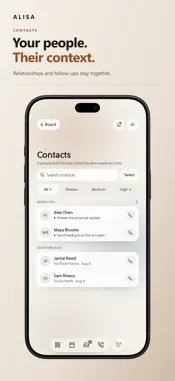
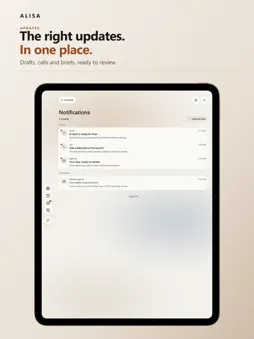
ALISA is an AI assistant for your email, calls and calendar. It prepares replies, answers your calls, follows up for you and shows what needs your decision, all in one calm place on mobile and web. You review before anything goes out. ASK ALISA, ANYWHERE • Tap the assistant button on any page to ask about it. ALISA already knows which email, call, event, package or contact you're looking at, and suggests questions to try • Press and hold to ask out loud, then pull the answer up to carry on in Chat • Today's Agenda opens as a small bar that keeps reading while you use the app, and you can ask about it • Ask ALISA to keep checking on something, or to remind you when you choose. Nothing starts until you tap Start YOUR DAY AT A GLANCE • Home shows only what has something in it and fits on one screen • Search emails, calls, contacts and events from one place • Daily and weekly briefs, and an Agenda that explains what matters and the next decision • Packages followed from your shipping emails, with arrivals on your Agenda and optional alerts. No carrier sign-ins • One-tap Join for Zoom, Google Meet, Teams and more, including links built from meeting IDs and dial-in numbers EMAIL READY FOR YOUR REVIEW • Choose which emails ALISA handles: only emails you label, all new emails, only people you choose, or your own list • ALISA reads the whole conversation before preparing a reply, so it skips mail that needs none • Review and edit each draft, then send with a few seconds to Undo • Schedule replies and new emails for a date and time • Save emails you send again and again as templates, with attachments and fill-ins • Ask ALISA to write a new email from a sentence, or change what you already wrote • Confirmation emails with an event can go on your calendar, with Undo (Standard and Pro) CALLS THAT KEEP CONTEXT AND FOLLOW UP • Set up your own ALISA number from Calls. ALISA answers, and offers real open times, never made-up ones • Read call transcripts, summaries and suggested follow-ups • Every call ALISA can't answer shows up in Missed, with the reason • Where enabled and consented, privately play retained recordings CONTACTS WITH MEMORY • Bring together authorized communication history, commitments, projects, preferences and notes for each contact • Use that context when preparing calls and emails, and review next actions before anything is sent YOUR LANGUAGE, YOUR SCREEN • Use ALISA in English or Spanish. Your screens, Agenda, Chat replies and notifications follow your choice, and translations are made by AI, so some wording may be off • Tablets and foldable phones get a side rail and two columns • A web app built for large screens, with an Ask ALISA panel that knows what's open MADE FOR EVERYONE • ALISA Sans, ALISA's own typeface, with a Large cut for low vision • Contrast checked in light and dark, text that flows at large sizes, screen reader support, and Reduce Motion, Reduce Transparency and Increase Contrast • Secure biometric sign-in on supported devices DESIGNED FOR CONTROL AND TRUST ALISA follows an approval-first approach. Drafts, scheduling decisions and destructive actions include review or confirmation steps where appropriate. Recording features are available only when enabled and consent requirements are met. Permissions support the features you choose, including microphone access for voice and optional photo access for your profile. SUBSCRIPTIONS ALISA offers Basic, Standard and Pro plans, billed monthly or yearly. Payment is charged to your Apple Account at confirmation of purchase. Subscriptions renew automatically unless canceled at least 24 hours before the end of the current period. Manage or cancel any time in your Apple Account settings. Terms of Use (EULA): https://www.apple.com/legal/internet-services/itunes/dev/stdeula/ ALISA Terms: https://alisaassistant.com/alisa/legal/terms-of-use Privacy Policy: https://alisaassistant.com/alisa/legal/privacy-policy
What's New
Version 9.8.1 2026-11-14
What's New in Alisa 9.8.1 Your Inbox stays easy to read with several inboxes and thousands of emails. You can also set an email aside with Later on any device,...What's New in Alisa 9.8.1 Your Inbox stays easy to read with several inboxes and thousands of emails. You can also set an email aside with Later on any device, see your history with the people in a meeting, and ask Alisa in chat to send, schedule or rewrite a reply. NEW: A CALMER INBOX • What needs you comes first. Emails that need you sit together at the top until you've handled them, however long ago they arrived. • Earlier days fold to one line. Today shows in full; each earlier day, week, month and year is a single line that says how much came in and what happened to it. Open a line to see what's inside. Each day's receipts, notifications and newsletters gather into one line, grouped by sender when you open it. • With more than one inbox connected, the Inbox title is a menu: see one inbox alone, with its own counts and search, or everything together. Name your inboxes and put them in the order you like. • Search finds email by who sent it. Prefer one long list? Choose Every email, newest first in the sort options. NEW: EXTRA INBOXES • On Standard and Pro, connect more inboxes by adding extra ones. Each is billed monthly the same way as your plan, so everything you pay for Alisa stays in one place. Find it under Plan in Settings. NEW: LATER, ON EVERY DEVICE • Set a conversation aside with Later and it comes back by itself this evening or tomorrow morning, on every device. Bring it back any time from Snoozed. NEW: MEETING PREP • Before a meeting, Alisa can show your recent emails and calls with the people attending. It's off until you turn it on in Settings, and turning it off deletes what it kept. NEW: SEND A REPLY FROM CHAT • In chat, ask Alisa to send, approve, schedule or rewrite a reply, cancel a scheduled send, change who it goes to, or mark a conversation Done. Alisa shows a card with what will happen, and nothing happens until you tap it. NEW: SHARE USAGE, YOUR CHOICE • Alisa counts which screens you open and which features you use, so we can see what works and improve it. A count never includes what's in your emails, calls or chats. Share usage in Settings turns it off and deletes the counts. NEW: EASIER TO READ • Phone numbers are written the way you'd write them, call minutes show how many you've used out of your plan's, and your Alisa number reads Ready when it can take calls. • Alisa's typeface was redrawn: the 6 and 9 are rounder, and the @ and & are easier to read. • A reply you're reviewing has one clear Send button with the other choices beneath it. • The Terms and Privacy Policy open without leaving the app, and Done brings you back, even while signing up. AND MORE • Sent keeps every conversation you replied in, even after the other person writes back. It still shows in Review when the new message needs you. • An email already deleted from your mailbox can be deleted from Alisa too, and when Alisa can't do something it says why. • Sender names read cleanly, with no stray quote mark, and an email with a short subject shows who sent it. • A missed call says why Alisa didn't answer, and a caller in your contacts shows by name. • The Ask Alisa button at the top of an open email, call, event, delivery or contact shows again. • Send sends what you see: edit a reply and press Send before saving, and your edited version goes out. • A dropped connection no longer signs you out. • Your plan shows its real status: a trial reads as active, a failed payment asks you to update your payment method, and a plan you've just paid for shows as soon as you're back from checkout. • With Lock Alisa on, opening the app shows the lock straight away. • Your Agenda waits until you're free and is read once. • A deleted conversation stays deleted, and you can always disconnect an inbox or delete a chat, even after your plan has ended. Technical Analysis
Package Overview Basic metadata
Bundle ID
com.maddtechnologies.Aria Current Version 9.8.1
Minimum iOS 16.4
Package Size App Store Size
Package Metadata 0 / 0 version records
Detailed binary, privacy manifest, framework, and Info.plist results have not been indexed for this package yet. The verified App Store and archive metadata above remains available.
Developer Information
Known Version Records
0 version records with stored package metadata
Stored metadata does not guarantee a package is currently available to download.
| Details | Version / IDs | Version date | Action |
|---|