Preview






Description
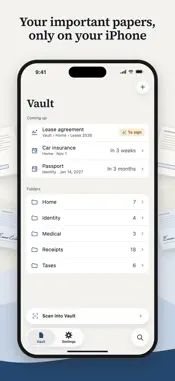
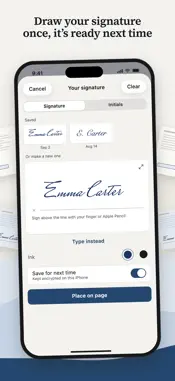
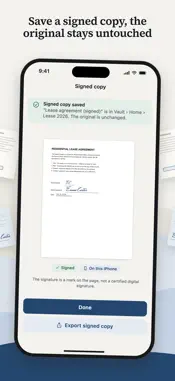
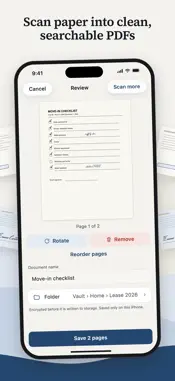
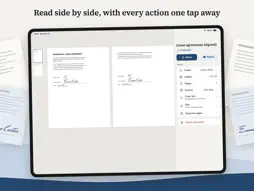
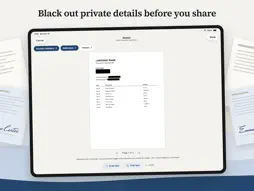
Dossio is a private place for the paperwork in your life. Scan paper or import PDFs into folders, and everything is encrypted on your device. Your documents are never sent to a server. KEEP IT ALL IN ONE PLACE Make folders for the house, the car, the tax year, or the kids. Scan a page straight into a folder, import PDFs and photos from Files, or send them in from any app with the share sheet. On iPad, drag PDFs and photos in from other apps. SCAN INTO SEARCHABLE PDFS Scanning uses the document scanner built into iOS. Each page becomes a PDF that Dossio reads on your device, so you can find a word later, even in a scan from years ago. Search matches titles first, then the text inside every page. PUT DOCUMENTS TOGETHER AND TAKE THEM APART Add pages to a document by scanning, or from Photos and Files. Merge two or more documents into one and drag them into the order you want. Split a document wherever a new one starts. A merged document remembers its originals, so you can split it back. Keep the originals if you want them, or let the new document replace them. SIGN ON THE PAGE Dossio finds the likely signature, initials, and date fields in a PDF or a scan, so you can see every field and place your mark in the right spot. Draw your signature once, or type your name, and it is ready the next time you need it. On iPad, sign straight into the field with Apple Pencil. Dossio saves a signed copy and leaves the original untouched. A signature in Dossio is a visual mark, not a certified digital signature. BLACK OUT PRIVATE DETAILS BEFORE YOU SHARE Dossio finds account numbers, ID numbers, email addresses, phone numbers, addresses, and dates of birth, and suggests what to hide. Blacked-out text is removed from the copy you share, not just covered. Share options can also strip hidden details such as the author name and the location in a photo. REMINDERS BEFORE THINGS EXPIRE Give a document an expiry date and Dossio reminds you in advance. Notifications never show a document or folder name. Coming up lists the dates in the next six months. RECEIPTS FOR YOUR ACCOUNTANT Pick a period and Dossio gathers the receipts in it into a CSV file you can open in any spreadsheet app. It reads the date, merchant, and total on your device, and flags any receipt without a total so you can fill it in. LOCKED TO YOU Your documents are encrypted with a key protected by the Secure Enclave, the same chip that guards Face ID. Unlock with Face ID or your device passcode. Dossio needs a device passcode before it can create a vault, and it locks when you leave the app, after the time you choose. BACKUPS YOU CHOOSE Your vault itself stays out of iCloud and computer backups. When you want a copy, Dossio writes an encrypted backup file and you choose where it goes: Files, iCloud Drive, or the share sheet for AirDrop and Mail. The file is encrypted before it leaves Dossio, and your recovery key opens it on another device. NOTHING TO SIGN IN TO No account, no ads, no subscription, and no in-app purchases. Dossio has no tracking and no advertising code, and your documents never leave your device.
Technical Analysis
Package Overview Basic metadata
Bundle ID
com.zatech.documents Current Version 1.0.0
Minimum iOS 26.0
Package Size App Store Size
Package Metadata 0 / 0 version records
Detailed binary, privacy manifest, framework, and Info.plist results have not been indexed for this package yet. The verified App Store and archive metadata above remains available.
Developer Information
Known Version Records
0 version records with stored package metadata
Stored metadata does not guarantee a package is currently available to download.
| Details | Version / IDs | Version date | Action |
|---|