
Preview





Description
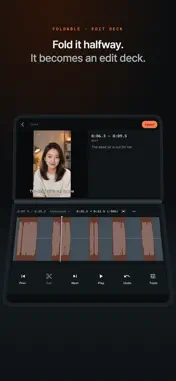
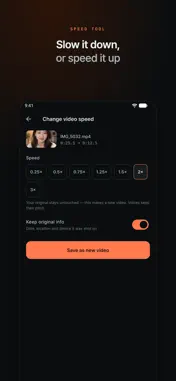
Drop in a video, and the dead air is gone. Auto captions · Auto dubbing · Subtitle files for YouTube • Recognizes speech and writes a caption for each segment. Edit any line by hand. • Translates those captions and reads them in that language as a new audio track, keeping the background sound underneath. • Exports .srt/.vtt so you can upload a subtitle track straight to YouTube — no need to burn text into the video. JumpCut finds the silent and static stretches, and cuts them out automatically. A 30-minute recording is analyzed in seconds; one slider controls how much gets cut, then you export. Key features • Zoomable timeline, draggable cut boundaries, split/merge for precise edits • Pick videos from Photos or the Files app (iCloud Drive, Google Drive) • Automatic silence detection — blazing fast • Sensitivity slider + presets (Talking · Tight · Relaxed) + fine-tuning • Tap segments on the timeline to cut or restore; the preview skips the cuts • Captions per segment, burned in; 9:16 vertical and 1:1 crops • Hardware-accelerated HEVC/H.264 encoding, save to Photos and share • Shrink video file size — make videos smaller without editing; batch and target size (25/100/300 MB) with Pro 100% on-device Analysis and encoding happen entirely on your phone. Nothing is uploaded, so it is fast, uses no data, and keeps your footage private. No watermark, no ads. Try everything free on your first 2 videos. If you like it, pick monthly, yearly, or lifetime. JumpCut Pro — monthly, yearly, or lifetime (one-time) • Your first 2 videos use every feature for free, no payment needed. • Lifetime is a single purchase — no subscription. ■ Subscription details • Monthly (1 month) / Yearly (1 year) auto-renewing subscriptions; Lifetime is a one-time payment • Renews automatically unless cancelled at least 24 hours before the period ends; billed to your store account • Manage or cancel any time in your account settings Terms of Use (EULA): https://www.apple.com/legal/internet-services/itunes/dev/stdeula/ Privacy Policy: https://jumpcut.filex.dev/privacy Support: https://jumpcut.filex.dev/contact
What's New
Version 2.5.3 2026-11-05
Share a video from Photos or Files, or use Open In, and JumpCut opens it straight in the editor. Technical Analysis
Package Overview Basic metadata
Bundle ID
com.lunalink.shrinkit Current Version 2.5.3
Minimum iOS 15.5
Package Size App Store Size
Package Metadata 0 / 0 version records
Detailed binary, privacy manifest, framework, and Info.plist results have not been indexed for this package yet. The verified App Store and archive metadata above remains available.
Developer Information
Known Version Records
0 version records with stored package metadata
Stored metadata does not guarantee a package is currently available to download.
| Details | Version / IDs | Version date | Action |
|---|