Preview


Description
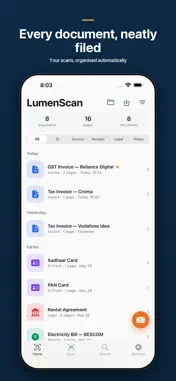
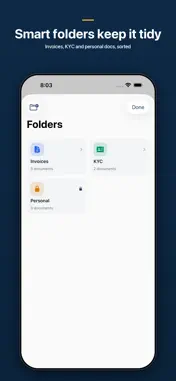
LumenScan turns your iPhone into a fast, private document scanner. Two taps from camera to PDF, with text recognition that runs entirely on your device — no cloud upload, no tracking. WHY LUMENSCAN Most scanner apps quietly ship your documents to overseas servers to run OCR and AI features. LumenScan does it all on your iPhone using Apple's Vision framework. The scans, the recognised text, and your signatures never leave the device unless you explicitly share them. FAST CAPTURE Auto edge detection and shadow removal turn even a casual phone photo into a clean, cropped page. Batch mode handles multi-page documents — receipts, contracts, lecture notes, book chapters — up to 50 pages in one session. ON-DEVICE OCR Apple's Vision framework recognises text in dozens of languages, on-device, with no internet round-trip. The recognised text becomes a searchable layer inside the PDF, so a full-text search across your library finds the right scan in seconds. SIGN, ANNOTATE, SHARE Highlight, draw, type, and add a real signature with a tap. Export to PDF, share to any app — Mail, Files, AirDrop, Messages. iCloud sync keeps every scan in step across iPhone, iPad, and Mac. PRIVATE BY DESIGN Optional Face ID / Touch ID lock on every vault. Sensitive numbers can be auto-masked before sharing. No accounts, no analytics on document content, no third-party trackers. FEATURES - Two-tap scanning with auto edge detection and shadow removal - Batch scanning (50+ pages in one session) - On-device OCR with searchable PDF text layer - Annotate, highlight, draw, and add signatures - Smart vaults: Invoices, Receipts, Contracts, IDs, Notes - Auto-mask sensitive numbers before sharing - B&W / Enhanced / Original filters - iCloud sync across iPhone, iPad, and Mac - Share to Mail, Files, AirDrop, or any third-party app - Face ID / Touch ID vault lock - Full-text search - Dark Mode and Dynamic Type FREE FOREVER Up to 5 scans per day, basic filters, PDF export, last 7 days of history, and standard share — free, forever. No account required. LUMENSCAN PRO 7-day free trial. Pro unlocks unlimited scans with no watermark, auto-mask, unlimited vaults and tags, iCloud backup, biometric lock, batch scanning, and more. Subscriptions auto-renew unless cancelled at least 24 hours before the end of the period. Manage in Settings → Apple ID → Subscriptions. QUESTIONS, BUGS, OR FEATURE REQUESTS Write to [email protected] — we read every email.
What's New
Version 1.0.13 2026-10-27
- Launch release - On-device OCR with searchable PDFs - Annotate, sign, and share to any app - Biometric vault + iCloud sync Technical Analysis
Package Overview Basic metadata
Bundle ID
com.lumenlabs.lumenscan Current Version 1.0.13
Minimum iOS 17.0
Package Size App Store Size
Package Metadata 0 / 1 version records
Detailed binary, privacy manifest, framework, and Info.plist results have not been indexed for this package yet. The verified App Store and archive metadata above remains available.
Developer Information
Known Version Records
0 version records with stored package metadata • 1 known version records
Stored metadata does not guarantee a package is currently available to download.
| Details | Version / IDs | Version date | Action |
|---|---|---|---|
| Not archived | App Store ID: 886210427 | Unknown | Request Version |