Notebook – Markdown Notes App Icon

Notebook – Markdown Notes

Productivity • Lukas Kaibel
4+ v1.1.0 Recorded price: Free App Store →
IPA Analysis
Technical Specs
Bundle ID com.lukaskbl.Notebook
Version 1.1.0
App Store Size 29.22 MB
Minimum iOS 27.0
Devices iPhone, iPad, iPod touch
Catalog release date 2026-10-27
Latest recorded version date 2026-11-01
Features & Support
Advisory 4+
Languages (1)
EN
Top In App Purchases
No In App Purchases Listed

Preview

Notebook – Markdown Notes screenshot 1 Notebook – Markdown Notes screenshot 2 Notebook – Markdown Notes screenshot 3 Notebook – Markdown Notes screenshot 4 Notebook – Markdown Notes screenshot 5 Notebook – Markdown Notes screenshot 6 Notebook – Markdown Notes screenshot 7 Notebook – Markdown Notes screenshot 8 Notebook – Markdown Notes screenshot 9 Notebook – Markdown Notes screenshot 10 Notebook – Markdown Notes screenshot 11 Notebook – Markdown Notes screenshot 12 Notebook – Markdown Notes screenshot 13 Notebook – Markdown Notes screenshot 14 Notebook – Markdown Notes screenshot 15 Notebook – Markdown Notes screenshot 16 Notebook – Markdown Notes screenshot 17 Notebook – Markdown Notes screenshot 18 Notebook – Markdown Notes screenshot 19 Notebook – Markdown Notes screenshot 20

Description

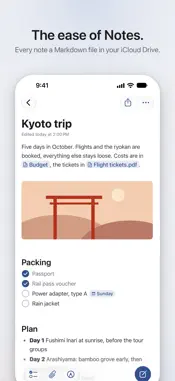
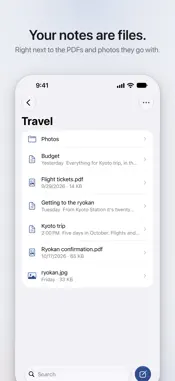
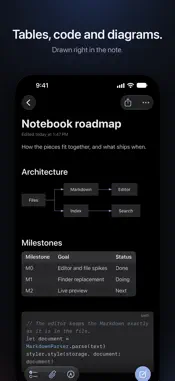
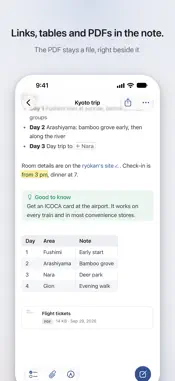
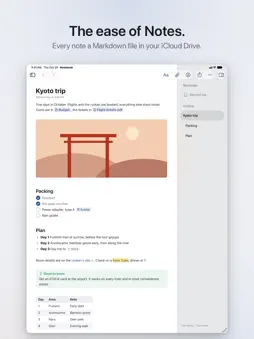
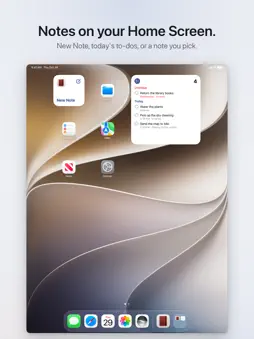
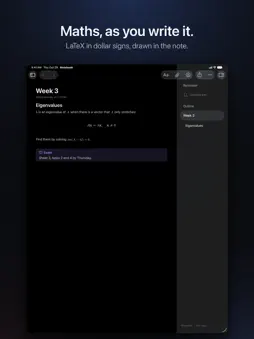
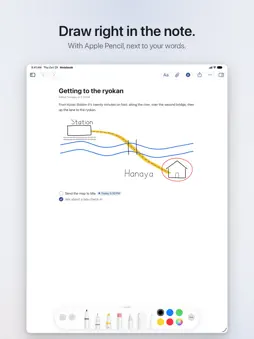
The ease of Notes. The freedom of files. Notebook keeps every note as a plain Markdown file, in your own iCloud Drive or any folder you choose. There is no vault to set up and nothing to import: your notes sit right next to the PDFs, photos and documents they belong with, and they stay yours. Obsidian and other Markdown apps open the same files. And it writes like Notes. Headings, bold, lists and checklists look finished as you type, and their Markdown marks show only on the line you're writing. Pictures, PDFs and drawings go right into the note. On the Mac, iPhone and iPad it's an Apple app through and through: widgets, Spotlight, Shortcuts, the share sheet, Apple Pencil and the keyboard shortcuts you know. NEW IN 1.1 • Widgets for a new note, today's to-dos and a note of your choice, and New Note in Control Center • Version history: every earlier version of a note, with what changed marked • Share to Notebook from any app • Import from Apple Notes • To-dos that repeat, and to-dos that don't need a note WRITE • Tables, code, maths and Mermaid diagrams, drawn right in the note • Pictures, PDFs and files in the note, kept in a hidden .assets folder beside it • Drawings with Apple Pencil, a finger, the mouse or the trackpad, and on iPhone and iPad right on PDFs • [[Links]] between notes that keep working when you rename or move them FIND • Search finds words in notes, PDFs, pictures, scans and handwriting, and names from a few letters, typos included • ⌘K finds anything and runs any command, and every note is in Spotlight TO-DOS • Every open checkbox of every note in one list, by when it's due, as in Reminders • Dates, times, places and repeats are written into the note, where other Markdown apps read them too YOUR FOLDERS • iCloud Drive as the Finder shows it, with drag and drop, and Undo for moves, renames and the Trash • Folder symbols and colours, kept where the Finder keeps them PRIVATE • No account, no server, no tracking. Notebook sees only the folders you choose. To look around first, Try Sample Notes on the first screen makes a folder of sample notes. Notebook is free and open source: github.com/lukaskaibel/notebook

What's New

Version 1.1.0 2026-11-01
Notebook 1.1 brings widgets, version history and a lot of polish. • Widgets: New Note on the Home Screen, the Lock Screen and the Mac's desktop, and as a contr...Notebook 1.1 brings widgets, version history and a lot of polish. • Widgets: New Note on the Home Screen, the Lock Screen and the Mac's desktop, and as a control in Control Center and on the Action button. A Today widget with your to-dos for today and the overdue ones, ticked right in the widget, and a Note widget that shows a note of your choice. • Share to Notebook: text, links, pictures and PDFs from any app's share sheet become a new note, or go at the end of the note you opened last. • Version history: Notebook keeps earlier versions of your notes as you write. Show Changes marks what's new and what went, and Restore puts a version back. File › Revert To on the Mac, Version History in the ⋯ menu on iPhone and iPad. • Import from Apple Notes: export notes from Notes as Markdown, then import them with their pictures, links and folders. • Draw and write on PDFs right on the page on iPhone and iPad, with Apple Pencil or a finger, saved into the PDF itself. Markup for pictures, and a file is renamed by tapping its name, as in Files. • Files are no longer greyed out: every file's icon is in the accent colour, and Settings gives each kind a colour of its own if you like. • To-dos that repeat every week, weekday, month or year, to-dos that aren't in a note, and swipe to delete in To-dos. • Sort a folder by date edited or date created. • Search and ⌘K find names loosely, as Spotlight does: "kytr" finds Kyoto trip, and a typo or two is fine. • On the Mac: Edit › Find in a note, Spelling and Grammar, Attach File, and File › Duplicate, as in Notes. Closing the window no longer quits Notebook. • On iPhone and iPad: a note's text follows the system's text size, the bar above the keyboard has the size of Notes', and notes fade softly under the bars as you scroll. • Notes are saved in the background, so a slow disk or iCloud never makes you wait. • Many fixes, among them a hang on the Mac with the same note open in two windows, and deleting on iPhone and iPad.

Technical Analysis

Package Overview Basic metadata
Bundle ID com.lukaskbl.Notebook
Current Version 1.1.0
Minimum iOS 27.0
Package Size App Store Size
Package Metadata 0 / 0 version records
Detailed binary, privacy manifest, framework, and Info.plist results have not been indexed for this package yet. The verified App Store and archive metadata above remains available.

Developer Information

Known Version Records

0 version records with stored package metadata

Stored metadata does not guarantee a package is currently available to download.

Details Version / IDs Version date Action