Preview



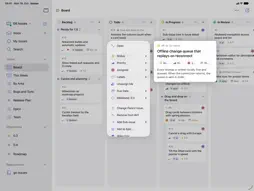


Description
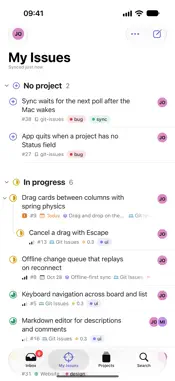
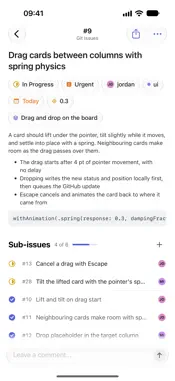
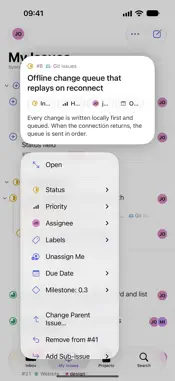
Issues is a fast, native app for GitHub Issues and GitHub Projects, on the Mac, iPhone and iPad. It is built like Mail and Notes, quick to drive from the keyboard, and everything stays in GitHub: teammates who don't use the app see the same issues and boards on github.com. PLAN AHEAD • Milestones: a board's next ones in the sidebar, each with its issues, how much is done and the day it's due • Epics: issues whose sub-issues are their work. On the board an epic's issues stand together under its name; drag the name to move them all • A roadmap: your epics as bars over the milestones, by month or quarter. Drag a bar to move an epic and its issues to another milestone • Your project's views from GitHub, such as "This week" or open bugs, as a board or a list, with filters you change in a click • Grouped by milestone or parent, a view shows how far each group is; a view of the current iteration shows its days left; a roadmap view is a timeline THE INBOX • What changed for you, from GitHub's notifications: who assigned you, mentioned you, commented, asked for your review or closed an issue you follow • Open one and the issue is right there, with what's new on top • Read, archive and snooze with a key or a swipe; github.com and all your devices agree ON THE MAC • Every project as a board or a list, My Issues with everything assigned to you, and every issue of your repositories, also those on no board • Drag issues to a new place, and shape the columns: add, rename, recolour and reorder them • Keyboard first: J and K move between issues, S, P, A and L change status, priority, assignee and labels, D sets the due date, and ⌘K opens a command palette for everything else • Select several issues and change them at once, or peek at one with Space • Sub-issues and blockers: put any issue under another, and mark what blocks what • Descriptions drawn as on GitHub, with tables, checklists that tick and Mermaid diagrams ON IPHONE AND IPAD • On iPhone, the Inbox, My Issues, your projects and search as tabs; on iPad, a sidebar and the board with drag and drop • Swipe right to mark an issue done, swipe left to assign it to yourself or delete it • Touch and hold an issue to change its status, priority, assignee, labels, milestone, parent or blockers, or drag it to a new place • Milestones and the roadmap, which is a timeline on iPad • On iPad with a keyboard, the Mac's keyboard shortcuts DUE DATES THAT REMIND YOU • Give an issue the day it is due: tomorrow, Friday, a day in the calendar, or typed as "in 3 days" • On the day, your Mac, iPhone and iPad remind you, with buttons to start the issue, mark it done or move it to tomorrow • The date is the project's Due date field on GitHub, so your team sees it too FAST AND RELIABLE • Every change shows at once and goes to GitHub in the background • Works offline: changes wait and are sent when you're back online • Careful with other people's work: when someone else changed the same text, nothing is overwritten PRIVATE • No account, no server, no tracking. Your login stays in your keychain and is only ever sent to GitHub. • Signed in on one of your devices? The others sign in by themselves through iCloud Keychain. In English, German, French, Spanish, Portuguese, Russian, Japanese, Korean and Chinese, following your device's language. Try it without an account: "Explore with Sample Data" opens two sample projects. Issues is open source: github.com/lukaskaibel/issues-for-github Issues is not affiliated with or endorsed by GitHub.
What's New
Version 1.0.0 2026-10-25
The biggest update yet: plan with milestones, epics and a roadmap, open your project's views from GitHub, and use Issues in nine languages, in a new look built ...The biggest update yet: plan with milestones, epics and a roadmap, open your project's views from GitHub, and use Issues in nine languages, in a new look built like Mail and Notes. • Milestones: a board's next ones in the sidebar, each with its issues, how much is done and the day it's due. Complete one and move what's left to the next • Epics: issues whose sub-issues are their work. On the board an epic's issues stand together under its name; drag the name to move them all • A roadmap: your epics as bars over the milestones, by month or quarter. Drag a bar to move an epic and its issues to another milestone • Your project's views from GitHub in the sidebar, as a board or a list, with filters as chips. Grouped by milestone or parent, a view shows how far each group is; a view of the current iteration shows its days left; a roadmap view is a timeline • Milestones, views and the roadmap on iPhone and iPad too; the roadmap is a list on iPhone and a timeline on iPad • A new look: on the Mac, the window of Mail and Notes in Liquid Glass, an inspector beside the issue, and right-click menus with a search field. On iPhone and iPad, issues with glass chips and comments as a conversation • A refined app icon, also on graphite or indigo, and an icon of your choice for each project • Nine languages: English, German, French, Spanish, Portuguese, Russian, Japanese, Korean and Chinese, following your device's language • The Inbox: your GitHub notifications, with the issue right beside them. Read, archive and snooze with a key or a swipe; github.com and your other devices agree • Due dates with reminders: pick a day or type it, such as "in 3 days", and on the day your Mac, iPhone and iPad remind you • Sub-issues hang under their parent; finish the last one and the parent is done too. Mark what blocks what • Every issue, on a board or not: your repositories in the sidebar, with the issues on no board one click from going onto one • My Issues your way: filter it and group it by project, status, priority or due date, with the most urgent first • Descriptions drawn as on GitHub: tables, checklists that tick, code and Mermaid diagrams • Writing Markdown as in a notes app: bold, italics and code turn on and off, lists go on with Return, and on iPhone and iPad the bar above the keyboard has buttons for where the caret is • Fewer clicks: picking a status, person or label closes the picker • Fixed: turning an iPad to landscape could quit the app, and on the Mac a two-finger swipe no longer goes back by accident Technical Analysis
Package Overview Basic metadata
Bundle ID
com.lukaskbl.GitIssues Current Version 1.0.0
Minimum iOS 27.0
Package Size App Store Size
Package Metadata 0 / 0 version records
Detailed binary, privacy manifest, framework, and Info.plist results have not been indexed for this package yet. The verified App Store and archive metadata above remains available.
Developer Information
Known Version Records
0 version records with stored package metadata
Stored metadata does not guarantee a package is currently available to download.
| Details | Version / IDs | Version date | Action |
|---|