

FocusLec App Icon

FocusLec

Utilities • Luis Julve
4+ v1.3.0 Recorded price: Free App Store →
IPA Analysis
Technical Specs
Bundle ID com.nonsensedevelopmentgroup.focuslec
Version 1.3.0
App Store Size 5.54 MB
Minimum iOS 15.0
Devices iPhone, iPad, iPod touch
Catalog release date 2026-10-06
Latest recorded version date 2026-11-09
Features & Support
Advisory 4+
Languages (6)
EN, FR, DE, IT, PT, ES
Top In App Purchases
No In App Purchases Listed

Preview

FocusLec screenshot 1 FocusLec screenshot 2 FocusLec screenshot 3 FocusLec screenshot 4 FocusLec screenshot 5 FocusLec screenshot 6 FocusLec screenshot 7 FocusLec screenshot 8 FocusLec screenshot 9 FocusLec screenshot 10 FocusLec screenshot 11

Description

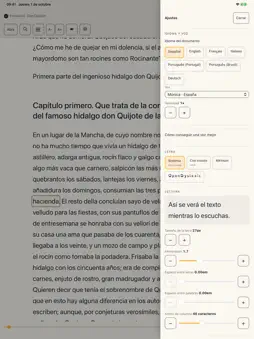
FocusLec reads documents aloud and highlights the word being spoken, much like karaoke. The highlight moves in sync with the voice—staying slightly ahead—so that your eyes land on the word just as you hear it. Hence the name: it places the focus on what is being read. It also includes options to customize the reading experience, such as font size and type, spacing, contrast, speed, and pauses.

What's New

Version 1.3.0 2026-11-09
Syllable-by-syllable mode with voice. In the mode options, “Advance with voice” makes the automatic advance read aloud, and the highlight moves from syllable to...Syllable-by-syllable mode with voice. In the mode options, “Advance with voice” makes the automatic advance read aloud, and the highlight moves from syllable to syllable with the voice. While it is on, − and + change the speed of the voice. “Sentence” and “Paragraph” now carry a speaker icon: tap them to hear the sentence or paragraph where the highlight is. The options take less room on screen. A speaker button next to “Previous” reads the highlighted word. Commas, full stops and other marks are now part of the highlight of their syllable. Below 0.6× reading really slows down: the gap between words grows. When reading slowly there is a little more pause after commas. Long books open faster. FocusLec shows the chapter where you left off first and prepares the rest while you read. The position bar now fills up to the word being read. The percentage is still under “Where you are”. Quick settings: the lightning button in the header gives you “Spacious”, “Large” and “Short lines” with one tap. Another tap turns them off. On Android, the voice moves from one sentence to the next without waiting, and the highlight adjusts itself to the pace of each voice. In syllable-by-syllable mode, a word that does not fit is split between syllables and the text no longer shifts. App notices are now signed. If the file on the server does not carry our signature, it is not shown.

Technical Analysis

Package Overview Basic metadata
Bundle ID com.nonsensedevelopmentgroup.focuslec
Current Version 1.3.0
Minimum iOS 15.0
Package Size App Store Size
Package Metadata 0 / 0 version records
Detailed binary, privacy manifest, framework, and Info.plist results have not been indexed for this package yet. The verified App Store and archive metadata above remains available.

Developer Information

Known Version Records

0 version records with stored package metadata

Stored metadata does not guarantee a package is currently available to download.

Details Version / IDs Version date Action