Preview

Description
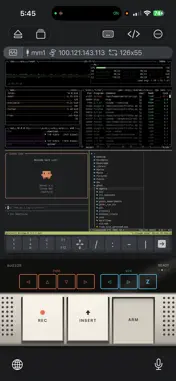
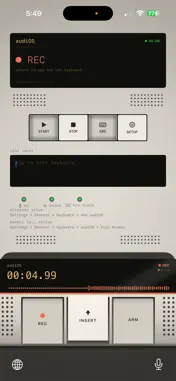
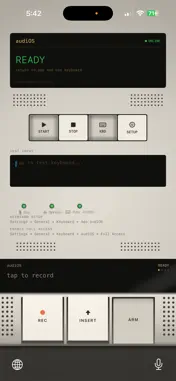
Voice-to-text keyboard that turns speech into text faster than you can type. audiOS sits in your keyboard tray and transcribes speech in near-real-time using the speech model you choose — cloud, live-streaming, or fully on-device. Speak naturally. WORKS EVERYWHERE • iMessage, WhatsApp, Slack, Notes, Mail, social media — anywhere the iOS keyboard works • ARM/DISARM safety switch — armed mode submits text with a newline, disarmed mode inserts only. No accidental sends. • Built-in TMUX / Claude Code shortcut pages for terminal power users HOW IT WORKS 1. Open the audiOS app and tap START to activate the background audio service 2. Switch to any app and select the audiOS keyboard 3. Tap REC to record — speak naturally 4. Watch your transcript appear in real-time on the keyboard display 5. Tap INSERT to paste text POWER FEATURES: • LIFT - Cut the text before your cursor into a stack, INSERT to paste it anywhere else • ARM - **Claude Code only** ARM-up: INSERT adds a newline, ARM-down: INSERT submits the prompt • AUTO - **Claude Code only** Automatically press INSERT every 1 second LIVE ACTIVITY Recording status appears on your Lock Screen and Dynamic Island so you always know when the mic is hot. CHOOSE YOUR MODEL • Cloud models from Groq, OpenAI, xAI, and Cloudflare (Deepgram) — each row names who runs it • Live models stream your voice while you speak, so your text is ready the instant you stop • On-device models (Apple, WhisperKit) keep your audio on your phone FINE-TUNE YOUR EXPERIENCE • Idle shutdown control — keep the audio service alive from 5 minutes to 4 hours depending on your workflow HARDWARE AESTHETIC Inspired by legendary field recorders. Convex mechanical buttons with haptic feedback and tape-deck sound effects. An OLED-style display. It's a real device. 14-DAY FREE TRIAL Try audiOS free for 14 days. Then unlock with a one-time Lifetime purchase or a monthly subscription. With a cloud or live model, your audio is sent through our proxy server to the company that runs that model (Groq, OpenAI, xAI, or Cloudflare/Deepgram) for transcription. On-device models never leave your phone. We do not store your audio. See our privacy policy for details. Requires iOS 26.0+. Keyboard extension requires Full Access enabled in Settings. Terms of Use: https://www.apple.com/legal/internet-services/itunes/dev/stdeula/
What's New
Version 1.6 2026-11-10
• NEW: Custom shortcut screens. Build your own screens of keyboard buttons, with your own labels, colors and groups, for your terminal, editor or any app. • Eac...• NEW: Custom shortcut screens. Build your own screens of keyboard buttons, with your own labels, colors and groups, for your terminal, editor or any app. • Each button runs a sequence: keys (arrows, Page Up/Down, function keys, with Ctrl/Alt/Shift), text, and timed delays. • Leader keys: set tmux's prefix, or any key, once and reuse it in any button. • Turn screens on or off and drag to reorder them in Settings → Shortcut Pages. A new Question Navigator screen (↑ ↓ Page Up/Down) is included, off by default. • Export your screens as JSON, tweak them (or have an AI do it), and import them back. Technical Analysis
Package Overview Basic metadata
Bundle ID
com.audios.app Current Version 1.6
Minimum iOS 26.0
Package Size App Store Size
Package Metadata 0 / 3 version records
Detailed binary, privacy manifest, framework, and Info.plist results have not been indexed for this package yet. The verified App Store and archive metadata above remains available.
Developer Information
Known Version Records
0 version records with stored package metadata • 3 known version records
Stored metadata does not guarantee a package is currently available to download.
| Details | Version / IDs | Version date | Action |
|---|---|---|---|
| Not archived | App Store ID: 886341887 | Unknown | Request Version |
| Not archived | App Store ID: 883248454 | Unknown | Request Version |
| Not archived | App Store ID: 882175557 | Unknown | Request Version |