
Preview







Description
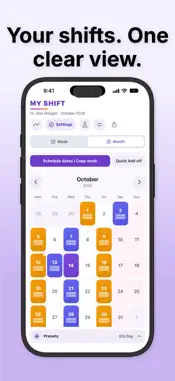
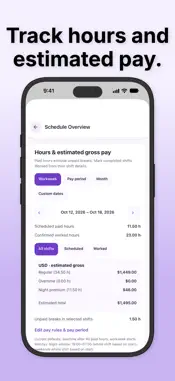
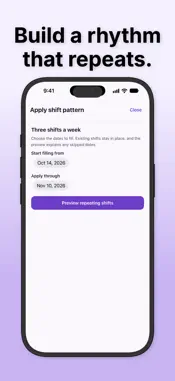
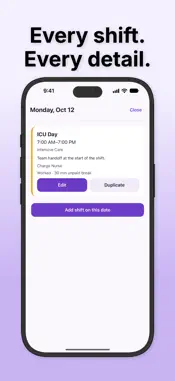
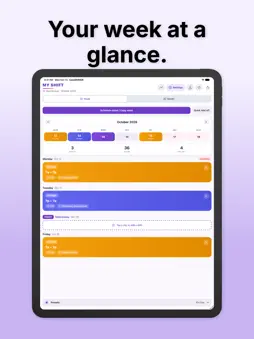
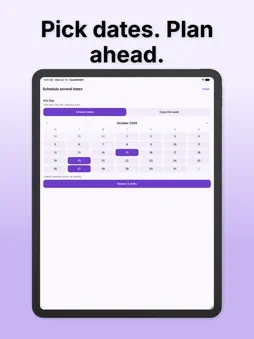
Your shifts, your time, your life outside work. CareShiftER helps nurses and healthcare shift workers organize changing schedules, build rotations, and track hours and estimated pay. PLAN YOUR SCHEDULE • See your shifts in weekly and monthly calendars. • Create named custom shift presets with exact start and end times, colors, and optional workplaces. • Add a shift to several dates at once or copy a week. • Review the proposed schedule, overlaps, and long-day warnings before saving. • Undo a recent schedule change when you need to. KEEP THE DETAILS TOGETHER • Open any day to see its shifts, workplaces, notes, and tags. • Follow overnight shifts across midnight with clear next-day end times. • Edit a shift or duplicate it to a new date. • Mark shifts as Scheduled or Worked and record unpaid breaks. BUILD REPEATING PATTERNS • Create a rotation that matches your working week or shift cycle. • Choose a date range and review the shifts before applying it. • Update one occurrence or the matching future shifts in that pattern. UNDERSTAND YOUR HOURS AND PAY • Set hourly rates and configure overtime, night, and weekend premiums. • Keep employer groups and currencies separate. • Review hours and estimated gross pay by workweek, pay period, month, or custom dates. • Use weekly, biweekly, or twice-monthly pay periods and individual shift rate overrides. SHARE AND BACK UP • Share your schedule as text, an image, or a calendar file. • Export a complete backup with shifts, presets, patterns, profile, and preferences. • Preview a backup before restoring it, with a recovery copy of the preceding data. MAKE IT YOURS • Choose your calendar week start, date format, 12- or 24-hour time, and reminder preferences. • Choose a holiday country and available regional calendars independently of the app language. • Keep all 45 app language choices available. • Use the guided setup to review your preferences at any time. • Keep role and workplace details optional. TRY IT, THEN UNLOCK FOR LIFE Enjoy a 30-day trial, then choose a one-time Pro Lifetime purchase. No recurring subscription. Your local purchase price is shown before you confirm. After the trial ends, you can still view and export your saved schedule. Restore eligible purchases from Settings. Pay figures are estimates of gross pay before taxes and deductions, based on the settings you enter. They may differ from your employer's payroll calculations.
What's New
Version 2.5.0 2026-10-15
Pay-period dates now follow your preferred date format. Tap a date to choose it from a calendar. New: Twice a month — 15th and last day. Estimates cover the 1s... Technical Analysis
Package Overview Basic metadata
Bundle ID
com.vibecode.careshifter.3w4m2l Current Version 2.5.0
Minimum iOS 15.1
Package Size App Store Size
Package Metadata 0 / 4 version records
Detailed binary, privacy manifest, framework, and Info.plist results have not been indexed for this package yet. The verified App Store and archive metadata above remains available.
Developer Information
Known Version Records
0 version records with stored package metadata • 4 known version records
Stored metadata does not guarantee a package is currently available to download.
| Details | Version / IDs | Version date | Action |
|---|---|---|---|
| Not archived | App Store ID: 885219617 | Unknown | Request Version |
| Not archived | App Store ID: 884931354 | Unknown | Request Version |
| Not archived | App Store ID: 883000764 | Unknown | Request Version |
| Not archived | App Store ID: 880707889 | Unknown | Request Version |