
Preview


Description
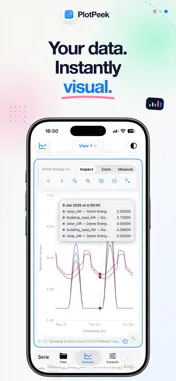
Your data has a story. PlotPeek helps you see it in seconds. Open CSV, Excel (.xlsx), or Parquet files and move from raw rows to a clear visual answer—without building a spreadsheet or writing code first. Choose the worksheet or range you need, then explore it in a focused native workspace for iPhone, iPad, and Mac. SEE THE DATA FROM THE RIGHT ANGLE Switch freely between 11 analysis modes: • Time series\ • RAW data\ • Scatter + regression\ • Regression Lab\ • Correlation\ • 3D explorer\ • Histogram\ • Box / violin\ • Summary statistics\ • Bar chart\ • Pie / donut EXPLORE INTERACTIVELY • Zoom, pan, filter, and inspect exact values directly on a chart\ • Compare columns and series across multiple files\ • Resample, aggregate, and smooth time-series data\ • Explore linear and polynomial relationships\ • Review distributions, outliers, correlations, and descriptive statistics\ • Personalize colors, axes, legends, line styles, and chart appearance\ • Keep different questions organized in tabs and stacked graph workspaces OPEN THE DATA YOU ALREADY HAVE PlotPeek reads CSV, Excel, and Parquet directly. It detects common CSV delimiters and date formats, lets you select the right Excel worksheet or range, and keeps typed Parquet data ready for analysis without a conversion step. Organize imported files into Projects with folders and tags, work with several sources at once, and optionally sync selected Project data through iCloud Drive. Save named Sessions to return to a useful workspace, or build repeatable import workflows for familiar files. KEEP THE CONTEXT WITH THE WORK Create Markdown Notes with folders, tags, search, attachments, and captures. Link a note to a graph, save a snapshot of the view that inspired it, and return to the underlying work later without losing your place. EXPORT WHAT MATTERS Turn an analysis into a PNG, JPEG, or PDF, or export the rows behind it as a filtered CSV. Customize the presentation and save reusable export presets so the result is ready for a report, presentation, message, or deeper analysis. BUILT FOR APPLE DEVICES PlotPeek adapts naturally to iPhone, iPad, and Mac, with touch, pointer, trackpad, and keyboard interactions designed for each screen. Your analysis stays on your device, with iCloud used only when you choose to enable it. PlotPeek is made for the fast first look before deeper work. It complements spreadsheets, statistical software, and reporting tools by helping you understand a file quickly, export the useful result, and move forward.
What's New
Version 1.2 2026-09-02
What’s New in PlotPeek 1.2 MORE WAYS TO OPEN DATA • Open Excel workbooks and Parquet files directly alongside CSV • Choose the worksheet and data range you ... Technical Analysis
Package Overview Basic metadata
Bundle ID
luke-taglia.PlotPeek Current Version 1.2
Minimum iOS 26.4
Package Size App Store Size
Package Metadata 0 / 0 version records
Detailed binary, privacy manifest, framework, and Info.plist results have not been indexed for this package yet. The verified App Store and archive metadata above remains available.
Developer Information
Known Version Records
0 version records with stored package metadata
Stored metadata does not guarantee a package is currently available to download.
| Details | Version / IDs | Version date | Action |
|---|