
Preview




Description
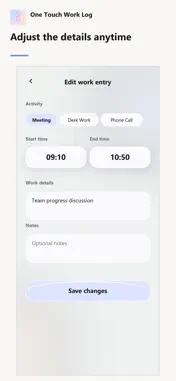
Know where your workday went, one tap at a time. One Touch Work Log is a simple work-time tracker. Tap the activity you're doing to start recording. When you switch to the next activity, the previous entry ends automatically, building a clear timeline of your day. SWITCH ACTIVITIES WITH ONE TAP Choose from your work activities to start logging a meeting, client visit, desk work, phone call, travel, or whatever your day involves. SEE YOUR DAY AS A TIMELINE Review each entry's start and end times, details, and notes. Edit an activity, its times, or its content whenever you need to correct a record. GET A DAILY REPORT Pick a date from the calendar to see total work time, time by activity, and the full timeline. No manual totaling required. SHARE YOUR WORK LOG Copy a daily report as text, email it, or use the system share menu. When you choose to, you can also add completed work entries to Calendar. MAKE IT YOUR WORKFLOW Add, edit, reorder, or hide activities. Choose light, dark, or system appearance and use the app in English, Traditional Chinese, Simplified Chinese, or Japanese. Core work entries are stored on your device, and no account is required. The app may display ads. See the privacy policy for information about ad-related data processing and your choices.
What's New
Version 1.2 2026-10-13
Version 1.2 improves startup stability and the bottom layout, keeping content, ads, and navigation clearly separated. You can choose a report date directly from... Technical Analysis
Package Overview Basic metadata
Bundle ID
com.onetouchworklog.app Current Version 1.2
Minimum iOS 16.4
Package Size App Store Size
Package Metadata 0 / 0 version records
Detailed binary, privacy manifest, framework, and Info.plist results have not been indexed for this package yet. The verified App Store and archive metadata above remains available.
Developer Information
Known Version Records
0 version records with stored package metadata
Stored metadata does not guarantee a package is currently available to download.
| Details | Version / IDs | Version date | Action |
|---|