
Preview





Description
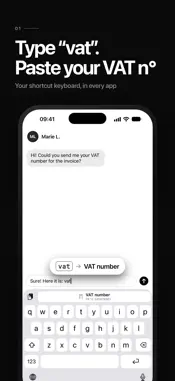
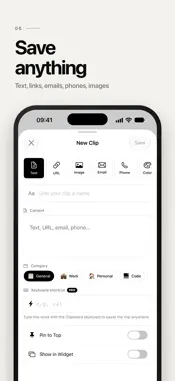
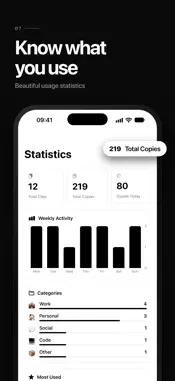
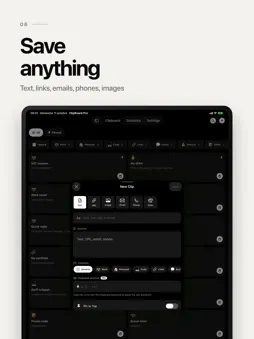
Stop retyping the same things over and over. Clipboard keeps all the texts you use every day — IBAN, addresses, email replies, links, codes, phone numbers — and copies them in ONE tap. Right from the app, or straight from your Home Screen widget. YOUR SHORTCUT KEYBOARD (NEW) Add the Clipboard keyboard and switch to it with the globe key. Give a clip a shortcut word like “vat”: type it, tap the suggestion, and the word is replaced with your full VAT number (Pro). It works in WhatsApp, Mail, Messages, Safari and any other app. You can also paste any saved clip straight from the keyboard, for free. Full Access is only used to read the clips saved on your iPhone. Nothing you type is recorded, stored or sent. COPY IN ONE TAP Tap a clip and it's copied. Paste it anywhere: Messages, WhatsApp, Mail, Safari, Notes, forms… No more digging through old notes or emails. INTERACTIVE HOME SCREEN WIDGETS Your favorite clips live on your Home Screen. Tap a clip in the widget: it's copied instantly. Small, medium and large sizes. ORGANIZED YOUR WAY • Categories: Work, Personal, Code, Links, Social, Finance… • Emojis and colors for every clip • Pin the essentials to the top • Instant search • List or grid view PRIVATE CLIPS WITH FACE ID Protect sensitive content — passwords, bank details, access codes — behind Face ID. EVERY TYPE OF CONTENT Text, links, emails, phone numbers, colors and images. USAGE STATISTICS See your most copied clips, your weekly activity and your top categories. DESIGNED FOR iOS Clean native design, light & dark mode, haptic feedback, 34 languages. PERFECT FOR • Freelancers & sales: quote templates, IBAN, signatures • Customer support: canned replies • Developers: snippets, commands, API endpoints • Social media: hashtags, bios, links • Everyone: address, phone number, Wi-Fi password, promo codes CLIPBOARD PRO Unlock unlimited clips, keyboard shortcuts, advanced widgets, full customization and detailed statistics. Monthly, yearly or lifetime. Payment is charged to your Apple ID account. Subscriptions renew automatically unless cancelled at least 24 hours before the end of the current period. Manage them in your App Store account settings. Terms of Use (EULA): https://www.apple.com/legal/internet-services/itunes/dev/stdeula/ Privacy Policy: https://louisvalli.be/clipboardpro
What's New
Version 1.2.1 2026-10-16
New: add any clip to iOS Text Replacement in a few taps. Type its shortcut and Apple's keyboard suggests the full text, in every app. Also: the floating bar no ... Technical Analysis
Package Overview Basic metadata
Bundle ID
com.louisv2304.clipboardpro Current Version 1.2.1
Minimum iOS 18.6
Package Size App Store Size
Package Metadata 0 / 3 version records
Detailed binary, privacy manifest, framework, and Info.plist results have not been indexed for this package yet. The verified App Store and archive metadata above remains available.
Developer Information
Known Version Records
0 version records with stored package metadata • 3 known version records
Stored metadata does not guarantee a package is currently available to download.
| Details | Version / IDs | Version date | Action |
|---|---|---|---|
| Not archived | App Store ID: 883714525 | Unknown | Request Version |
| Not archived | App Store ID: 883296275 | Unknown | Request Version |
| Not archived | App Store ID: 882520666 | Unknown | Request Version |