Preview




Description
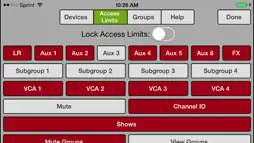
***Master Fader 4 is now available for iPhone and iPod touch. Please search the App Store and update to Master Fader 4 for the latest features and bug fixes. My Fader 3.2.1 is no longer supported and remains available for compatibility only.*** The Mackie My Fader™ app gives you pocketable control over your Mackie DL Series digital live sound mixer with Mackie Master Fader v3. My Fader 3 provides the perfect set of features for on-stage performers controlling their own monitor mix and is also great for the FOH engineer who needs quick wireless control from anywhere in the venue. Mackie My Fader provides a great way to try out the functions of the DL32R, DL1608 or DL806 mixer before you buy. For actual audio functionality, a Mackie DL Series Mixer is required. Features: * Wireless control allows band members to dial in monitor mixes from stage * Support for DL32R, DL1608, and DL806 * Intuitive touch control over key mixing functions * Mixer view allows fast adjustment of main and monitor mix levels and mutes with full metering * Customize each iOS device’s control with Access Limiting * Support for up to 10 iOS devices connected wirelessly * Recall snapshots for instant changes during the show * Easy channel identification with channel naming, colors and built in icons or take pictures with the built-in camera * View groups improve organization and ease navigation * Mute groups provides customizable control of channel muting * Input channel linking and aux send linking for better control over stereo sources * Grow and Glow™ clearly shows controls being adjusted * Pair with Mackie Master Fader app for complete system control Requirements: * My Fader 3.2 requires Mackie Master Fader v3.2. * My Fader 3.2 requires iOS 7.1 or greater. * My Fader 3.2 is compatible with iPhone 4, iPhone 4s, iPhone 5, iPhone 5c, iPhone 6, iPhone 6 Plus, or iPod touch (5th generation). * For wireless control, a Wi-Fi router is required. See the DL Series Reference Guide for complete information. * My Fader 3.2 does not mix audio on its own. It requires a DL32R, DL1608 or DL806 Mixer and Master Fader 3.0 for full functionality. Having trouble? Email [email protected] for support.
What's New
Version 3.2.1 2015-07-21
***Master Fader 4 is now available for iPhone and iPod touch. Please search the App Store and update to Master Fader 4 for the latest features and bug fixes. My... Technical Analysis
Package Overview Basic metadata
Bundle ID
com.mackie.MackieMyFader3 Current Version 3.2.1
Minimum iOS 7.1
Package Size Latest Recorded Package Size
Package Metadata 2 / 4 version records
Detailed binary, privacy manifest, framework, and Info.plist results have not been indexed for this package yet. The verified App Store and archive metadata above remains available.
Developer Information
Known Version Records
2 version records with stored package metadata • 4 known version records
Stored metadata does not guarantee a package is currently available to download.
| Details | Version / IDs | Version date | Action |
|---|---|---|---|
 43.77 MB | v3.2.1 App Store ID: 837083927Build: 852000 | 2020-07-29 19:04:26 | Get Version |
| Not archived | App Store ID: 812850199 | Unknown | Request Version |
| Not archived | App Store ID: 812523790 | Unknown | Request Version |
 43.5 MB | v3.0.2 App Store ID: 811706895Build: 655368 | 2015-02-26 13:57:02 | Get Version |