
Preview



Description
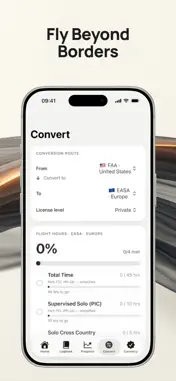
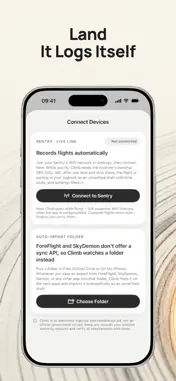
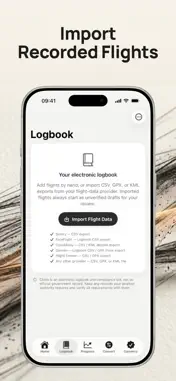
Climb is an electronic pilot logbook built around one principle: flight data is evidence — and evidence gets verified, never auto-approved. Import it, verify it, send it to your instructor for sign-off and endorsement, and finalize it as a locked regulatory record. RECORDS FLIGHTS AUTOMATICALLY Connect to your Sentry receiver's WiFi network and fly. Climb reads the receiver's live GPS (GDL 90), detects takeoff and landing, and drops the finished flight into your logbook — time, route, and landings already filled in, waiting as an unverified draft for your review. No cables, no manual entry after a long day. Using ForeFlight, SkyDemon, or Garmin? Point Climb's Auto-Import folder at your exports and new flights are ingested automatically the next time you open the app. IMPORT, THEN VERIFY Bring in CSV, GPX, or KML exports from Sentry, Flight Demon, ForeFlight, CloudAhoy, Garmin, and other providers. Imports arrive as clearly-marked unverified drafts that do not count toward your totals or currency until you personally verify every field against your source records. THE VERIFICATION WORKFLOW Every record moves through four states — Imported · Unverified, Pilot Verified, Instructor Verified, Finalized — with a clear badge on each entry and a timeline showing exactly when every step happened. DREAMING OF FLYING ABROAD? For pilots who dream of moving to Italy — or anywhere under EASA rules — your FAA hours don't start from zero. Pick your current and target authorities and Climb shows exactly which requirements your logged time already satisfies, and exactly what's left, with citations to the governing regulation. SEND IT FOR SIGN-OFF Add your instructor or examiner in the Instructor Portal — name, certificate number, authority, ratings — then send any pilot-verified record to them for sign-off and endorsement. When they sign, Face ID, Touch ID, or your passcode authenticates it: a typed name is never accepted as a signature. The endorsement preserves the instructor's credentials exactly as they were at signing time, the record version it applies to, a SHA-256 fingerprint, and the device. An instructor can return a record to you with a note, and every decision — request, signature, return — stays in the audit trail. IMMUTABLE HISTORY Finalized records are never silently overwritten. Corrections create new versions with field-level diffs, prior signatures stay attached, and the complete audit trail — who changed what, when, and why — is preserved. ONE RECORD, TWELVE AUTHORITIES Log PIC, SIC, PICUS, SPIC, solo, dual received, night, instrument, cross-country, FSTD time, and landings once. Climb renders your progress against FAA, EASA, UK CAA, Transport Canada, CASA, HKCAD, DGCA, CAAC, SACAA, JCAB, GCAA (UAE), and QCAA (Qatar) requirements — Private through ATP and MPL — with inline citations to the governing regulation. STAY CURRENT Medical, Flight Review, Night, and Instrument currency each show Current, Due Soon, or Expired, calculated from your verified records. A VERSIONED RULESET ENGINE Requirements are computed by a versioned regulatory engine. Records keep the ruleset version they were finalized under, so future rule changes never corrupt your history. EXPORT ANYTHING Full logbook CSV for any authority's columns, plus a self-verifying JSON evidence bundle with versions, audit trail, signatures, and record hashes. PRIVATE BY DESIGN No account. No sign in. No ads. No subscriptions. No cloud sync. Everything stays on your iPhone, and deleting the app deletes your data. IMPORTANT Climb is an electronic logbook and compliance aid, not an official government record. Where your authority prescribes logbook formats, signatures, or retention, maintain those records with them. Requirement and currency figures are simplified from published regulations and may change. Always verify every requirement with your aviation authority.
What's New
Version 1.5 2026-11-08
NEW: FLIGHT MAP Attach a GPS track to any entry — GPX or KML from ForeFlight or SkyDemon, or a CSV track log — and see your flight as a breadcrumb trail on the ...NEW: FLIGHT MAP Attach a GPS track to any entry — GPX or KML from ForeFlight or SkyDemon, or a CSV track log — and see your flight as a breadcrumb trail on the map: departure and arrival markers with UTC times, a replay scrubber showing altitude, groundspeed and course, and an altitude profile. Tracks are stored as supporting evidence with the untouched original file, and never change the entry's data, hash, or signatures. FIXED Corrected the decoding of Sentry (GDL 90) GPS positions and pressure altitudes, which could be read incorrectly in version 1.4. Flights captured with a Sentry now also keep a breadcrumb track and a re-importable CSV log automatically. Technical Analysis
Package Overview Basic metadata
Bundle ID
app.rork.aszk8b81wljielvwukf1p Current Version 1.5
Minimum iOS 18.0
Package Size App Store Size
Package Metadata 0 / 0 version records
Detailed binary, privacy manifest, framework, and Info.plist results have not been indexed for this package yet. The verified App Store and archive metadata above remains available.
Developer Information
Known Version Records
0 version records with stored package metadata
Stored metadata does not guarantee a package is currently available to download.
| Details | Version / IDs | Version date | Action |
|---|