
Preview





Description
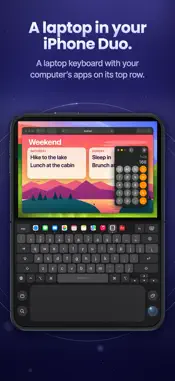
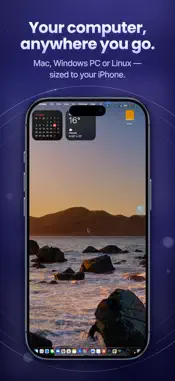
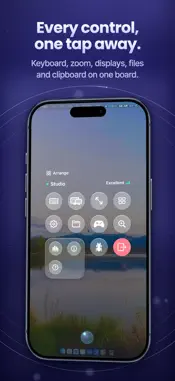
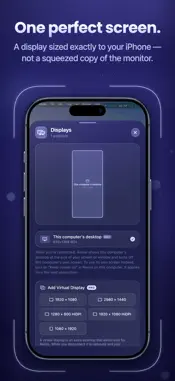
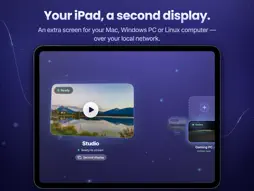
Remio is a free remote desktop app for iPhone and iPad: control your Mac, Windows PC or Linux computer from your phone or tablet, at home or over the internet, up to 6K at 120 FPS. Every touch lands right away and text stays crisp - it feels like you're sitting at your computer. Free at home or at work: no time limit, no ads, no card to enter. ▸ CONNECT IN SECONDS Install the free Remio Host on your computer, then scan its QR code or type its Device ID and PIN. No account, no router setup - on the same Wi‑Fi or from anywhere. ▸ REMOTE SUPPORT WITH AN INVITATION Help a friend or family member with their computer, or get help on yours. Invite someone to a computer on your account for 1, 8 or 24 hours, choose what they can do - control, clipboard, files, sound - and revoke it any time. Nobody gets in until you say yes on the computer. Got a code? Join with it from Pair. ▸ FEELS LIKE YOUR MACHINE • The remote desktop reshapes itself to your screen, pixel-perfect, and follows when you rotate • A dedicated virtual display sized exactly to your device, not a squeezed copy of the host's monitor • Up to 6K at 120 FPS with hardware H.265, and about 8 ms of processing latency on your local network • HDR from a Mac with Apple silicon or a Windows PC, on an iPhone or iPad with an HDR screen • Close the MacBook lid and keep working - no dummy HDMI dongle ▸ TOUCH THAT MAKES SENSE • Trackpad mode turns your screen into a precision trackpad - a remote mouse and keyboard for your computer. Direct Touch lets you tap exactly where you see it. • Tap to click, two-finger tap to right-click, scroll, pinch to zoom, press and hold to drag, three-finger swipes between desktops and into Mission Control • The on-screen keyboard never covers what you type, and shortcuts carry through - with a real Windows key • Apple Pencil, a keyboard and trackpad on iPad, or your controller to play PC games ▸ A SECOND SCREEN FOR YOUR COMPUTER Make your iPhone or iPad an extra display for your Mac, Windows PC or Linux computer and move windows over to it. It extends your desktop instead of copying it, straight between your devices - never through a relay or Remio's servers. On Linux it needs GNOME or X11; away from your own network, the latest Remio Host. ▸ BUILT FOR IPHONE DUO Fold it halfway and it's a mini laptop - your computer on top, the keyboard below the hinge. ▸ EVERYTHING WITHIN REACH One board holds the keyboard, zoom, volume, files, apps, displays and settings, arranged your way. Hear your computer's sound, copy on one device and paste on the other, send files to your computer, type your clipboard into sign-in screens that block paste, pick which screen to view, and blank or lock the computer's screen. Picture in Picture keeps your computer in view, and your session stays on the Lock Screen and in the Dynamic Island. ▸ PRIVATE BY DESIGN Video, audio, input, clipboard and files are encrypted end to end. A direct peer-to-peer connection by default; an encrypted relay only when your network needs it. No ads, no data brokers, nothing on your screen is logged. ▸ QUESTIONS PEOPLE ASK Can I control my Mac from my iPhone? Yes - or a Windows 11 or 10 PC (Home included) or a Linux computer, from any iPhone or iPad. Does it work on a different network? Yes - at home, at work or on cellular, without opening ports on your router. Is Remio really free? Yes - free to use, with no time limit and no ads. Do I need an account? No - pair with a QR code, or the Device ID and PIN. Can I use my iPad as a second monitor for Windows? Yes - for a Windows PC, a Mac or a Linux computer. Is it safe? Yes - everything is encrypted end to end, and only devices you've paired, or a guest you let in, can connect. ▸ WORKS WITH YOUR COMPUTERS Remio Host - free at remio.net - runs on macOS, Windows and Linux. Remio also runs on Mac, Windows PCs, Apple TV and Apple Vision Pro. Terms of Use: https://remio.net/terms Privacy Policy: https://remio.net/privacy
What's New
Version 3.8.9 2026-11-24
New • Say "Disconnect with Remio" to Siri, or use Spotlight or Shortcuts, to end a session without opening the app. • iPhone Duo: choose the size of your second...New • Say "Disconnect with Remio" to Siri, or use Spotlight or Shortcuts, to end a session without opening the app. • iPhone Duo: choose the size of your second display in the Resolution panel. Each way you fold it remembers its own size. Improvements • The Lock Screen and Dynamic Island show a session as one calm row with a round glass button to end it. • The first picture no longer waits for your device's speaker to open. • More sessions find the direct path instead of staying on the relay. • Connecting flows in one motion, and fades with Reduce Motion. • Panels fit better: Files and Accessories open at half height, Text on screen holds the picture still, and everything stays readable over a bright screen and at large text sizes. • On the Trackpad, your finger carries the pointer onto another device's second display. Bug fixes • Pulling down in the Apps panel now refreshes it. • No more dropped frame about once a second during a session. • Leaving a session no longer stalls on its first frames. • Back and forward arrows point the right way in right-to-left languages. Some features need the latest Remio Host on your computer. Technical Analysis
Package Overview Basic metadata
Bundle ID
com.remio.client Current Version 3.8.9
Minimum iOS 18.0
Package Size App Store Size
Package Metadata 0 / 24 version records
Detailed binary, privacy manifest, framework, and Info.plist results have not been indexed for this package yet. The verified App Store and archive metadata above remains available.
Developer Information
Known Version Records
0 version records with stored package metadata • 24 known version records
Stored metadata does not guarantee a package is currently available to download.
| Details | Version / IDs | Version date | Action |
|---|---|---|---|
| Not archived | App Store ID: 888269833 | Unknown | Request Version |
| Not archived | App Store ID: 888191787 | Unknown | Request Version |
| Not archived | App Store ID: 888124966 | Unknown | Request Version |
| Not archived | App Store ID: 888067038 | Unknown | Request Version |
| Not archived | App Store ID: 887879887 | Unknown | Request Version |
| Not archived | App Store ID: 887860293 | Unknown | Request Version |
| Not archived | App Store ID: 887344789 | Unknown | Request Version |
| Not archived | App Store ID: 887020807 | Unknown | Request Version |
| Not archived | App Store ID: 886913357 | Unknown | Request Version |
| Not archived | App Store ID: 886555848 | Unknown | Request Version |
| Not archived | App Store ID: 886432159 | Unknown | Request Version |
| Not archived | App Store ID: 886386445 | Unknown | Request Version |
| Not archived | App Store ID: 885534746 | Unknown | Request Version |
| Not archived | App Store ID: 885467237 | Unknown | Request Version |
| Not archived | App Store ID: 885245004 | Unknown | Request Version |
| Not archived | App Store ID: 885212297 | Unknown | Request Version |
| Not archived | App Store ID: 884925632 | Unknown | Request Version |
| Not archived | App Store ID: 884726954 | Unknown | Request Version |
| Not archived | App Store ID: 884507476 | Unknown | Request Version |
| Not archived | App Store ID: 884285879 | Unknown | Request Version |
| Not archived | App Store ID: 883974573 | Unknown | Request Version |
| Not archived | App Store ID: 883503454 | Unknown | Request Version |
| Not archived | App Store ID: 883140740 | Unknown | Request Version |
| Not archived | App Store ID: 882555501 | Unknown | Request Version |