
Preview




Description
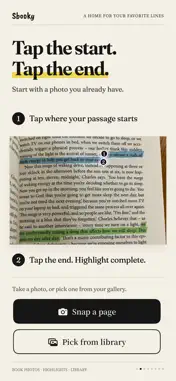
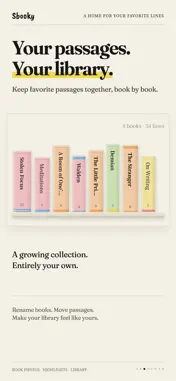
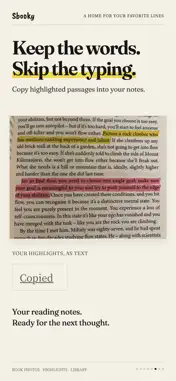
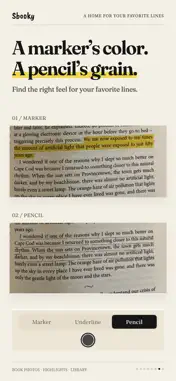
Highlight book passages in photos and collect them in your own Library. Snap a page, then tap the first and last letter of a passage. Add a textured highlight, save it by book, and copy the words or share the page to Instagram Stories. For library books, borrowed books, and books you'd rather keep unmarked. Keep the words that stay with you, without leaving a mark on the page. ◆ Highlight with two taps · Tap the first and last letter to select a passage. · Choose a highlighter, underline, or pencil, each with its own texture. · Make it yours with five soft colors. · Straighten tilted page photos and crop to the part you want. ◆ Build a Library from your reading · Keep your saved passages organized by book. · Watch each book's spine grow thicker as you collect more passages. · Fill your shelf with colorful spines and subtle paper textures. · Rename books or move passages between them. · Add page numbers so you can find your way back. ◆ Rediscover a favorite · A saved passage greets you on the app's home screen each day. · Tap to revisit the original page photo. · Remember the words—and what made you stop to keep them. ◆ Copy and share · Copy highlighted passages as text into Notes, Notion, or your reading journal. · Share directly to Instagram Stories, with the feel of the printed page intact. · Save to Photos to use wherever you like. · Prefer to keep it private? Saving to your Library is enough. ◆ Keep your Library in iCloud · Turn on iCloud Library to keep your books, passages, and photos in your own iCloud. · Reinstall the app or start fresh on a new iPhone, turn it on, and your Library comes back. · On your other iPhones with the same Apple Account, turn it on to see the same Library. · It stays on your iPhone and in your own iCloud. Not even Sbooky can see it. · An optional one-time purchase. Photos use your iCloud storage. ◆ A quiet place for your words · No account, no login, no ads. · Your passages and photos are stored on your device, and in your own iCloud if you turn on iCloud Library. · Only anonymous usage statistics are collected. · Start free with up to 3 books in your Library. · Unlock unlimited books with a one-time purchase. No subscription. Return the book. Keep the words. Start with one passage you love.
What's New
Version 1.4 2026-10-16
New: iCloud Library Turn it on, and your books, sentences, and photos are kept in your own iCloud. Delete and reinstall the app, or set up a new iPhone without...New: iCloud Library Turn it on, and your books, sentences, and photos are kept in your own iCloud. Delete and reinstall the app, or set up a new iPhone without restoring a backup, then turn it on, and your library comes back. · It stays on your iPhone and in your own private iCloud storage. Not even Sbooky can see it. · Photos use your iCloud storage. · It's a one-time purchase, and you can turn it off anytime. Turning it off doesn't delete your library on this iPhone or in iCloud. If you bought Sbooky Premium before this update, iCloud Library is free for you. Thank you for being early. Turn it on from the badge at the top left of your Library. Our privacy policy now covers iCloud Library. Technical Analysis
Package Overview Basic metadata
Bundle ID
com.logogram-lc.Sbooky Current Version 1.4
Minimum iOS 26.2
Package Size App Store Size
Package Metadata 0 / 4 version records
Detailed binary, privacy manifest, framework, and Info.plist results have not been indexed for this package yet. The verified App Store and archive metadata above remains available.
Price History (USA store)
2 recorded price change points. These are historical observations, not a guarantee of the current price.
| Recorded at | Price | Currency |
|---|---|---|
| 0.49 | USD | |
| 0.0 | USD |
Developer Information
Known Version Records
0 version records with stored package metadata • 4 known version records
Stored metadata does not guarantee a package is currently available to download.
| Details | Version / IDs | Version date | Action |
|---|---|---|---|
| Not archived | App Store ID: 887928979 | Unknown | Request Version |
| Not archived | App Store ID: 887877030 | Unknown | Request Version |
| Not archived | App Store ID: 887713939 | Unknown | Request Version |
| Not archived | App Store ID: 885902690 | Unknown | Request Version |