
Preview







Description
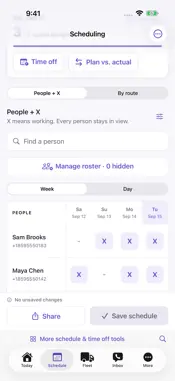
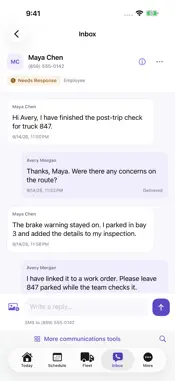
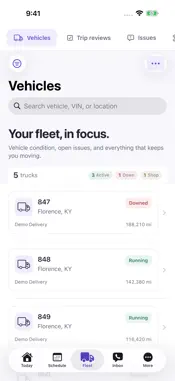
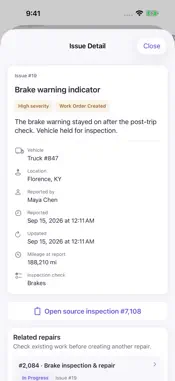
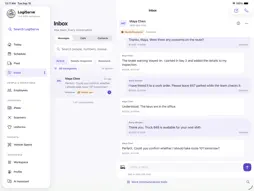
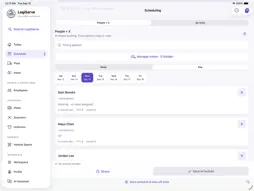
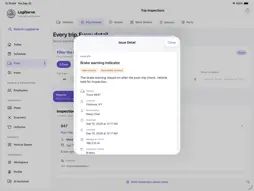
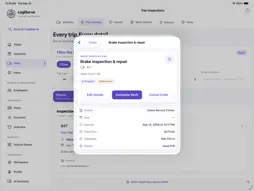
Keep your delivery operation moving with LogiServe P&D. Built for delivery contractors, business contacts, managers and drivers, LogiServe brings the workday together on iPhone and iPad. FOR DRIVERS Sign in with your phone number, email, or personal My LogiServe link. Your company and station are linked automatically. Complete native pre-trip and post-trip checks with saved photo previews, photo-quality feedback, and your signature. Choose optional driver notifications in More. YOUR LOCATIONS, ONE WORKSPACE Choose a location once to focus the app on that operation, or select All locations. Start Today with yesterday's service results, see who is working and review inspection exceptions. Expand individual locations when you need the details. PLAN YOUR TEAM'S DAY View schedules by person or route, manage working days and assignments, review time-off requests and share reviewed schedules by email, text or both. Manage the location roster, recover unfinished schedule edits and use drag and drop on iPad. KEEP CONVERSATIONS CONNECTED Read conversation history, load earlier messages and reply where human attention is needed. Review automation ownership, callbacks and candidate information. Keep employee notes and the current schedule alongside their conversation. Make and receive calls through the integrated dialer. REVIEW TRIPS AND MANAGE REPAIRS Review pre-trip and post-trip reports, photos and mileage exceptions. Group issues by truck, choose which open issues to include in one work order, assign shops or employee mechanics, choose stocked parts and follow repair progress. Find gaps in preventive maintenance and retrieve monthly maintenance records. SUPPORT YOUR PEOPLE Review employee records, PTO balances and private driver portal links. Follow driver readiness and training assignments. Review recruiting progress, prepared offers, video interviews and completed onboarding documents. AI HELP WITHIN REACH Open AI Assistant from the workspace header to ask questions about your operation and find help with LogiServe workflows. Review its sources and revisit conversation history. DESIGNED FOR IPHONE AND IPAD A clear interface keeps important actions within reach on iPhone. The iPad workspace makes room for schedules and detailed records, with keyboard shortcuts and touch controls. Search drivers, vehicles, conversations and work orders. Customize available push alerts based on your assigned access. LogiServe P&D requires an existing LogiServe organization account. Features and data depend on your organization's setup and your assigned access. An internet connection is required for current data and actions. Selected previously loaded schedules and vehicle data can be viewed with a saved-copy timestamp during a connection interruption.
What's New
Version 1.5.5 2026-10-28
Complete pre-trip and post-trip photos in one scrolling list. Open optional photo examples with the info button. Use clear Pass / Needs attention checks and add... Technical Analysis
Package Overview Basic metadata
Bundle ID
com.logiservepnd.www Current Version 1.5.5
Minimum iOS 17.0
Package Size App Store Size
Package Metadata 0 / 2 version records
Detailed binary, privacy manifest, framework, and Info.plist results have not been indexed for this package yet. The verified App Store and archive metadata above remains available.
Developer Information
Known Version Records
0 version records with stored package metadata • 2 known version records
Stored metadata does not guarantee a package is currently available to download.
| Details | Version / IDs | Version date | Action |
|---|---|---|---|
| Not archived | App Store ID: 883939550 | Unknown | Request Version |
| Not archived | App Store ID: 883716596 | Unknown | Request Version |