Preview



Description
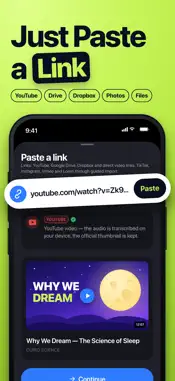
Turn any video into text in minutes — right on your iPhone. Import a video or paste a link, and get a clean transcript, speaker labels, and AI notes you can search, caption, and share. 【 VIDEO TO TEXT 】 Pick a video from Photos or Files and Video Transcriber extracts the audio and transcribes every word with timestamps. Transcription runs on your device, so your videos stay private — no account, no upload required. 【 PASTE A LINK 】 YouTube, YouTube Shorts, Google Drive, and Dropbox links transcribe directly — just paste. TikTok and Instagram? Save the video in the app, then import it in two taps. Previews show you the title and thumbnail before you start. 【 EVERY WORD, EVERY SPEAKER 】 AI transcription in 17 languages with automatic language detection. Speaker detection labels who said what, and you can rename speakers, edit any line in place, and tap a line to jump the video to that exact moment. 【 AI NOTES & CHAT 】 Get structured notes in the template you choose — video, lecture, meeting, interview, or call — with summaries, key moments, and action items. Then ask AI Chat anything about the video and get answers grounded in the transcript. 【 CAPTIONS & EXPORT 】 Export SRT or VTT subtitles for your own videos, or share the transcript as text, Markdown, or a styled PDF. Copy to Notes, send to Mail, AirDrop to your Mac — your words, anywhere. 【 BUILT FOR LONG VIDEOS 】 Hour-long lectures and meetings are transcribed in chunks and resume where they left off, even after you close the app. On iOS 26 the work continues in the background and a notification tells you when it's ready. Also inside: live recording with real-time transcription, audio file and voice memo imports, phone call recordings, folders, tags, favorites, and full-text search across everything you've transcribed. Whether you're studying from recorded lectures, turning interviews into articles, captioning content, or catching up on meetings you missed, Video Transcriber gets you from video to usable text fast. Download Video Transcriber and never scrub through a video for one sentence again. Privacy Policy: https://sites.google.com/view/transcriber-app/privacy Terms of Use: https://sites.google.com/view/transcriber-app/terms
What's New
Version 3.0.3 2026-11-15
Now on iPad • Video Transcriber is a universal app: recording, imports, AI notes and chat on the big screen. • In landscape, the video stays next to the ...Now on iPad • Video Transcriber is a universal app: recording, imports, AI notes and chat on the big screen. • In landscape, the video stays next to the transcript, summary and chat. • Works in portrait and landscape. Watch sound become text • New lines appear as they are transcribed, both in live recording and while a video imports. • A beam of light on the video thumbnail shows how far the transcription has got. • A clear "ready" moment, with a gentle tap, when your transcript lands. Polish • New lime app icon. • The import preview fits any video, portrait or ultra-wide. • Clearer download progress, e.g. "12 / 156 MB". • One progress activity on the Lock Screen during background imports instead of two. • A clearer message when a video link can't be reached on your network. Plus bug fixes and performance improvements. Technical Analysis
Package Overview Basic metadata
Bundle ID
com.laaps.aitranscriber Current Version 3.0.3
Minimum iOS 18.6
Package Size App Store Size
Package Metadata 0 / 0 version records
Detailed binary, privacy manifest, framework, and Info.plist results have not been indexed for this package yet. The verified App Store and archive metadata above remains available.
Developer Information
Known Version Records
0 version records with stored package metadata
Stored metadata does not guarantee a package is currently available to download.
| Details | Version / IDs | Version date | Action |
|---|