Preview






Description
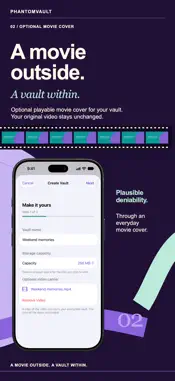
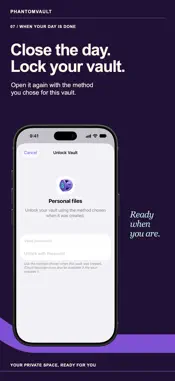
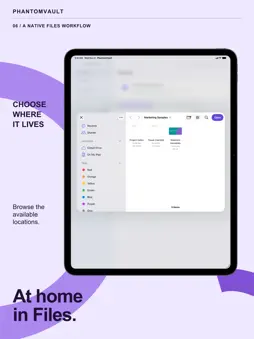
Your files. Your private vault. A real calendar, too. PhantomVault combines encrypted storage with plausible deniability through a working PhantomCal calendar disguise and optional playable movie covers. Keep personal documents, photos and other files in vaults you control, then use a real calendar to organize your day. MAKE A VAULT YOUR OWN • Create separate encrypted vaults with 64 MB, 256 MB or 1 GB capacity. • Choose a password or compatible USB/NFC FIDO2 security key, with an optional additional iCloud Keychain requirement. • Enroll up to four named security keys per vault; add a spare or replace a key using an enrolled key. Hardware-key vaults have no password, biometric or device-passcode fallback. Losing all enrolled keys means losing access. Key changes affect this vault, not older backups, and require updated apps on other devices. • Give a vault a playable movie cover. A copy of your selected video holds the encrypted vault; your original stays unchanged. WORK WITH YOUR FILES • Create or move vaults in Files, including iCloud Drive and supported document providers, or open compatible existing PhantomVault files. • Add files through Files or the Add to PhantomVault share extension. Imports copy your files; originals stay in place. • Organize folders, search your vault list or the current folder, rename items and delete files you no longer need. • Export a file through the system share sheet or export a separate encrypted vault copy. • Retry pending saves or reconnect a Files location when your storage provider is unavailable. MEET PHANTOMCAL Browse months and daily agendas, jump to a date and choose which calendars appear. Create, edit or delete timed or all-day events, with locations, notes and time zones. Native calendar options include repeat settings, alerts and invitees. Turn schedules into events: scan with the camera, select photos, import PDF, TXT or text-only RTF documents, or enter schedule text. Recognition runs on your device. Review, correct or deselect proposed events, choose a writable calendar, then confirm what to add. Matching existing events are skipped. CHOOSE YOUR OPENING SCREEN Enable PhantomCal for a working calendar disguise and alternate calendar icon. Your separate PhantomCal PIN or passphrase, entered through Go to Date, returns you to the vault interface. The installed app name and system prompts remain PhantomVault. Optional App Lock uses available Face ID, Touch ID or your device passcode. It is separate from the PhantomCal credential and each vault's unlock method. Open vaults close when the app enters the background. Choose system, light or dark appearance, and use guided walkthroughs and setup tips for both experiences. GOOD TO KNOW Requires iOS or iPadOS 27 or later. Calendar events belong to your chosen calendar accounts, outside encrypted vault storage. Compatible Mac vaults can open on iOS; Mac-bound and keyfile-protected vaults are unsupported. Close a vault and let your storage provider and iCloud Keychain finish syncing before using it elsewhere. Simultaneous editing is unsupported. Keep your password and required keys safe; we cannot recover them. SUBSCRIPTION An active monthly or annual PhantomVault subscription enables vault creation, opening and editing on iPhone, iPad and Mac. Current prices and any eligible free trial appear before purchase. Restore purchases from Settings. Payment is charged to your Apple Account at confirmation or after a free trial. Subscriptions renew automatically unless cancelled at least 24 hours before the current period ends. Manage or cancel in Apple Account settings. Apple and website subscriptions are separate. Privacy Policy: https://littleguydev.com/privacy.html Terms of Use: https://www.apple.com/legal/internet-services/itunes/dev/stdeula/
Technical Analysis
Package Overview Basic metadata
Bundle ID
com.littleguydev.PhantomVault Current Version 1.0.0
Minimum iOS 27.0
Package Size App Store Size
Package Metadata 0 / 0 version records
Detailed binary, privacy manifest, framework, and Info.plist results have not been indexed for this package yet. The verified App Store and archive metadata above remains available.
Developer Information
Known Version Records
0 version records with stored package metadata
Stored metadata does not guarantee a package is currently available to download.
| Details | Version / IDs | Version date | Action |
|---|