
Preview





Description
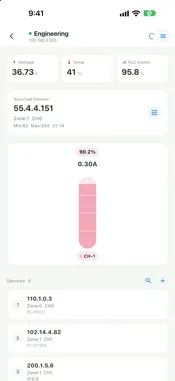
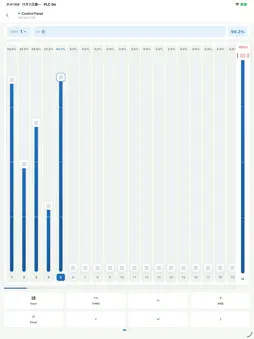
PLC Go is the setup and control app for Lite-Puter lighting systems. It is built for installers, system integrators and facility staff who need to commission dimmers and operate lighting on site. CONNECTIONS • ORBIT PLC dimmers through a PL-MXE101 gateway — connect directly over your local network, or remotely over the internet when you are away from the site. • Bluetooth — connect to LITEPUTER-ART and DP-NEX3 controllers, or to a PL-XX-BL Bluetooth gateway. WHAT YOU CAN DO • Find devices automatically. The app scans for Bluetooth controllers and network gateways at the same time and lists everything it finds. • Control up to 96 circuits from one console, individually or in groups. • Save and recall scenes. • Set up schedules and timers stored on the gateway. • Configure wall panel keys (PL-CP204) — assign zones, scenes and key behaviour. • Configure occupancy and daylight sensors (PL-DPS1, PL-PIR02). • Review every circuit at a glance with live levels and current readings, and set overcurrent protection limits. • Adjust dimming mode and fade time per circuit. REQUIREMENTS PLC Go works with Lite-Puter hardware and has no function without it. Network features require the app and the gateway to be reachable on the same network, or a working internet connection for remote access. ABOUT PERMISSIONS PLC Go asks for Bluetooth access to find nearby Lite-Puter controllers, and for local network access to find gateways on your Wi-Fi. It does not use your location.
Technical Analysis
Package Overview Basic metadata
Bundle ID
com.liteputer.lptools Current Version 1.5.0
Minimum iOS 15.0
Package Size App Store Size
Package Metadata 0 / 0 version records
Detailed binary, privacy manifest, framework, and Info.plist results have not been indexed for this package yet. The verified App Store and archive metadata above remains available.
Developer Information
Known Version Records
0 version records with stored package metadata
Stored metadata does not guarantee a package is currently available to download.
| Details | Version / IDs | Version date | Action |
|---|