
Preview






Description
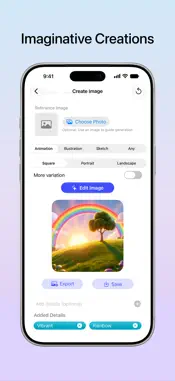
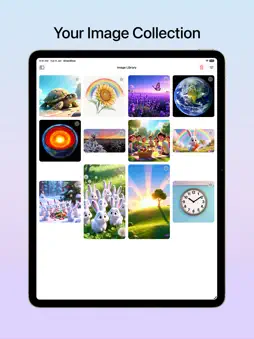
DrawSlice is your visual sketchbook for brainstorming ideas, mapping out concepts, and organizing study notes. Whether you're breaking down a complex topic for an exam, structuring a project mind map, or sketching out an early product concept, DrawSlice gives your thoughts room to breathe and connect. Combine sketches, typed notes, geometric shapes, physical document scans, and AI visual inspiration on one flexible, open canvas. THINK & CREATE ON AN OPEN CANVAS Break free from rigid documents and linear notes. DrawSlice gives you a flexible workspace designed for visual thinking. • Mind Maps & Diagrams: Sketch freehand, connect thoughts with arrows, and add shapes to map out workflows and concept trees. • Structured Study Notes: Combine typed notes, equations, and handwritten diagrams on the same page. Use customizable grid backgrounds—dot grid, lines, or isometric—to keep charts and notes organized. • Scan Real-World Notes: Snap textbook pages, whiteboard brainstorms, or paper notebook sketches directly onto your canvas using the built-in document scanner to annotate and build on them. • Organize Your Way: Tag and search your sketches to find any subject or project instantly, with automatic iCloud sync keeping your sketchbook updated across iPhone and iPad. VISUAL INSPIRATION WITH APPLE INTELLIGENCE Bring your ideas to life when words and sketches need a visual spark. • Canvas as Reference: Use your rough drawing, notes, or a photo as a starting point to create concept artwork powered by Apple Intelligence. • Refine & Adapt: Explore different styles and new portrait and landscape formats to find the right aspect for your image. • Build Moodboards & Concepts: Drop generated images directly into your open canvas to create reference boards, story scenes, or product concepts. • Dedicated Image Library: Browse all your visual creations in your image library, and export high-resolution images. Image generation requires a device with Apple Intelligence enabled. On iOS 27, an internet connection is also required. DRAWSLICE PREMIUM Take your visual thinking further: • Grid overlays (dots, lines, full grid, isometric) for structured diagrams and neat notes • Custom color-coded tags for advanced organization • High-resolution exports with 1.5x upscaling • Exclusive premium app icons PRIVACY BY DESIGN Your notes and sketches belong to you. Sketches, notes, and documents stay private on your device and iCloud storage. Image generation requires Apple Intelligence running on supported devices and an internet connection. SUBSCRIPTIONS • Payment is charged to your Apple ID at confirmation of purchase. • Subscription auto‑renews unless canceled at least 24 hours before the end of the current period. • Manage or cancel anytime in Settings › Apple ID › Subscriptions. • Free trial, if offered, converts to a paid subscription unless canceled at least 24 hours before it ends. • Any unused portion of a free trial, if offered, is forfeited when a subscription is purchased. Terms of Use: https://www.apple.com/legal/internet-services/itunes/dev/stdeula/
What's New
Version 1.2 2026-11-13
Your visual idea sketchbook — built for brainstorming concepts, mapping out thoughts, and keeping visual study notes. • Visual Canvas: Freely sketch, type note...Your visual idea sketchbook — built for brainstorming concepts, mapping out thoughts, and keeping visual study notes. • Visual Canvas: Freely sketch, type notes, and add shapes on a flexible workspace. Whether you're connecting thoughts in a mind map or organizing study notes, customizable grid templates (lines, dots, isometric) keep everything structured. • Scan Physical Notes & Documents: Use your camera to bring textbook diagrams, whiteboard brainstorms, or paper sketches directly onto your canvas to annotate and expand digitally. • Canvas-Powered Visual Inspiration: Generate concept imagery with Apple Intelligence directly from your open canvas, using your sketches or notes as visual prompts. • Optimized for iPhone Duo with adaptive layouts designed for its foldable display. • Bug fixes and performance improvements. Image generation requires a device with Apple Intelligence enabled. On iOS 27, an internet connection is also required. Technical Analysis
Package Overview Basic metadata
Bundle ID
com.codewithlionel.DrawSlice Current Version 1.2
Minimum iOS 26.0
Package Size App Store Size
Package Metadata 0 / 11 version records
Detailed binary, privacy manifest, framework, and Info.plist results have not been indexed for this package yet. The verified App Store and archive metadata above remains available.
Developer Information
Known Version Records
0 version records with stored package metadata • 11 known version records
Stored metadata does not guarantee a package is currently available to download.
| Details | Version / IDs | Version date | Action |
|---|---|---|---|
| Not archived | App Store ID: 889696263 | Unknown | Request Version |
| Not archived | App Store ID: 888450891 | Unknown | Request Version |
| Not archived | App Store ID: 885356028 | Unknown | Request Version |
| Not archived | App Store ID: 884534390 | Unknown | Request Version |
| Not archived | App Store ID: 883486219 | Unknown | Request Version |
| Not archived | App Store ID: 883097231 | Unknown | Request Version |
| Not archived | App Store ID: 882906375 | Unknown | Request Version |
| Not archived | App Store ID: 882657280 | Unknown | Request Version |
| Not archived | App Store ID: 882554845 | Unknown | Request Version |
| Not archived | App Store ID: 882431896 | Unknown | Request Version |
| Not archived | App Store ID: 881514466 | Unknown | Request Version |