
Preview



Description
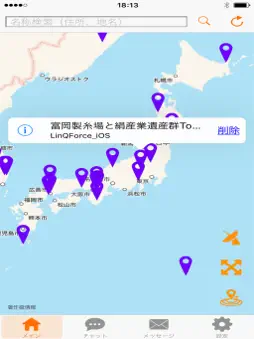
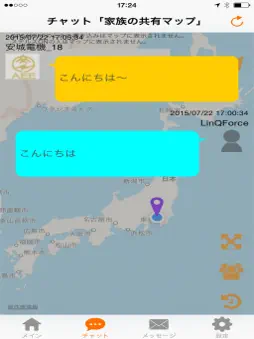
"Fremap" You can create a map in the preferences of the user's personal. Without display is no place of interest, you can create freely so as to display interesting location only. Find a fellow who with the same hobbies Interests and purpose, distribute, share, and you can enjoy the conversation. ■ FEATURES - Myself you can create a dedicated mark map. Flat when it stopped the location was good, it can be marked in the memo sense. And friends and made to others to teach the map. · His position only want to know I can see in the map. - My people that have the same interests as it is possible to look for. - Friends and it is possible to become friends talk. - Many pieces also of can be seen on top of the map. It will tell to or away from approaching the mark point. ■ Function Marking function Chat feature · Fellow search function Stealth function Mark alert function Timeline feature ■ How to use [Main screen] 1. Let's take a look at the MAP that made friends and others. MAP list appears in the right flick. "Open", "party", choose from three of the "private". Open MAP can see anyone MAP. Be a MAP that can edit is in. Party MAP will be displayed from making the newly yourself and participate from the group management of the pre-set screen. Private MAP is you and MAP of your friends. Invite or or you can participate. 2. Look for friends and colleagues. After selecting the MAP, and around you by pressing the antenna button on the screen lower right upper, let's exploration at the place you want to find. 3. Mark location on the display once. And when you do not know where there is a mark, such as when you want to see the whole at a time, please press the more button (lower right of the screen middle). 4. Add the mark, and moved to the current location. To add a mark to open MAP, press the pin button (lower right of the screen bottom). You can also be the current location on the screen center. If you select the mark added, you can add a mark by choosing the open MAP. [Chat screen] 1. trying to chat with friends and colleagues. MAP list appears in the right flick. Choose the MAP to chat. 2. Let's display friends and colleagues. When you press the more button (bottom right top), peers and friends will be displayed at once. Buddy list will appear in person button (lower right of the screen middle). 3. chat replay It will replay the chat with his friends in the replay button (lower right of the screen bottom). [Message Window] Messages and received, is also a display system logs such as alert. I can well as reply button and approval. Way of outgoing messages, you can originate from the friends list of people tap and settings on the MAP. [Setting screen] 1. Group Management You can create a new group, or you can join the existing group. Invitation, application, because there are three forms of free participation, please feel free to use. Such as participation and withdrawal, I can at any time freely. 2. terminal management Your ID and password, you can confirm, such as your equipment. Also I can image registration your avatar. 3. Friends list We will do the registration and search of friends. Please a friend request First by nickname search. Opponent will appear in the list if approved. 4. Security Settings You can set a four-digit number that is required at the time of return of Fremap. ※※ Note ※※ And position "does not allow" in whether the message information to allow the use of When you select, some of the functions along with the display of the current position becomes impossible it is you will not be able to use. • During use of location information (in GPS logging) Please note the battery consumption. Writing etc. that public policy to go against the content and personal information and management was deemed inappropriate, is, we delete. Similarly, the user ID that inappropriate behavior has continued will be deleted.
What's New
Version 2.1.2 2018-12-28
BugFIX -Display of Areasheet & MapCategory Technical Analysis
Package Overview Basic metadata
Bundle ID
jp.co.linqforce.fremap Current Version 2.1.2
Minimum iOS 10.0
Package Size App Store Size
Package Metadata 1 / 15 version records
Detailed binary, privacy manifest, framework, and Info.plist results have not been indexed for this package yet. The verified App Store and archive metadata above remains available.
Known Version Records
1 version record with stored package metadata • 15 known version records
Stored metadata does not guarantee a package is currently available to download.
| Details | Version / IDs | Version date | Action |
|---|---|---|---|
 6.29 MB | v2.1.2 App Store ID: 829546022Build: 1 | 2018-12-21 23:35:22 | Get Version |
| Not archived | App Store ID: 829354332 | Unknown | Request Version |
| Not archived | App Store ID: 829172726 | Unknown | Request Version |
| Not archived | App Store ID: 826905708 | Unknown | Request Version |
| Not archived | App Store ID: 825964781 | Unknown | Request Version |
| Not archived | App Store ID: 822104431 | Unknown | Request Version |
| Not archived | App Store ID: 822078614 | Unknown | Request Version |
| Not archived | App Store ID: 821985616 | Unknown | Request Version |
| Not archived | App Store ID: 821900333 | Unknown | Request Version |
| Not archived | App Store ID: 821832779 | Unknown | Request Version |
| Not archived | App Store ID: 821815825 | Unknown | Request Version |
| Not archived | App Store ID: 820324879 | Unknown | Request Version |
| Not archived | App Store ID: 818367557 | Unknown | Request Version |
| Not archived | App Store ID: 813289045 | Unknown | Request Version |
| Not archived | App Store ID: 812566432 | Unknown | Request Version |