Preview




Description
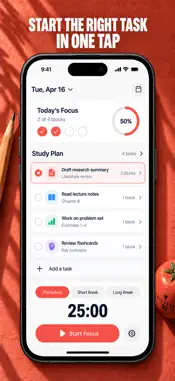
One thing at a time, with a clock on it. Set the length of your focus block, choose what you are working on, and let every completed block count toward it. THE COUNTDOWN A single ring shows the phase you are in and how many blocks remain before your next long break. Start, pause, reset, or skip ahead with one tap. Switch on auto-start and the next phase begins by itself, so a whole cycle runs without you touching the screen. INTERVALS YOU SET Nothing is fixed to the textbook numbers. A focus phase can run anywhere from 1 to 90 minutes, short breaks up to 30, long breaks up to 60, and you decide how many focus blocks come before the long break arrives. Short bursts on restless days, long stretches when the work deserves them. A LIST THAT KEEPS SCORE Write down what you need to get through and estimate how many blocks each item will take. Select one, and every completed phase is tallied against it, so a progress bar fills as you go instead of a vague sense that you were busy. Tick items off when they are done. SEE YOUR HISTORY Totals for today, for the past week, and for all time, plus a seven-day bar chart of focused minutes. Your current run of consecutive days and your best run are tracked day by day, so a skipped afternoon is visible and easy to put right tomorrow. SOUND, ALERTS, AND FEEL A soft tick can run underneath a focus phase to mark that the clock is live, and a chime signals the end of one. Completion notifications reach you even when the app is in the background. Haptic feedback confirms the transitions you care about. Every one of these is a switch you control. FIVE COLOR THEMES Coral, Graphite, Pine, Iris, or Ember. The accent color carries through the ring, the tab bar, and the charts, so the app looks the way you want to look at it for hours. BUILT TO STAY OUT OF THE WAY Your blocks, your list, and your history are stored on your device. There is no account to create, no feed, and no banners between you and the countdown. Study Timer & Focus Planner requires Premium to run a focus block. Premium opens the complete app: full control over focus, short break and long break lengths and how many blocks come before the long break; the task list with per-item block estimates and progress bars; the statistics screen with today, this week and all-time totals, the seven-day chart of focused minutes and your current and best streak; and all five color themes, Coral, Graphite, Pine, Iris and Ember. Plans: a weekly subscription, a yearly subscription, or a one-time lifetime purchase. Payment is charged to your Apple ID account at confirmation of purchase. The subscription renews automatically unless it is cancelled at least 24 hours before the end of the current period, and your account is charged for renewal within 24 hours before the end of that period. You can manage your subscription and turn off auto-renewal in your Account Settings after purchase. Privacy policy: https://pnkl26.web.app/privacy-policy Terms of use: https://pnkl26.web.app/terms-of-service
What's New
Version 1.1 2026-10-26
New Focus home with a countdown ring, a Today view and a day plan. Task details with session estimates, session history and an end-of-day review. Pro access thr... Technical Analysis
Package Overview Basic metadata
Bundle ID
com.pnkl.focustimer Current Version 1.1
Minimum iOS 17.0
Package Size App Store Size
Package Metadata 0 / 1 version records
Detailed binary, privacy manifest, framework, and Info.plist results have not been indexed for this package yet. The verified App Store and archive metadata above remains available.
Developer Information
Known Version Records
0 version records with stored package metadata • 1 known version records
Stored metadata does not guarantee a package is currently available to download.
| Details | Version / IDs | Version date | Action |
|---|---|---|---|
| Not archived | App Store ID: 885526211 | Unknown | Request Version |