Preview




Description
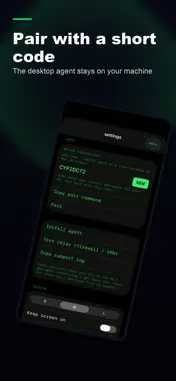
Requires the free gbr-agent desktop agent installed and running on your own Windows PC, Mac or Linux computer. Build Remote Agent is the iPhone and iPad remote for that agent: see and steer the terminal sessions, such as a coding CLI, already running on your computer. NOT A STANDALONE CODING APP This app does not run code, host an AI model or open a terminal on the iPhone itself. Without gbr-agent running on a computer you own, it can only show an offline demo. If you cannot install software on a Windows, macOS or Linux computer, this app is not for you. WHAT YOU NEED 1. A Windows 10/11, macOS 12 or later, or Linux desktop computer that you can install software on. 2. gbr-agent, the free and open-source (MIT) desktop agent from grokbuildremote.com or GitHub (LinespottingOrg/GrokBuildRemote-Agents). 3. A terminal window on that computer running the CLI or coding agent you want to steer. 4. An internet connection on both devices (ordinary outbound HTTPS). 5. This app on an iPhone or iPad with iOS / iPadOS 18 or later. HOW IT WORKS 1. Install gbr-agent on your computer (installers and checksums: grokbuildremote.com). 2. Open the terminal session you want to control on the computer. 3. On the computer, run "gbr-agent pair". A pairing QR code opens in your browser. 4. In this app, tap "Scan QR from computer" and point the camera at that QR code. Or type the short code by hand (valid about 10 minutes). 5. On the computer, run "gbr-agent run" and leave it running (or "gbr-agent service install" to start it at login). 6. Your terminal sessions appear in the app. Pick one, type or dictate a command, and read the output as it streams back. An offline demo shows the interface before you pair. It does not control a computer. WHAT YOU CAN DO - See a live, named list of the terminal sessions on your paired computer - Session titles follow renames and update as windows open and close - Send commands to the selected session by typing or by hold-to-talk voice input - Read the output in a colorized, scrollable transcript - Queue commands while offline; they are sent when you reconnect - Check agent and relay health in Settings - Disconnect to pause live updates, or Unpair / Forget this PC to remove the pairing - Optionally point the app at a relay you host yourself WORKS ON - iPhone (full-screen chat layout) - iPad (split view with session list) - Mac and Apple Vision Pro, where the App Store offers them The computer you control always needs gbr-agent installed and running. HOW THE CONNECTION WORKS Your iPhone and your computer never connect to each other directly and you do not open any ports. Both sides talk over HTTPS to a relay mailbox that is protected by a key created when you pair. You can use the hosted relay or run your own. PLEASE NOTE - One pairing gives this device the ability to type into every terminal session gbr-agent discovers on that computer. Only pair computers you are allowed to control, and Unpair before handing a computer to someone else. - On macOS, typing into terminal windows needs the Accessibility permission for gbr-agent. On Linux, a graphical desktop session is needed. - Headless servers and browser dashboards that do not run in a terminal window are not shown. - You are responsible for the commands you send. Review what a coding agent will do before you approve it. SETUP HELP Install, pairing and troubleshooting guides: https://grokbuildremote.com/ Support: https://grokbuildremote.com/support.html Trouble pairing? Email [email protected] with your computer's OS and the output of "gbr-agent version". Unsure if your setup is supported? Ask us before you buy. PRIVACY Privacy policy and how to request data deletion: https://linespotting.com/privacy-policy/ Terms of Use (EULA): https://www.apple.com/legal/internet-services/itunes/dev/stdeula/ Build Remote Agent is an independent LineSpotting AB product, not affiliated with the makers of the CLI tools you run.
What's New
Version 1.4.4 2026-10-29
Clearer store listing: this app needs the free gbr-agent desktop agent on your Windows, Mac or Linux computer. Setup steps are now at the top of the description... Technical Analysis
Package Overview Basic metadata
Bundle ID
grokbuildremote.com.app Current Version 1.4.4
Minimum iOS 18.0
Package Size App Store Size
Package Metadata 1 / 2 version records
Detailed binary, privacy manifest, framework, and Info.plist results have not been indexed for this package yet. The verified App Store and archive metadata above remains available.
Price History (USA store)
5 recorded price change points. These are historical observations, not a guarantee of the current price.
| Recorded at | Price | Currency |
|---|---|---|
| 12.99 | USD | |
| 13.0 | USD | |
| 12.99 | USD | |
| 10.99 | USD | |
| 12.99 | USD |
Developer Information
Known Version Records
1 version record with stored package metadata • 2 known version records
Stored metadata does not guarantee a package is currently available to download.
| Details | Version / IDs | Version date | Action |
|---|---|---|---|
| 3.69 MB | v1.3.2 App Store ID: 888546768Build: 1.3.2 | 2026-08-23 06:31:43 | Paid / Arcade |
| Not archived | App Store ID: 888361785 | Unknown | Paid / Arcade |