
Preview




Description
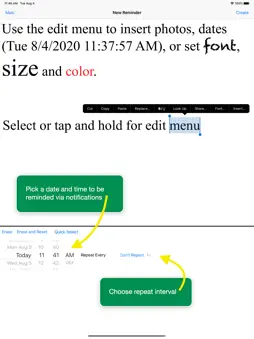
Never forget anything ever again. Menu Minder is an app for organizing reminders. Keep your plans in order and make sure you are reminded of the tasks and plans you have set for yourself. Reminders are color coded when they repeat. Menu Minder uses notifications and internal alerts. You can have reminders repeat hourly, daily, weekly, etc. Reminders can be saved into reminder sets that are Menu Minder documents. These documents can be saved and shared. You can email them, or save them in Files. If you use iCloud you can view and edit the same reminders on your desktop and mobile devices. Documentation of all features is provided conveniently in the app itself. Here is a broad overview of major features of Menu Minder: • Create, manage and access your reminders from all of your iOS devices and macOS computers • Store reminders in iCloud, locally on the device, or both • Set a "fire" date and time to be reminded by Menu Minder with in-app alerts, local device notifications and a list of recently fired reminders • Recent reminders, i.,e. reminders that have fired, are displayed in a separate list in the main view called “Recents”. You can clear them all at once. • Clear items from recents when they are completed • Organize, save and backup reminders into "Reminder Sets" that can be shared on other iOS or macOS devices • Switch between Reminder Sets for different projects and contexts • Email Reminder Sets as attachments • Open attached Reminder Sets in Menu Minder from the Mail app by simply tapping on them in the message (in iOS and macOS) • On the Mac you can use device file sharing in the Finder to add Reminder Sets to Menu Minder, or copy them from your iPhone or iPad to the Mac with drag and drop to the Finder • Reminders can be sorted by their creation, modification, fire and fired date or by text • Reminders with styled text and photos are all conveniently displayed, sorted and accessed in a menu list format • Tap reminder items in the menu to edit them • Export reminders or recents as text, mail, messages, PDFs, or Menu Minder's own document format via the standard iOS Share mechanism • Choose from a variety of in-app alert and notification sounds to accompany a reminder to get your attention when they fire • Reminders are colored according to the number of times they fired: green, yellow and orange for 1st, 2nd and 3rd times respectively, and red thereafter • Repetition intervals: minute, hour, day, week or month • Search reminders by content to easily find what you are looking for • Supports local device notifications when a reminder fires if the app is in the background or the device is in lock screen mode • The display can be tailored by options such as whether or not to number reminders or truncate them when displayed in the menu, or display as styled text with graphics or simply plain text • Editor supports all fonts, various sizes and colors, internal copy and pasting of styles, and insertion or pasting of images from the photo library or camera • Contains a special editor style named “Crazy Text” - use it to apply a style that consists of randomly selected fonts, colors and sizes to any text selection! • Create and view reminders with Siri. Some things you can ask Siri to do with Menu Minder: Remind me with Menu Minder Create a reminder with Menu Minder Show reminders witeh Menu Minder Show today's reminders with Menu Minder Show tomorrow's reminders with Menu Minder Show next weeks reminders with Menu Minder
What's New
Version 2.1.4 2023-05-16
Maintenance update. Technical Analysis
Package Overview Basic metadata
Bundle ID
com.limit-point.menu-minder Current Version 2.1.4
Minimum iOS 12.4
Package Size App Store Size
Package Metadata 1 / 24 version records
Detailed binary, privacy manifest, framework, and Info.plist results have not been indexed for this package yet. The verified App Store and archive metadata above remains available.
Developer Information
Known Version Records
1 version record with stored package metadata • 24 known version records
Stored metadata does not guarantee a package is currently available to download.
| Details | Version / IDs | Version date | Action |
|---|---|---|---|
 4.72 MB | v2.1.4 App Store ID: 857118013Build: 10051 | 2023-05-15 18:17:38 | Get Version |
| Not archived | App Store ID: 845619435 | Unknown | Request Version |
| Not archived | App Store ID: 840679852 | Unknown | Request Version |
| Not archived | App Store ID: 840288162 | Unknown | Request Version |
| Not archived | App Store ID: 840168086 | Unknown | Request Version |
| Not archived | App Store ID: 839786714 | Unknown | Request Version |
| Not archived | App Store ID: 839191793 | Unknown | Request Version |
| Not archived | App Store ID: 838262049 | Unknown | Request Version |
| Not archived | App Store ID: 838163283 | Unknown | Request Version |
| Not archived | App Store ID: 837928259 | Unknown | Request Version |
| Not archived | App Store ID: 837623785 | Unknown | Request Version |
| Not archived | App Store ID: 837543292 | Unknown | Request Version |
| Not archived | App Store ID: 837478745 | Unknown | Request Version |
| Not archived | App Store ID: 837452671 | Unknown | Request Version |
| Not archived | App Store ID: 835945487 | Unknown | Request Version |
| Not archived | App Store ID: 833152868 | Unknown | Request Version |
| Not archived | App Store ID: 829250839 | Unknown | Request Version |
| Not archived | App Store ID: 827464646 | Unknown | Request Version |
| Not archived | App Store ID: 826089948 | Unknown | Request Version |
| Not archived | App Store ID: 825501954 | Unknown | Request Version |
| Not archived | App Store ID: 824995914 | Unknown | Request Version |
| Not archived | App Store ID: 822680394 | Unknown | Request Version |
| Not archived | App Store ID: 819403230 | Unknown | Request Version |
| Not archived | App Store ID: 813473275 | Unknown | Request Version |