
Preview





Description
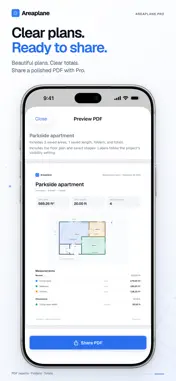
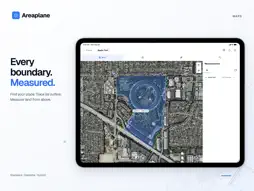
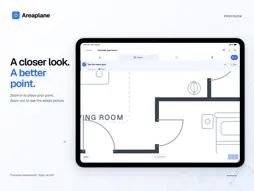
Measure rooms, yards and land, right on your plan or map. Areaplane turns floor plans, blueprints and maps into clear areas and lengths. Trace a room, outline a property or measure a fence line, then share a polished report with your clients. MEASURE FLOOR PLANS Import a plan from a photo, image or PDF and set the scale from any known distance. Trace rooms with polygons and rectangles, measure walls with lengths, and see every value on the plan as you work. Smart snapping lines your points up with walls and corners, and a long press inside a room outlines it in one step. MEASURE ON THE MAP Search an address and trace gardens, lots, roofs and paths on standard, satellite or hybrid maps, with areas and distances calculated from real-world coordinates. PLACE EVERY POINT PRECISELY Precision mode zooms in so you can tap the exact spot, then zooms back out. Turn any area into its perimeter with one tap, and edit corners, move shapes or undo at any time. EDIT TOGETHER (PRO) Invite your crew, clients or family to work on the same project. Everyone you invite can edit, even on the free plan, and changes appear for everyone within seconds. When two people edit at once, both sets of changes are combined room by room, so nobody's work is lost. Only the people you invite can open it, and the project stays in your iCloud. SYNC ACROSS YOUR DEVICES (PRO) Start a plan on iPhone at the site and finish it on iPad at your desk. With Areaplane Pro, your projects sync through your own iCloud, and every change appears on your other devices within seconds. Measure without a signal, and your changes sync when you're back online. If a project changes in two places at once, both versions are kept, so nothing is ever overwritten. WORKS WITH THE AREAPLANE WEB APP Save projects to your iCloud for free at Areaplane.com, in any browser. In the free app, they appear under From the Web to view, and you can open a project file downloaded from the web to edit your own copy. With Pro, you edit web projects right in the app, and changes sync both ways. MADE FOR IPHONE DUO Unfold iPhone Duo and your plan gets the whole inner screen, with your measurements, steps and actions in a panel beside it, and your tools in a rail within thumb's reach. Move the panel below or beside the plan in either orientation. Folded, every tool is still on the cover screen for quick checks on site. PROFESSIONAL PDF REPORTS (PRO) Choose which measurements to include, add your client, site address and notes, and brand each report with your logo, business details and colour. KEEP EVERYTHING ORGANISED Name measurements, group them in folders, and find projects with search. Work in feet or metres, with automatic switching to acres, miles, hectares or kilometres for larger measurements. LEARN IN A MINUTE The Quick Tutorial walks you through every tool on a ready-made floor plan, and never uses a project slot. FREE AND PRO Free: 2 floor plans and 2 maps, up to 10 measurements per project, every unit, folders and dark mode. Free also includes your web projects to view, opening project files from the web, and editing projects others share with you, with no limits. Pro: unlimited projects and measurements, inviting people to edit together, sync across iPhone, iPad and the web, editing web projects in the app, PDF reports, file backups and sharing a copy by link. Choose a monthly or yearly subscription or a one-time purchase. One purchase covers all your devices, and there's no account to create. For renovations, landscaping, property planning and everyday measuring, from the first outline to a report you can share. EULA: https://areaplane.com/ios/terms
What's New
Version 1.3 2026-10-30
• Edit together (Pro): invite people to work on the same project. Everyone you invite can edit, even on the free plan, and changes appear for everyone within se...• Edit together (Pro): invite people to work on the same project. Everyone you invite can edit, even on the free plan, and changes appear for everyone within seconds. Edits made at the same time are combined room by room. • Sync across your devices (Pro): your projects sync through your own iCloud between iPhone and iPad, and every change appears within seconds. • Works with the Areaplane web app: save projects to your iCloud for free at Areaplane.com. In the free app they appear under From the Web to view. With Pro, edit them in the app and sync both ways. • Made for iPhone Duo: the plan now fills the whole unfolded screen. • All-new PDF reports (Pro): choose what to include, add your client's details and notes, and brand every report with your logo, business details and colour. • Create Perimeter: turn any area into a length that traces its outline, from an area's ··· menu. • A more generous free plan: every unit, folders and dark mode, with 2 floor plans and 2 maps. • A simpler home screen, a cleaner Share & Export menu, and measurement labels that stay readable at any zoom. • A clearer Pro upgrade: see everything that's included, then pick Yearly, Monthly or Lifetime. • Subscribers can switch to Lifetime or manage their plan right inside the app. Technical Analysis
Package Overview Basic metadata
Bundle ID
com.Areaplane.iOS Current Version 1.3
Minimum iOS 26.2
Package Size App Store Size
Package Metadata 0 / 0 version records
Detailed binary, privacy manifest, framework, and Info.plist results have not been indexed for this package yet. The verified App Store and archive metadata above remains available.
Developer Information
Known Version Records
0 version records with stored package metadata
Stored metadata does not guarantee a package is currently available to download.
| Details | Version / IDs | Version date | Action |
|---|