
Preview


Description
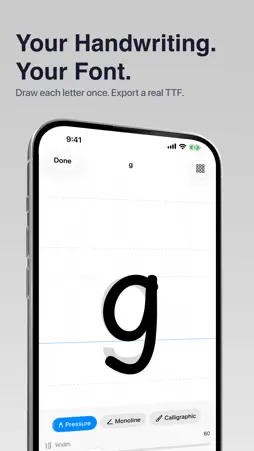
Turn your handwriting into a font you can actually use. FontStudio is a complete type design studio for iPhone and iPad: draw every letter, perfect the curves, tune spacing and kerning, then export a real TTF, OTF, or WOFF file. Everything is made and stored on your device. DRAW EVERY LETTER • Sketch each character with Apple Pencil or your finger on a pressure-sensitive canvas • Four nib profiles: Pressure, Monoline, Calligraphic with a pen angle dial, and Tapered • Guides for baseline, x-height, cap height, ascender, and descender, plus an adjustable grid • Trace or compare against a ghost reference letter shown in any font on your device • Pencil-only mode lets fingers pan and zoom while only Apple Pencil draws • Double-tap or squeeze your Apple Pencil to switch between drawing and erasing • Deep per-letter undo and redo that survives switching characters PRINT A SHEET, SCAN A WHOLE ALPHABET • Generate a printable handwriting sheet on US Letter or A4, ruled with your font's own metrics • Write your letters in the printed cells, then scan the pages with your camera • Registration marks align each page automatically, with manual adjustment if one is missed • Review every cell, exclude the ones you want to redo, and import a full alphabet at once PERFECT EVERY CURVE WITH VECTOR NODES • Edit true outlines with anchor points and bezier handles • Switch nodes between corner and smooth, add or delete points • Move, scale, and rotate selections with an on-canvas gizmo or lasso select WEIGHT, SPACING, AND KERNING • One slider makes the whole font lighter or bolder — your strokes stay intact, and reset is one tap away • Set left and right side bearings per letter with a live proof of its neighbors • Kern pairs by dragging letters closer or apart, with suggestions like AV, To, and LT TEST IT BEFORE YOU SHIP IT • The type tester compiles your font and renders live text in it • Type your own sample or use built-in specimens for pangrams, capitals, numerals, punctuation, and kerning • Adjust size and line height, and preview in light or dark IMPORT ARTWORK, OR OPEN A FONT YOU ALREADY HAVE • Bring in PNG or SVG artwork from Photos, Files, the clipboard, or by dragging it onto a letter • Tune ink detection and smoothing to control how artwork is traced • Open TTF, OTF, WOFF, and WOFF2 files to edit, straight from Files, AirDrop, or the share sheet EXPORT REAL FONT FILES • TrueType (.ttf) — the one file most people need; installs on iPhone, iPad, Mac, and Windows • OpenType CFF (.otf) — for design applications • WOFF — for @font-face on your website • Per-letter SVG files and a printable specimen PDF • Real kerning tables are compiled into the exported font • Export checks catch empty letters, unclosed outlines, and name conflicts, then jump you straight to the fix • Send your font with the share sheet or save it to Files YOUR FONT LIBRARY • Every font shows a live specimen drawn from your own letters • Grid, list, compact, and gallery layouts, favorites, and sorting • Duplicate a font, or duplicate as a variant to build a family • Choose your coverage: capitals, lowercase, numerals, punctuation, accented Latin, and your own custom characters • Set family name, style, PostScript name, version, author, copyright, and license — written into the font itself PRIVATE BY DESIGN • No account, no sign-in, no upload — fonts are compiled entirely on your device • Optional iCloud sync keeps your library on all your devices and works offline • Lock the app with Face ID or Touch ID • Export and import a full backup of your fonts at any time FREE AND PRO Drawing, node editing, importing, weight, spacing, kerning, the type tester, and printing handwriting sheets are free forever. Pro unlocks font export and handwriting scanning, as a monthly subscription or a one-time lifetime purchase. Terms of Use: https://www.apple.com/legal/internet-services/itunes/dev/stdeula/
Technical Analysis
Package Overview Basic metadata
Bundle ID
com.lifeutilityapps.FontCreator Current Version 1.0
Minimum iOS 26.2
Package Size App Store Size
Package Metadata 0 / 0 version records
Detailed binary, privacy manifest, framework, and Info.plist results have not been indexed for this package yet. The verified App Store and archive metadata above remains available.
Developer Information
Known Version Records
0 version records with stored package metadata
Stored metadata does not guarantee a package is currently available to download.
| Details | Version / IDs | Version date | Action |
|---|